Install Kafka with KRaft mode

Kafka รองรับ KRaft mode (Kafka Raft) ตั้งแต่ version 3.3+ ทำให้ไม่ต้องใช้ Zookeeper เหมือนแต่ก่อน สิ่งที่แตกต่างคือ

  • No Zookeeper – Kafka สามารจัดการ Metadata ได้เองด้วย Raft consensus
  • KAFKA_PROCESS_ROLES: broker, controller – สามารถจัดการ broker และ controller ด้วย node เดียว
  • KAFKA_CONTROLLER_QUORUM_VOTERS – ทนแทนการทำ Leader election ผ่าน Zookeeper
  • จำนวน pod น้อยลง จำนวน resource ที่ใช้น้อยลง และ architecture โดยรวมง่ายขึ้น

ตัวอย่างนี้เราจะ setup Kafka จำนวน 3 replicas เพื่อใช้งานสำหรับ prouction ด้วยมี configuration ดังนี้

  • 3 Kafka replicas – ใช้ podManagementPolicy: Parallel ทำให้ startup ได้เร็ว
  • Dynamic NODE_ID – ใช้ค่าจาก hostname (kafka-0 -> 0, kafka-1 -> 1, kafka-2 -> 2)
  • Dynamic ADVERTISED_LISTENERS – แต่ละ pod จะ advertises hostname ของตัวเอง
  • 3 controller votes : 0@kafka-0.kafka:9093, 1@kafka-1.kafka:9093,2@kafka-2.kafka:9093
  • Replication factor: 3 และ min.insync.replicas:2 สำหรับ fault tolerance (Quorum + fault tolerance)
  • Proper Cluster ID: สร้าง cluster id จาก kafka-storage random-uuid
  • Schema Registry: 2 Replicas สำหรับ leader election ที่จะทำให้มี Active และ Standby สำหรับกรณี failover (active/standby failover)
  • Control Center: 1 Replica สำหรับ monitor UI เนื่องจากเป็น component ที่ไม่ critical และไม่เกี่ยวข้องกับการทำงานของระบบจึงไม่จำเป็นต้องมีหลาย replicas
Shell
#!/bin/bash
#===============================================================================
# install-kafka-kraft.sh
# Deploy Confluent Kafka Stack on Kubernetes (KRaft mode - No Zookeeper)
# Components: Kafka 3-node cluster, Schema Registry, Control Center
#===============================================================================
set -euo pipefail
NAMESPACE="kafka"
GREEN='\033[0;32m'
NC='\033[0m'
info() { echo -e "${GREEN}[INFO]${NC} $*"; }
#===============================================================================
# Step 1: Create Namespace
#===============================================================================
info "Creating namespace '${NAMESPACE}'..."
kubectl create namespace ${NAMESPACE} --dry-run=client -o yaml | kubectl apply -f -
#===============================================================================
# Step 2: Generate Cluster ID
#===============================================================================
CLUSTER_ID=$(docker run --rm confluentinc/cp-kafka:7.6.0 kafka-storage random-uuid 2>/dev/null || cat /proc/sys/kernel/random/uuid | base64 | head -c 22)
info "Generated Kafka Cluster ID: ${CLUSTER_ID}"
#===============================================================================
# Step 3: Deploy Kafka 3-node cluster in KRaft Mode
#===============================================================================
info "Deploying Kafka 3-node cluster (KRaft mode - no Zookeeper)..."
cat > /tmp/kafka.yaml <<OUTER
---
apiVersion: v1
kind: Service
metadata:
name: kafka
labels:
app: kafka
spec:
ports:
- port: 9092
name: internal
- port: 29092
name: external
- port: 9093
name: controller
clusterIP: None
selector:
app: kafka
---
apiVersion: v1
kind: Service
metadata:
name: kafka-external
labels:
app: kafka
spec:
type: LoadBalancer
ports:
- port: 9092
targetPort: 9092
name: external
selector:
app: kafka
---
apiVersion: apps/v1
kind: StatefulSet
metadata:
name: kafka
spec:
serviceName: kafka
replicas: 3
podManagementPolicy: Parallel
selector:
matchLabels:
app: kafka
template:
metadata:
labels:
app: kafka
spec:
securityContext:
fsGroup: 1000
initContainers:
- name: fix-permissions
image: busybox:1.35
command: ["sh", "-c", "rm -rf /var/lib/kafka/data/lost+found && chown -R 1000:1000 /var/lib/kafka/data"]
volumeMounts:
- name: kafka-data
mountPath: /var/lib/kafka/data
containers:
- name: kafka
image: confluentinc/cp-kafka:7.6.0
ports:
- containerPort: 9092
- containerPort: 29092
- containerPort: 9093
env:
- name: CLUSTER_ID
value: "${CLUSTER_ID}"
- name: KAFKA_PROCESS_ROLES
value: "broker,controller"
- name: KAFKA_CONTROLLER_QUORUM_VOTERS
value: "0@kafka-0.kafka:9093,1@kafka-1.kafka:9093,2@kafka-2.kafka:9093"
- name: KAFKA_LISTENER_SECURITY_PROTOCOL_MAP
value: "PLAINTEXT:PLAINTEXT,CONTROLLER:PLAINTEXT,PLAINTEXT_HOST:PLAINTEXT"
- name: KAFKA_CONTROLLER_LISTENER_NAMES
value: "CONTROLLER"
- name: KAFKA_INTER_BROKER_LISTENER_NAME
value: "PLAINTEXT"
- name: KAFKA_OFFSETS_TOPIC_REPLICATION_FACTOR
value: "3"
- name: KAFKA_TRANSACTION_STATE_LOG_MIN_ISR
value: "2"
- name: KAFKA_TRANSACTION_STATE_LOG_REPLICATION_FACTOR
value: "3"
- name: KAFKA_DEFAULT_REPLICATION_FACTOR
value: "3"
- name: KAFKA_MIN_INSYNC_REPLICAS
value: "2"
- name: KAFKA_GROUP_INITIAL_REBALANCE_DELAY_MS
value: "0"
- name: KAFKA_AUTO_CREATE_TOPICS_ENABLE
value: "true"
- name: KAFKA_LOG_RETENTION_HOURS
value: "168"
- name: KAFKA_LOG_DIRS
value: "/var/lib/kafka/data"
command:
- /bin/bash
- -c
- |
# Derive NODE_ID from hostname (kafka-0 -> 0, kafka-1 -> 1, kafka-2 -> 2)
export KAFKA_NODE_ID=\${HOSTNAME##*-}
export KAFKA_LISTENERS="PLAINTEXT://0.0.0.0:9092,CONTROLLER://0.0.0.0:9093,PLAINTEXT_HOST://0.0.0.0:29092"
export KAFKA_ADVERTISED_LISTENERS="PLAINTEXT://\${HOSTNAME}.kafka:9092,PLAINTEXT_HOST://\${HOSTNAME}.kafka:29092"
exec /etc/confluent/docker/run
resources:
requests:
memory: "1Gi"
cpu: "500m"
limits:
memory: "2Gi"
cpu: "1000m"
volumeMounts:
- name: kafka-data
mountPath: /var/lib/kafka/data
volumeClaimTemplates:
- metadata:
name: kafka-data
spec:
accessModes: ["ReadWriteOnce"]
resources:
requests:
storage: 5Gi
OUTER
kubectl apply -n ${NAMESPACE} -f /tmp/kafka.yaml
info "Waiting for Kafka to be ready..."
kubectl rollout status statefulset/kafka -n ${NAMESPACE} --timeout=300s
#===============================================================================
# Step 4: Deploy Schema Registry
#===============================================================================
info "Deploying Schema Registry..."
cat > /tmp/schema-registry.yaml <<'EOF'
---
apiVersion: v1
kind: Service
metadata:
name: schema-registry
labels:
app: schema-registry
spec:
ports:
- port: 8081
name: http
selector:
app: schema-registry
---
apiVersion: apps/v1
kind: Deployment
metadata:
name: schema-registry
spec:
replicas: 2
selector:
matchLabels:
app: schema-registry
template:
metadata:
labels:
app: schema-registry
spec:
enableServiceLinks: false
containers:
- name: schema-registry
image: confluentinc/cp-schema-registry:7.6.0
ports:
- containerPort: 8081
env:
- name: PORT
value: "8081"
- name: SCHEMA_REGISTRY_HOST_NAME
value: "schema-registry"
- name: SCHEMA_REGISTRY_KAFKASTORE_BOOTSTRAP_SERVERS
value: "kafka-0.kafka:9092,kafka-1.kafka:9092,kafka-2.kafka:9092"
- name: SCHEMA_REGISTRY_LISTENERS
value: "http://0.0.0.0:8081"
- name: SCHEMA_REGISTRY_KAFKASTORE_TOPIC
value: "_schemas"
- name: SCHEMA_REGISTRY_DEBUG
value: "true"
resources:
requests:
memory: "512Mi"
cpu: "250m"
limits:
memory: "1Gi"
cpu: "500m"
readinessProbe:
httpGet:
path: /
port: 8081
initialDelaySeconds: 60
periodSeconds: 10
failureThreshold: 10
livenessProbe:
httpGet:
path: /
port: 8081
initialDelaySeconds: 120
periodSeconds: 15
failureThreshold: 10
EOF
kubectl apply -n ${NAMESPACE} -f /tmp/schema-registry.yaml
info "Waiting for Schema Registry to be ready..."
kubectl rollout status deployment/schema-registry -n ${NAMESPACE} --timeout=120s
#===============================================================================
# Step 5: Deploy Control Center
#===============================================================================
info "Deploying Control Center..."
cat > /tmp/control-center.yaml <<'EOF'
---
apiVersion: v1
kind: Service
metadata:
name: control-center
labels:
app: control-center
spec:
type: LoadBalancer
ports:
- port: 9021
targetPort: 9021
name: http
selector:
app: control-center
---
apiVersion: apps/v1
kind: Deployment
metadata:
name: control-center
spec:
replicas: 1
selector:
matchLabels:
app: control-center
template:
metadata:
labels:
app: control-center
spec:
enableServiceLinks: false
containers:
- name: control-center
image: confluentinc/cp-enterprise-control-center:7.6.0
ports:
- containerPort: 9021
env:
- name: CONTROL_CENTER_BOOTSTRAP_SERVERS
value: "kafka-0.kafka:9092,kafka-1.kafka:9092,kafka-2.kafka:9092"
- name: CONTROL_CENTER_SCHEMA_REGISTRY_URL
value: "http://schema-registry:8081"
- name: CONTROL_CENTER_REPLICATION_FACTOR
value: "3"
- name: CONTROL_CENTER_INTERNAL_TOPICS_PARTITIONS
value: "3"
- name: CONTROL_CENTER_MONITORING_INTERCEPTOR_TOPIC_PARTITIONS
value: "3"
- name: CONFLUENT_METRICS_TOPIC_REPLICATION
value: "3"
- name: PORT
value: "9021"
resources:
requests:
memory: "2Gi"
cpu: "1000m"
limits:
memory: "4Gi"
cpu: "2000m"
readinessProbe:
httpGet:
path: /
port: 9021
initialDelaySeconds: 60
periodSeconds: 10
failureThreshold: 10
livenessProbe:
httpGet:
path: /
port: 9021
initialDelaySeconds: 120
periodSeconds: 15
failureThreshold: 10
EOF
kubectl apply -n ${NAMESPACE} -f /tmp/control-center.yaml
info "Waiting for Control Center to be ready..."
kubectl rollout status deployment/control-center -n ${NAMESPACE} --timeout=300s
#===============================================================================
# Step 6: Cleanup temp files
#===============================================================================
rm -f /tmp/kafka.yaml /tmp/schema-registry.yaml /tmp/control-center.yaml
#===============================================================================
# Step 7: Summary
#===============================================================================
info "============================================"
info "Kafka Stack (KRaft) Deployed Successfully!"
info "============================================"
echo ""
echo " Mode: KRaft (No Zookeeper)"
echo " Cluster ID: ${CLUSTER_ID}"
echo " Replicas: 3"
echo " Namespace: ${NAMESPACE}"
echo " Kafka Brokers: kafka-0.kafka:9092, kafka-1.kafka:9092, kafka-2.kafka:9092"
echo " Schema Registry: schema-registry.${NAMESPACE}:8081"
echo ""
info "Get external IPs:"
echo " kubectl get svc -n ${NAMESPACE}"
echo ""
info "Check all pods:"
echo " kubectl get pods -n ${NAMESPACE}"
echo ""
info "Test Kafka:"
echo " kubectl exec -n ${NAMESPACE} kafka-0 -- kafka-topics --bootstrap-server localhost:9092 --list"
echo " kubectl exec -n ${NAMESPACE} kafka-0 -- kafka-topics --bootstrap-server localhost:9092 --create --topic test --partitions 3 --replication-factor 3"
echo " kubectl exec -n ${NAMESPACE} kafka-0 -- kafka-metadata --snapshot /var/lib/kafka/data/__cluster_metadata-0/00000000000000000000.log --cluster-id ${CLUSTER_ID}"

ผลลัพธ์จากการ run script

deployment "control-center" successfully rolled out
[INFO] ============================================
[INFO] Kafka Stack (KRaft) Deployed Successfully!
[INFO] ============================================
Mode: KRaft (No Zookeeper)
Cluster ID: FF-0MIbaQDmDQuAZoEI9kQ
Replicas: 3
Namespace: kafka
Kafka Brokers: kafka-0.kafka:9092, kafka-1.kafka:9092, kafka-2.kafka:9092
Schema Registry: schema-registry.kafka:8081
[INFO] Get external IPs:
kubectl get svc -n kafka
[INFO] Check all pods:
kubectl get pods -n kafka
[INFO] Test Kafka:
# Check topic details and replication
kubectl exec -n kafka kafka-0 -- kafka-topics --bootstrap-server localhost:9092 --describe --topic test
# Test producing a message
kubectl exec -n kafka kafka-0 -- bash -c 'echo "hello kafka" | kafka-console-producer --bootstrap-server localhost:9092 --topic test'
# Test consuming the message
kubectl exec -n kafka kafka-0 -- kafka-console-consumer --bootstrap-server localhost:9092 --topic test --from-beginning --max-messages 1

ทดสอบการใช้งานตามตัวอย่าง

[nutanix@nkp-boot ~]$ kubectl get svc -n kafka
NAME TYPE CLUSTER-IP EXTERNAL-IP PORT(S) AGE
control-center LoadBalancer 10.96.18.27 10.55.39.63 9021:30541/TCP 4m51s
kafka ClusterIP None <none> 9092/TCP,29092/TCP,9093/TCP 25m
kafka-external LoadBalancer 10.103.153.22 10.55.39.62 9092:31267/TCP 25m
schema-registry ClusterIP 10.102.209.166 <none> 8081/TCP 24m
[nutanix@nkp-boot ~]$ kubectl get pods -n kafka
NAME READY STATUS RESTARTS AGE
control-center-6969748bd5-kpkzq 1/1 Running 0 4m56s
kafka-0 1/1 Running 0 6m13s
kafka-1 1/1 Running 0 6m26s
kafka-2 1/1 Running 0 6m36s
schema-registry-6fb4f4b8b8-btmcz 1/1 Running 0 5m59s
schema-registry-6fb4f4b8b8-dwqhg 1/1 Running 0 18m
[nutanix@nkp-boot ~]$ kubectl exec -n kafka kafka-0 -- kafka-topics --bootstrap-server localhost:9092 --describe --topic test
Defaulted container "kafka" out of: kafka, fix-permissions (init)
Topic: test TopicId: SwmGm8XkQf6XRsZp5Gkobg PartitionCount: 3 ReplicationFactor: 3 Configs: min.insync.replicas=2
Topic: test Partition: 0 Leader: 0 Replicas: 0,1,2 Isr: 0,1,2
Topic: test Partition: 1 Leader: 1 Replicas: 1,2,0 Isr: 1,2,0
Topic: test Partition: 2 Leader: 2 Replicas: 2,0,1 Isr: 2,0,1
[nutanix@nkp-boot ~]$ kubectl exec -n kafka kafka-0 -- bash -c 'echo "hello kafka" | kafka-console-producer --bootstrap-server localhost:9092 --topic test'
Defaulted container "kafka" out of: kafka, fix-permissions (init)
[nutanix@nkp-boot ~]$ kubectl exec -n kafka kafka-0 -- kafka-console-consumer --bootstrap-server localhost:9092 --topic test --from-beginning --max-messages 1
Defaulted container "kafka" out of: kafka, fix-permissions (init)
hello kafka
Processed a total of 1 messages

รายการ access url

kafka (3 brokers)10.55.39.62:9092
Schema Registry (2 replicas)Internal schema-registry:8081
Control Centerhttp://10.55.39.63:9021

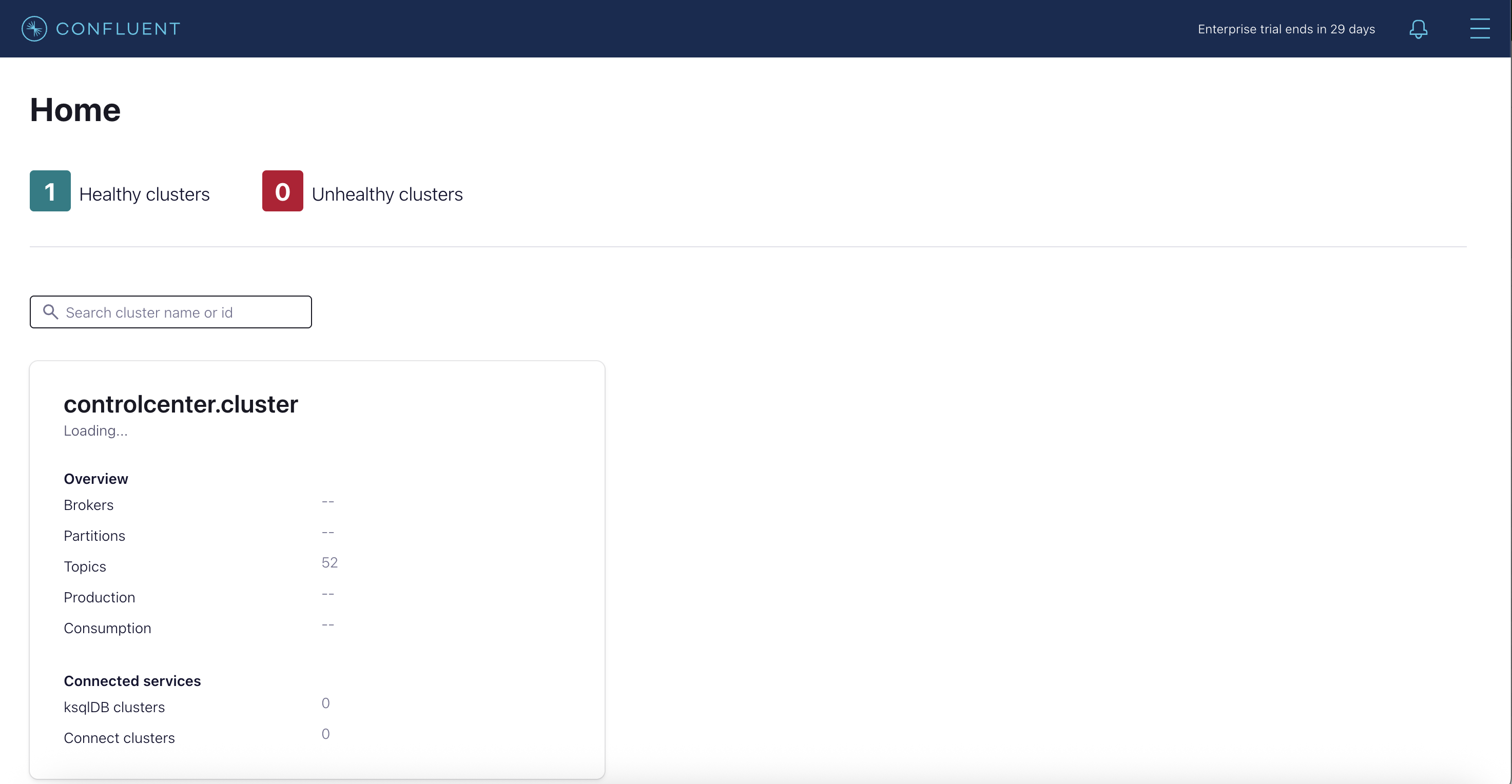
เข้าหน้าจอ Control Center UI, http://10.55.39.63:9021
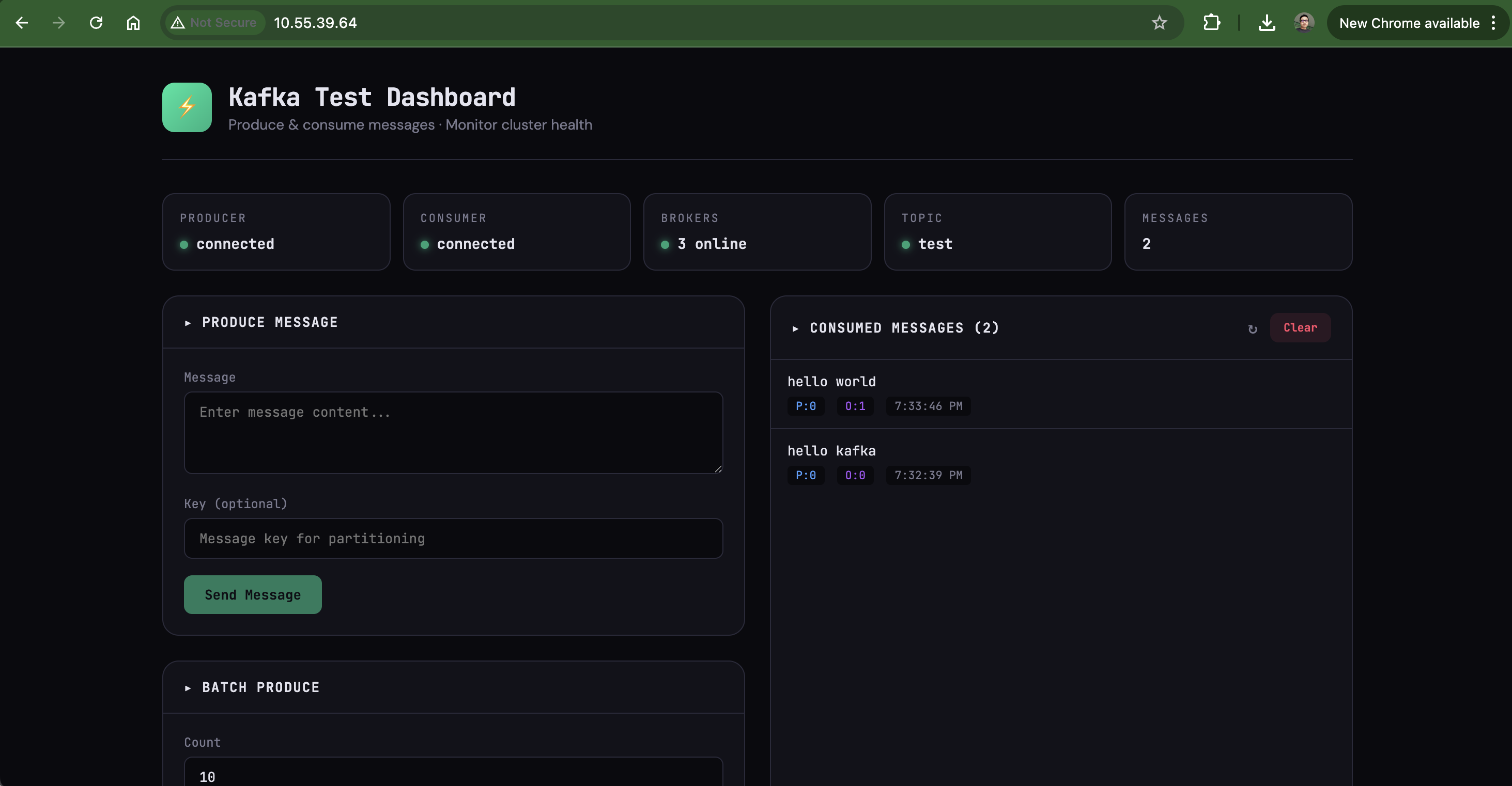
ทดสอบใช้งานผ่าน app ที่เขียนด้วย react โดยดูตัวอย่าง code ได้จาก repo https://github.com/pkhamdee/kafka-test-app.git

ทำการ pull code และ deploy container ไปยัง kubernetes เพื่อทดสอบ kafka

[nutanix@nkp-boot ~]$ git clone https://github.com/pkhamdee/kafka-test-app.git
Cloning into 'kafka-test-app'...
remote: Enumerating objects: 12, done.
remote: Counting objects: 100% (12/12), done.
remote: Compressing objects: 100% (10/10), done.
remote: Total 12 (delta 1), reused 12 (delta 1), pack-reused 0 (from 0)
Receiving objects: 100% (12/12), 8.24 KiB | 1.18 MiB/s, done.
Resolving deltas: 100% (1/1), done.
[nutanix@nkp-boot kafka-test-app]$ ls
Dockerfile build-and-deploy.sh k8s-deployment.yaml package.json public server.js
[nutanix@nkp-boot kafka-test-app]$ kubectl apply -f k8s-deployment.yaml
deployment.apps/kafka-test-app created
service/kafka-test-app created
[nutanix@nkp-boot kafka-test-app]$ kubectl get pod -n kafka -l app=kafka-test-app
NAME READY STATUS RESTARTS AGE
kafka-test-app-58645c546b-tz2jq 1/1 Running 0 24s
[nutanix@nkp-boot kafka-test-app]$ kubectl get svc -n kafka
NAME TYPE CLUSTER-IP EXTERNAL-IP PORT(S) AGE
kafka-test-app LoadBalancer 10.108.213.166 10.55.39.64 80:32485/TCP 11m

ทดสอบใช้งานผ่านหน้า GUI โดยเข้าไปที่ http://10.55.39.64
Integrate HashiCorp Vault with Kubernetes deployment

โดยหลักๆ แล้วจะมีวิธีการ integrate อยู่สองแบบคือ

  1. Vault Agent Injector เป็นวิธีการที่นิยมที่สุดด้วยการใช้ Annottions เพื่อให้ Vault Agent สร้าง sidecar container ทำการ inject credential ให้กับ pod
  2. Vault CSI Provider ใช้ Secret Store CSI Driver เพื่อ mount Vault secret ในรูปแบบ volume ให้กับ pod

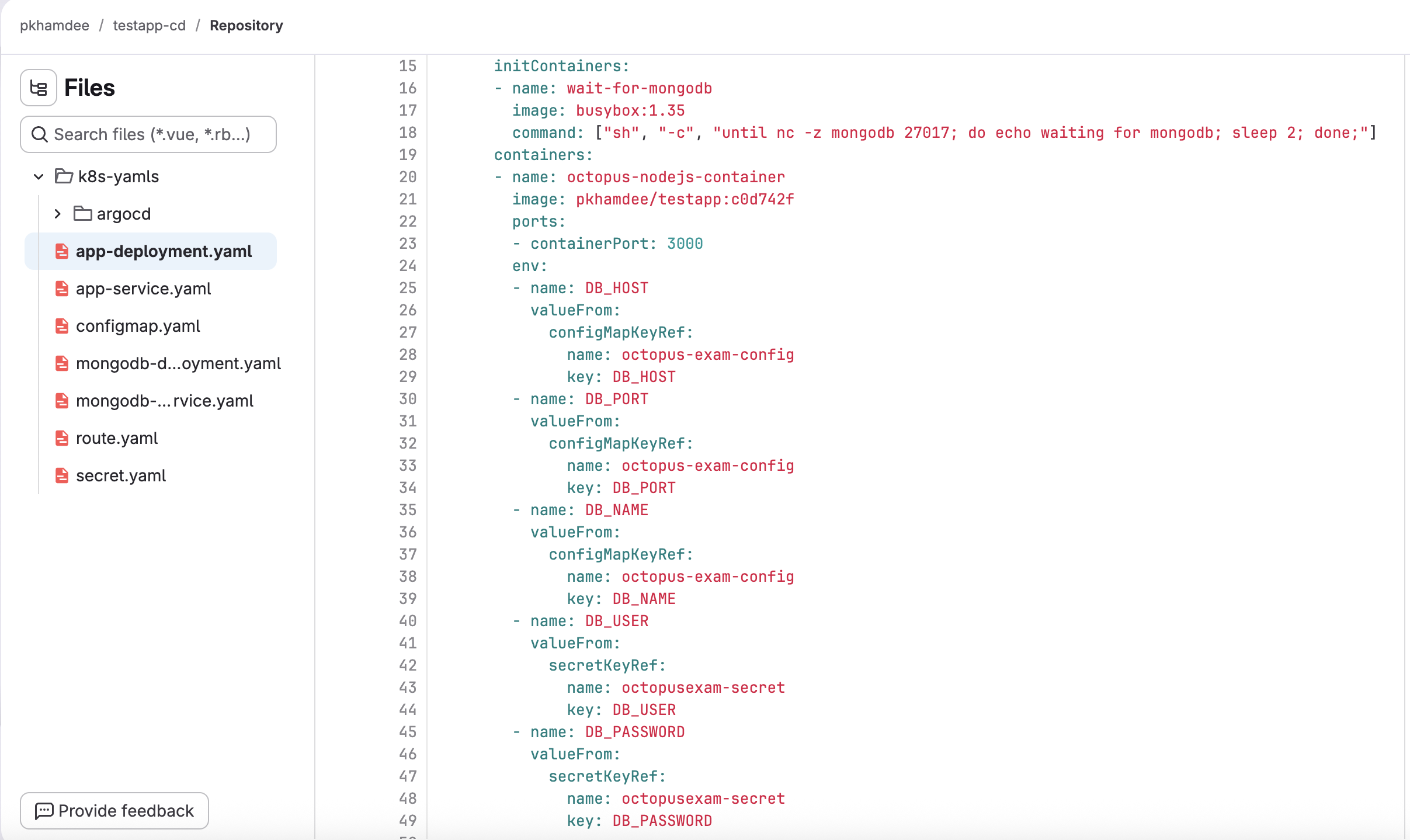
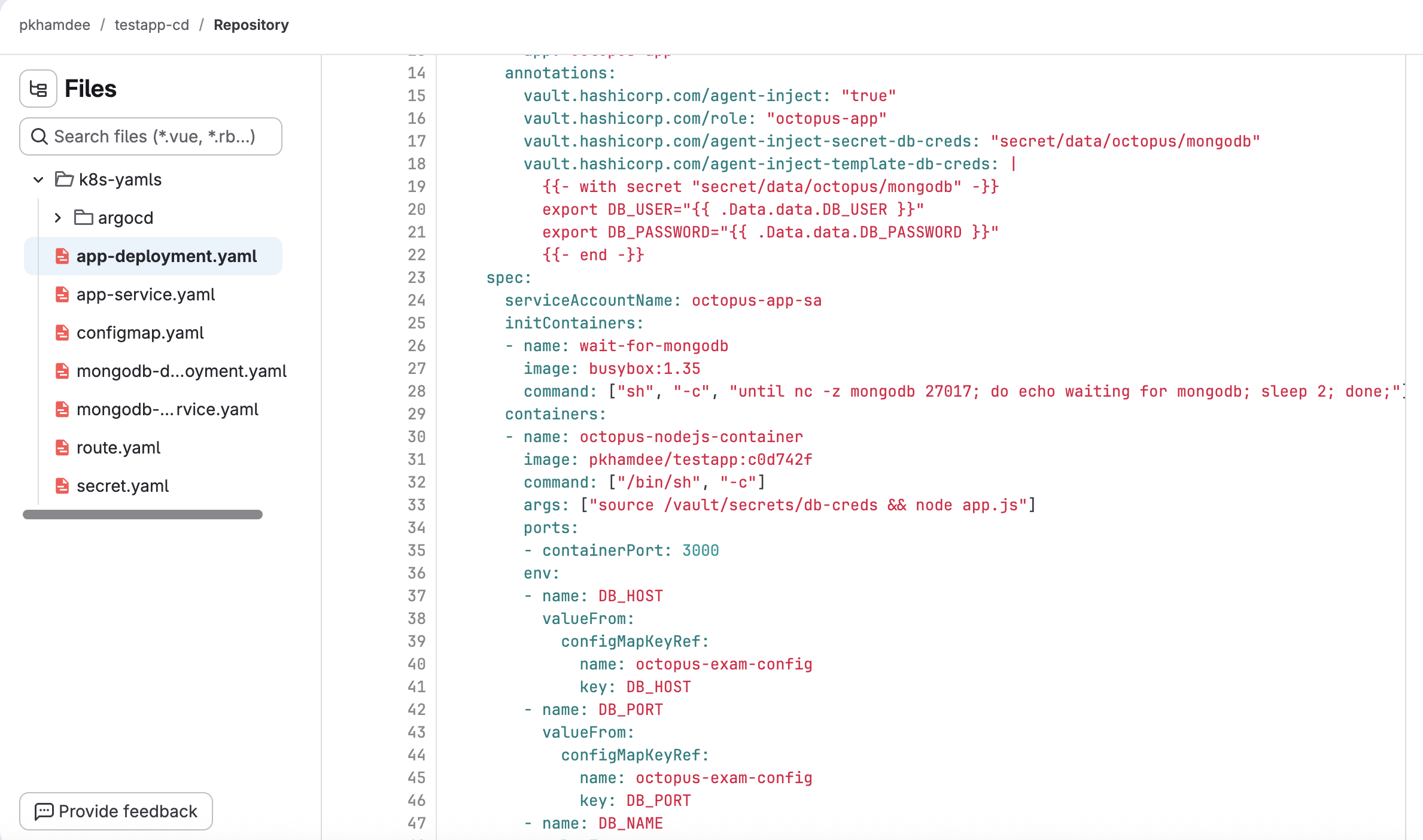
ตัวอย่างนี้จะใช้วิธีแรกคือ Vault Agent Injector ที่เราได้ทำการ setup แล้วใน Install Hashicorp Vault to Kubernetes และใช้ตัวอย่างของ application testapp-cd โดยที่ branch main จะใช้ password จาก secret

เราจะเปลี่ยนให้เรียก password จาก vault ซึ่งต้องเพิ่ม annotation ตามตัวอย่างใน branch dev testapp-cd

เริ่มแรกต้องสร้าง service account สำหรับ vault agent เรียกไปยัง vault server

kubectl create sa vault-auth -n vault

กำหนดสิทธิให้กับ service account ด้วย cluster rolebinding เพื่อให้ review token ได้

kubectl apply -f - <<EOF
apiVersion: rbac.authorization.k8s.io/v1
kind: ClusterRoleBinding
metadata:
name: vault-auth-tokenreview-binding
roleRef:
apiGroup: rbac.authorization.k8s.io
kind: ClusterRole
name: system:auth-delegator
subjects:
- kind: ServiceAccount
name: vault-auth
namespace: vault
EOF

สร้าง service account ภายใต้ namespace ของ application

cat <<EOF | kubectl apply -f -
apiVersion: v1
kind: ServiceAccount
metadata:
name: octopus-app-sa
namespace: default
EOF

ทำการ enable kubernetes auth method จาก vault cli

export VAULT_ADDR="http://10.55.39.59:8200"
[nutanix@nkp-boot ~]$ vault login hvs.j5wj9UsLG6lQqNS3nsdyBZN6
[nutanix@nkp-boot ~]$ vault auth enable kubernetes
Success! Enabled kubernetes auth method at: kubernetes/

สร้างข้อมูลที่จำเป็นสำหรับ kubernetes auth method

K8S_HOST=$(kubectl config view --minify -o jsonpath='{.clusters[0].cluster.server}')
K8S_CA_CERT=$(kubectl config view --raw --minify -o jsonpath='{.clusters[0].cluster.certificate-authority-data}' | base64 -d)
TOKEN_REVIEWER_JWT=$(kubectl create token vault-auth -n vault 2>/dev/null || \
kubectl get secret $(kubectl get sa vault-auth -n vault -o jsonpath='{.secrets[0].name}') -n vault -o jsonpath='{.data.token}' | base64 -d)

ทำการ configure kubernetes auth method

vault write auth/kubernetes/config \
kubernetes_host="${K8S_HOST}" \
kubernetes_ca_cert="${K8S_CA_CERT}" \
token_reviewer_jwt="${TOKEN_REVIEWER_JWT}"

สร้าง read policy ให้กับ application ให้ read ที่ secret path ได้

vault policy write octopus-app-policy - <<POLICY
path "secret/data/octopus/mongodb" {
capabilities = ["read"]
}
POLICY

สร้าง vault role binding ให้กับ service account ของ application และ policy ที่สร้างขึ้น

vault write auth/kubernetes/role/octopus-app \
bound_service_account_names=octopus-app-sa \
bound_service_account_namespaces=default \
policies=octopus-app-policy \
ttl=1h

สร้าง secret บน vault server

vault kv put secret/octopus/mongodb \
DB_USER="admin" \
DB_PASSWORD="password123"

ทำสอบ deploy app โดย clone code จาก testapp-cd แล้วเปลี่ยนไปที่ branch dev

[nutanix@nkp-boot ~]$ git clone https://gitlab.com/pkhamdee/testapp-cd.git
Cloning into 'testapp-cd'...
remote: Enumerating objects: 189, done.
remote: Counting objects: 100% (189/189), done.
remote: Compressing objects: 100% (86/86), done.
remote: Total 189 (delta 97), reused 179 (delta 93), pack-reused 0 (from 0)
Receiving objects: 100% (189/189), 21.81 KiB | 21.81 MiB/s, done.
Resolving deltas: 100% (97/97), done.
[nutanix@nkp-boot ~]$ cd testapp-cd/
[nutanix@nkp-boot testapp-cd]$ git checkout dev
branch 'dev' set up to track 'origin/dev'.
Switched to a new branch 'dev'
[nutanix@nkp-boot testapp-cd]$ cd k8s-yamls
[nutanix@nkp-boot k8s-yamls]$ ls
app-deployment.yaml app-service.yaml argocd configmap.yaml mongodb-deployment.yaml mongodb-service.yaml route.yaml secret.yaml
[nutanix@nkp-boot k8s-yamls]$ k apply -f .
deployment.apps/octopus-app created
service/octopus-app created
configmap/octopus-exam-config created
deployment.apps/mongodb created
service/mongodb created
Warning: annotation "kubernetes.io/ingress.class" is deprecated, please use 'spec.ingressClassName' instead
ingress.networking.k8s.io/octopus-app-route created
secret/octopusexam-secret created

ตรวจสอบ vault agent ว่าทำงานถูกต้องจากการ describe ที่ pod

[nutanix@nkp-boot ~]$ kubectl describe pod octopus-app-6dcf45487d-dnpbs
Name: octopus-app-6dcf45487d-dnpbs
Namespace: default
Priority: 0
Service Account: octopus-app-sa
Node: workload01-md-0-s5zcv-ntnvg-xrxpm/10.55.39.109
Start Time: Fri, 27 Feb 2026 06:15:57 +0000
Labels: app=octopus-app
pod-template-hash=6dcf45487d
Annotations: vault.hashicorp.com/agent-inject: true
vault.hashicorp.com/agent-inject-secret-db-creds: secret/data/octopus/mongodb
vault.hashicorp.com/agent-inject-status: injected
vault.hashicorp.com/agent-inject-template-db-creds:
{{- with secret "secret/data/octopus/mongodb" -}}
export DB_USER="{{ .Data.data.DB_USER }}"
export DB_PASSWORD="{{ .Data.data.DB_PASSWORD }}"
{{- end -}}
vault.hashicorp.com/role: octopus-app
Status: Running
IP: 192.168.1.45
IPs:
IP: 192.168.1.45
Controlled By: ReplicaSet/octopus-app-6dcf45487d
Init Containers:
wait-for-mongodb:
Container ID: containerd://0dc59ec4b9b7894eedbbe48ed3a6ec3bff7dcd75b5408720fb0c89bd9d5abc7f
Image: busybox:1.35
Image ID: docker.io/library/busybox@sha256:98ad9d1a2be345201bb0709b0d38655eb1b370145c7d94ca1fe9c421f76e245a
Port: <none>
Host Port: <none>
Command:
sh
-c
until nc -z mongodb 27017; do echo waiting for mongodb; sleep 2; done;
State: Terminated
Reason: Completed
Exit Code: 0
Started: Fri, 27 Feb 2026 06:15:58 +0000
Finished: Fri, 27 Feb 2026 06:16:21 +0000
Ready: True
Restart Count: 0
Environment: <none>
Mounts:
/var/run/secrets/kubernetes.io/serviceaccount from kube-api-access-gpwm5 (ro)
/vault/secrets from vault-secrets (rw)
vault-agent-init:
Container ID: containerd://3c34e6174111c0cd278f1a251c48c01a339e625982c18af05b6fa91040eb9107
Image: hashicorp/vault:1.21.2
Image ID: docker.io/hashicorp/vault@sha256:eb0ba6836e8d4699b7a1e8ca70d8433f7b87dcd067e6d82dff237d3ed2600ea0
Port: <none>
Host Port: <none>
Command:
/bin/sh
-ec
Args:
echo ${VAULT_CONFIG?} | base64 -d > /home/vault/config.json && vault agent -config=/home/vault/config.json
State: Terminated
Reason: Completed
Exit Code: 0
Started: Fri, 27 Feb 2026 06:16:22 +0000
Finished: Fri, 27 Feb 2026 06:16:22 +0000
Ready: True
Restart Count: 0
Limits:
cpu: 500m
memory: 128Mi
Requests:
cpu: 250m
memory: 64Mi
Environment:
NAMESPACE: default (v1:metadata.namespace)
HOST_IP: (v1:status.hostIP)
POD_IP: (v1:status.podIP)
VAULT_LOG_LEVEL: info
VAULT_LOG_FORMAT: standard
VAULT_CONFIG: eyJhdXRvX2F1dGgiOnsibWV0aG9kIjp7InR5cGUiOiJrdWJlcm5ldGVzIiwibW91bnRfcGF0aCI6ImF1dGgva3ViZXJuZXRlcyIsImNvbmZpZyI6eyJyb2xlIjoib2N0b3B1cy1hcHAiLCJ0b2tlbl9wYXRoIjoiL3Zhci9ydW4vc2VjcmV0cy9rdWJlcm5ldGVzLmlvL3NlcnZpY2VhY2NvdW50L3Rva2VuIn19LCJzaW5rIjpbeyJ0eXBlIjoiZmlsZSIsImNvbmZpZyI6eyJwYXRoIjoiL2hvbWUvdmF1bHQvLnZhdWx0LXRva2VuIn19XX0sImV4aXRfYWZ0ZXJfYXV0aCI6dHJ1ZSwicGlkX2ZpbGUiOiIvaG9tZS92YXVsdC8ucGlkIiwidmF1bHQiOnsiYWRkcmVzcyI6Imh0dHA6Ly92YXVsdC52YXVsdC5zdmM6ODIwMCJ9LCJ0ZW1wbGF0ZSI6W3siZGVzdGluYXRpb24iOiIvdmF1bHQvc2VjcmV0cy9kYi1jcmVkcyIsImNvbnRlbnRzIjoie3stIHdpdGggc2VjcmV0IFwic2VjcmV0L2RhdGEvb2N0b3B1cy9tb25nb2RiXCIgLX19XG5leHBvcnQgREJfVVNFUj1cInt7IC5EYXRhLmRhdGEuREJfVVNFUiB9fVwiXG5leHBvcnQgREJfUEFTU1dPUkQ9XCJ7eyAuRGF0YS5kYXRhLkRCX1BBU1NXT1JEIH19XCJcbnt7LSBlbmQgLX19XG4iLCJsZWZ0X2RlbGltaXRlciI6Int7IiwicmlnaHRfZGVsaW1pdGVyIjoifX0ifV0sInRlbXBsYXRlX2NvbmZpZyI6eyJleGl0X29uX3JldHJ5X2ZhaWx1cmUiOnRydWV9fQ==
Mounts:
/home/vault from home-init (rw)
/var/run/secrets/kubernetes.io/serviceaccount from kube-api-access-gpwm5 (ro)
/vault/secrets from vault-secrets (rw)
Containers:
octopus-nodejs-container:
Container ID: containerd://214f0a43c0b1f52b8972fe5a7ef80bb63d4cff6bf79a95df609042c1a453d8aa
Image: pkhamdee/testapp:c0d742f
Image ID: docker.io/pkhamdee/testapp@sha256:f4d4a5ef8a19853ceef1be3ecec90643bd74ace7b9f0b04c0f22ac2a1a5a1624
Port: 3000/TCP
Host Port: 0/TCP
Command:
/bin/sh
-c
Args:
source /vault/secrets/db-creds && node app.js
State: Running
Started: Fri, 27 Feb 2026 06:16:28 +0000
Ready: True
Restart Count: 0
Limits:
cpu: 500m
memory: 256Mi
Requests:
cpu: 500m
memory: 256Mi
Environment:
DB_HOST: <set to the key 'DB_HOST' of config map 'octopus-exam-config'> Optional: false
DB_PORT: <set to the key 'DB_PORT' of config map 'octopus-exam-config'> Optional: false
DB_NAME: <set to the key 'DB_NAME' of config map 'octopus-exam-config'> Optional: false
Mounts:
/var/run/secrets/kubernetes.io/serviceaccount from kube-api-access-gpwm5 (ro)
/vault/secrets from vault-secrets (rw)
vault-agent:
Container ID: containerd://2d68c01152a9fcd0c98ac6322209f6eb578b3cb4343861664a0a2da7be720320
Image: hashicorp/vault:1.21.2
Image ID: docker.io/hashicorp/vault@sha256:eb0ba6836e8d4699b7a1e8ca70d8433f7b87dcd067e6d82dff237d3ed2600ea0
Port: <none>
Host Port: <none>
Command:
/bin/sh
-ec
Args:
echo ${VAULT_CONFIG?} | base64 -d > /home/vault/config.json && vault agent -config=/home/vault/config.json
State: Running
Started: Fri, 27 Feb 2026 06:16:28 +0000
Ready: True
Restart Count: 0
Limits:
cpu: 500m
memory: 128Mi
Requests:
cpu: 250m
memory: 64Mi
Environment:
NAMESPACE: default (v1:metadata.namespace)
HOST_IP: (v1:status.hostIP)
POD_IP: (v1:status.podIP)
VAULT_LOG_LEVEL: info
VAULT_LOG_FORMAT: standard
VAULT_CONFIG: eyJhdXRvX2F1dGgiOnsibWV0aG9kIjp7InR5cGUiOiJrdWJlcm5ldGVzIiwibW91bnRfcGF0aCI6ImF1dGgva3ViZXJuZXRlcyIsImNvbmZpZyI6eyJyb2xlIjoib2N0b3B1cy1hcHAiLCJ0b2tlbl9wYXRoIjoiL3Zhci9ydW4vc2VjcmV0cy9rdWJlcm5ldGVzLmlvL3NlcnZpY2VhY2NvdW50L3Rva2VuIn19LCJzaW5rIjpbeyJ0eXBlIjoiZmlsZSIsImNvbmZpZyI6eyJwYXRoIjoiL2hvbWUvdmF1bHQvLnZhdWx0LXRva2VuIn19XX0sImV4aXRfYWZ0ZXJfYXV0aCI6ZmFsc2UsInBpZF9maWxlIjoiL2hvbWUvdmF1bHQvLnBpZCIsInZhdWx0Ijp7ImFkZHJlc3MiOiJodHRwOi8vdmF1bHQudmF1bHQuc3ZjOjgyMDAifSwidGVtcGxhdGUiOlt7ImRlc3RpbmF0aW9uIjoiL3ZhdWx0L3NlY3JldHMvZGItY3JlZHMiLCJjb250ZW50cyI6Int7LSB3aXRoIHNlY3JldCBcInNlY3JldC9kYXRhL29jdG9wdXMvbW9uZ29kYlwiIC19fVxuZXhwb3J0IERCX1VTRVI9XCJ7eyAuRGF0YS5kYXRhLkRCX1VTRVIgfX1cIlxuZXhwb3J0IERCX1BBU1NXT1JEPVwie3sgLkRhdGEuZGF0YS5EQl9QQVNTV09SRCB9fVwiXG57ey0gZW5kIC19fVxuIiwibGVmdF9kZWxpbWl0ZXIiOiJ7eyIsInJpZ2h0X2RlbGltaXRlciI6In19In1dLCJ0ZW1wbGF0ZV9jb25maWciOnsiZXhpdF9vbl9yZXRyeV9mYWlsdXJlIjp0cnVlfX0=
Mounts:
/home/vault from home-sidecar (rw)
/var/run/secrets/kubernetes.io/serviceaccount from kube-api-access-gpwm5 (ro)
/vault/secrets from vault-secrets (rw)
Conditions:
Type Status
PodReadyToStartContainers True
Initialized True
Ready True
ContainersReady True
PodScheduled True
Volumes:
kube-api-access-gpwm5:
Type: Projected (a volume that contains injected data from multiple sources)
TokenExpirationSeconds: 3607
ConfigMapName: kube-root-ca.crt
ConfigMapOptional: <nil>
DownwardAPI: true
home-init:
Type: EmptyDir (a temporary directory that shares a pod's lifetime)
Medium: Memory
SizeLimit: <unset>
home-sidecar:
Type: EmptyDir (a temporary directory that shares a pod's lifetime)
Medium: Memory
SizeLimit: <unset>
vault-secrets:
Type: EmptyDir (a temporary directory that shares a pod's lifetime)
Medium: Memory
SizeLimit: <unset>
QoS Class: Burstable
Node-Selectors: <none>
Tolerations: node.kubernetes.io/not-ready:NoExecute op=Exists for 300s
node.kubernetes.io/unreachable:NoExecute op=Exists for 300s
Events:
Type Reason Age From Message
---- ------ ---- ---- -------
Normal Scheduled 43m default-scheduler Successfully assigned default/octopus-app-6dcf45487d-dnpbs to workload01-md-0-s5zcv-ntnvg-xrxpm
Normal Pulling 43m kubelet Pulling image "busybox:1.35"
Normal Pulled 43m kubelet Successfully pulled image "busybox:1.35" in 1.178s (1.178s including waiting). Image size: 2159953 bytes.
Normal Created 43m kubelet Created container: wait-for-mongodb
Normal Started 43m kubelet Started container wait-for-mongodb
Normal Pulled 42m kubelet Container image "hashicorp/vault:1.21.2" already present on machine
Normal Created 42m kubelet Created container: vault-agent-init
Normal Started 42m kubelet Started container vault-agent-init
Normal Pulling 42m kubelet Pulling image "pkhamdee/testapp:c0d742f"
Normal Pulled 42m kubelet Successfully pulled image "pkhamdee/testapp:c0d742f" in 5.156s (5.156s including waiting). Image size: 55585478 bytes.
Normal Created 42m kubelet Created container: octopus-nodejs-container
Normal Started 42m kubelet Started container octopus-nodejs-container
Normal Pulled 42m kubelet Container image "hashicorp/vault:1.21.2" already present on machine
Normal Created 42m kubelet Created container: vault-agent
Normal Started 42m kubelet Started container vault-agent

Setup Velero with NUS

นอกจากจะใช้ s3 storage จาก rook ceph แล้ว Velero ยังสามารถเชื่อไปยัง S3 compatible อื่นๆ ได้ ตัวอย่างนี้จะใช้ Nutanix Unified Storage สำหรับเก็บ file backup ของ velero

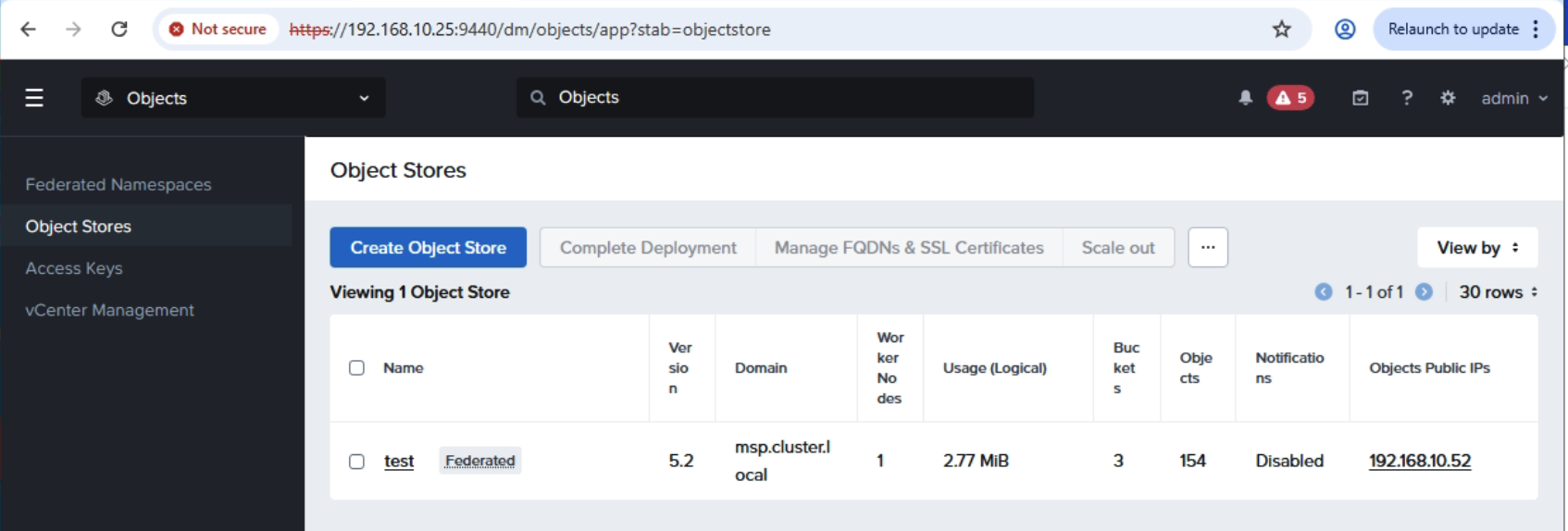
เริ่มแรกต้องสร้าง Access Keys ตามด้วย Object Store จากนั้นเข้าไปยัง Object Store ที่สร้างขึ้น

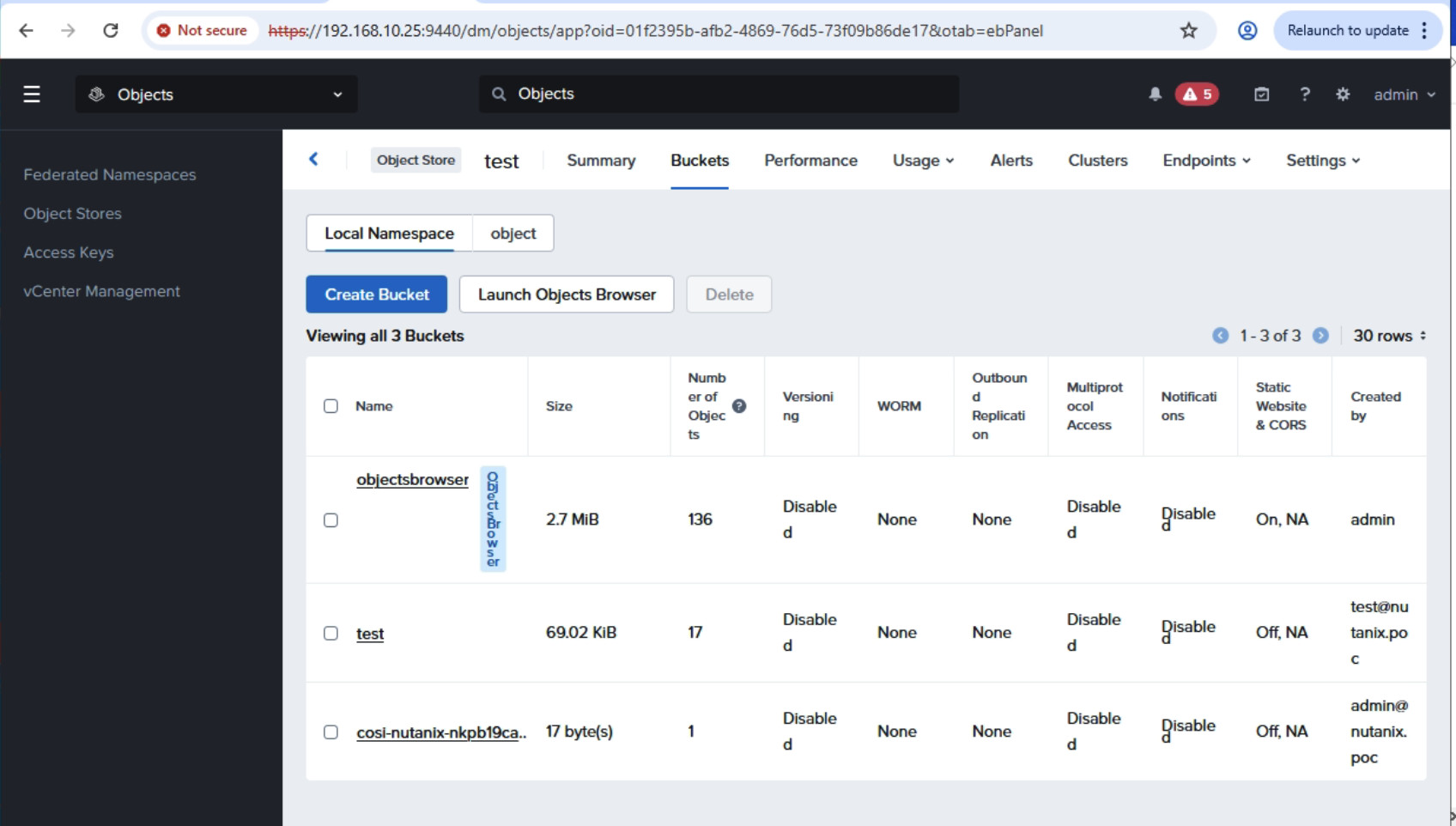
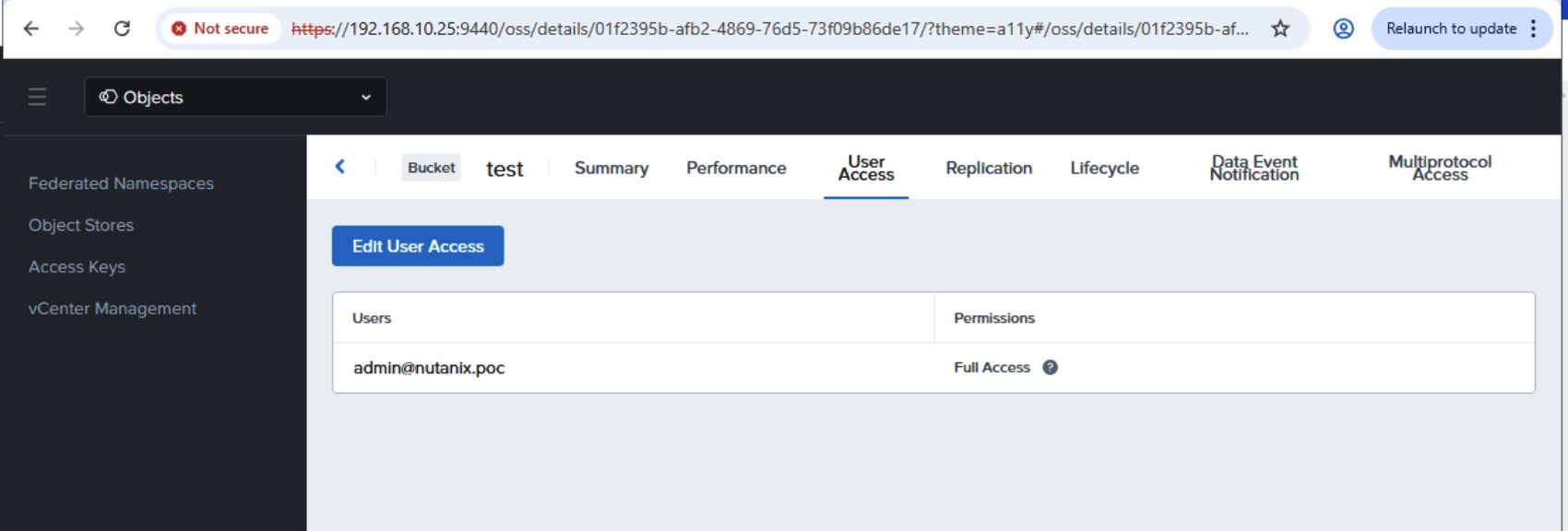
สร้าง Bucket เพื่อเก็บ file backup ตัวอย่างนี้ได้สร้างไว้แล้วชื่อว่า test เข้าไปที่ test bucket และทำการกำหนดสิทธิ์ให้กับ user ที่จะเข้าใช้

หลังจากเสร็จขั้นตอนการเตรียม S3 Storage แล้วให้สร้าง secret บน Kubernetes ที่เราต้องการจะ Enable Velero ด้วย yaml ไฟล์ดังนี้

YAML
apiVersion: v1
kind: Secret
metadata:
name: s3-velero-credential
namespace: develop
type: Opaque
stringData:
aws: |
[default]
aws_access_key_id = VYV5zb29jP-SttqznAn6h8WejBeBZTZj
aws_secret_access_key = SbjeQIEf5iZQMc8-uwvtsezBjC5lZaHO

จากนั้นทำการ enable Velero ที่ NKP Application Catalog ด้วย Configuration file ดังนี้

YAML
configuration:
backupStorageLocation:
- bucket: test
prefix: velero
config:
region: us-east-1
s3Url: https://192.168.10.52
s3ForcePathStyle: "true"
insecureSkipTLSVerify: "true"
profile: default
provider: aws
credential:
key: aws
name: s3-velero-credential
features: EnableCSI
uploaderType: kopia
volumeSnapshotLocation:
- config:
region: us-east-1
s3Url: https://192.168.10.52
provider: aws
deployNodeAgent: true
initContainers:
- image: velero/velero-plugin-for-aws:v1.13.2
imagePullPolicy: IfNotPresent
name: velero-plugin-for-aws
volumeMounts:
- mountPath: /target
name: plugins
metrics:
enabled: true
serviceMonitor:
enabled: true
nodeAgent:
annotations:
secret.reloader.stakater.com/reload: s3-velero-credential
priorityClassName: dkp-critical-priority
resources:
limits: null

หลังจาก Enable เสร็จแล้วตรวจสอบ ว่าระบบได้มีการ backupStorageLocation และ volumeSnapshotLocation ได้ถูกต้องและพร้อมใช้งาน

[root@guest-bastion-server-1 velero]# kubectl get backupstoragelocations -A
NAMESPACE NAME PHASE LAST VALIDATED AGE DEFAULT
develop default Available 47s 2m59s true
[root@guest-bastion-server-1 velero]# kubectl get volumesnapshotlocations -A
NAMESPACE NAME AGE
develop default 3m30s

ทำการติดตั้ง velero cliโดย download ได้จาก github แล้วตรวจสอบว่า velero สามารถมาองเห็น backup location ได้ถูกต้อง

[root@guest-bastion-server-1 velero]# velero get backup-location -n develop
NAME PROVIDER BUCKET/PREFIX PHASE LAST VALIDATED ACCESS MODE DEFAULT
default aws test/velero Available 2026-02-16 15:19:42 +0700 +07 ReadWrite true
[root@guest-bastion-server-1 velero]# velero get snapshot-location -n develop
NAME PROVIDER
default aws

ติดตั้ง workload เพื่อใช้ในการทดสอบ backup/restore ตัวอย่างนี้จะใช้ mysql

YAML
apiVersion: v1
kind: Secret
metadata:
name: mysql-password
type: opaque
stringData:
MYSQL_ROOT_PASSWORD: password
---
apiVersion: apps/v1
kind: StatefulSet
metadata:
name: mysql-set
spec:
selector:
matchLabels:
app: mysql
serviceName: "mysql"
replicas: 1
template:
metadata:
labels:
app: mysql
spec:
terminationGracePeriodSeconds: 10
containers:
- name: mysql
image: mysql:8.0
ports:
- containerPort: 3306
volumeMounts:
- name: mysql-store
mountPath: /var/lib/mysql
- name: mysql-data-1
mountPath: /usr/data1
env:
- name: MYSQL_ROOT_PASSWORD
valueFrom:
secretKeyRef:
name: mysql-password
key: MYSQL_ROOT_PASSWORD
volumeClaimTemplates:
- metadata:
name: mysql-store
spec:
accessModes: ["ReadWriteOnce"]
storageClassName: nutanix-volume
resources:
requests:
storage: 5Gi
- metadata:
name: mysql-data-1
spec:
accessModes: ["ReadWriteOnce"]
storageClassName: nutanix-volume
resources:
requests:
storage: 3Gi

ทำการ deploy mysql ไปยัง application

[root@guest-bastion-server-1 ndk-2.0.0-bundle]# kubectl get pod -n application
NAME READY STATUS RESTARTS AGE
mysql-set-0 1/1 Running 0 6h3m

ทำการ backup mysql ด้วย command velero backup

[root@guest-bastion-server-1 velero]# velero backup create mysql-backup-1 --include-namespaces application --snapshot-volumes=true -n develop --wait
Backup request "mysql-backup-1" submitted successfully.
Waiting for backup to complete. You may safely press ctrl-c to stop waiting - your backup will continue in the background.
............
Backup completed with status: Completed. You may check for more information using the commands `velero backup describe mysql-backup-1` and `velero backup logs mysql-backup-1`.

ตรวจสอบการ backup และ log โดยต้องมี option –insecure-skip-tls-verify เนื่องจาก storage ใช้ self-signed certificate

velero backup describe mysql-backup-1 --insecure-skip-tls-verify -n develop --details

ดู backup ทั้งหมดที่อยู่ใน namespace develop

[root@guest-bastion-server-1 velero]# velero get backup -n develop
NAME STATUS ERRORS WARNINGS CREATED EXPIRES STORAGE LOCATION SELECTOR
mysql-backup-1 Completed 0 0 2026-02-16 15:23:51 +0700 +07 29d default <none>

ทำการ delete mysql และ persistent volume claim แล้วทำการ restore

root@guest-bastion-server-1 velero]# velero restore create mysql-backup-1-restore --from-backup mysql-backup-1 --restore-volumes=true -n develop --wait
Restore request "mysql-backup-1-restore" submitted successfully.
Waiting for restore to complete. You may safely press ctrl-c to stop waiting - your restore will continue in the background.
..
Restore completed with status: Completed. You may check for more information using the commands `velero restore describe mysql-backup-1-restore` and `velero restore logs mysql-backup-1-restore`.
[root@guest-bastion-server-1 velero]# k get pod -n application
NAME READY STATUS RESTARTS AGE
mysql-set-0 1/1 Running 0 14s
[root@guest-bastion-server-1 velero]# k get pvc -n application
NAME STATUS VOLUME CAPACITY ACCESS MODES STORAGECLASS VOLUMEATTRIBUTESCLASS AGE
mysql-data-1-mysql-set-0 Bound pvc-d48bc1d4-4029-474c-8bf0-aabf98408087 3Gi RWO nutanix-volume <unset> 4h
mysql-store-mysql-set-0 Bound pvc-578fb355-9763-463e-9d61-e3f3939977a6 5Gi RWO nutanix-volume <unset> 4h

COSI Driver for Nutanix

COSI (Container Object Storage Interface) เป็น driver ที่ช่วย deploy และ config Object Storage ทำหน้าที่เหมือนกับ CSI (Container Storage Interface) เพื่อสร้าง volume ทั้งที่เป็น block และ file storage ให้กับ container หน้าที่ของ COSI จะสร้าง Bucket และ Access/Secret key ให้อัตโนมัติ ทำให้การใช้งาน object storage ทำได้อัตโนมัติผ่าน deployment metadata (yaml) ลดงาน operation ในการจัดการ object storage ให้กับ container application

COSI vs CSI Comparison

ConceptCSI (Block/File)COSI(Object)
Storage ClassStorageClassBucketClass
ClaimPersistentVolumeClaimBucketClaim
AccessBuilt into PVCBucketAccess + BucketAccessClass
MountVolume mount in podCredentials secret in pod
ProtocalBlock/NFS/etcS3, GCS, Azure Blob
StatusStable (v1)Alpha (v1alpha1)

Provider ที่ support COSI driver เช่น

ProviderDriver
MinIOminio.objectstorage.k8s.io
AWS S3s3.amazonaws.com
Ceph/RadosGWceph.objectstorage.k8s.io
Nutanix Objectsnutanix.objectstorage.k8s.io

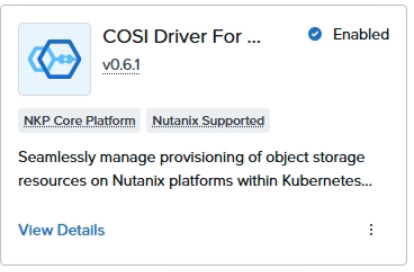
เปิดใช้งาน COSI ใน NKP สามารถทำได้ผ่าน Application Catalog โดยเข้าไปที่ COSI Driver for Nutanix

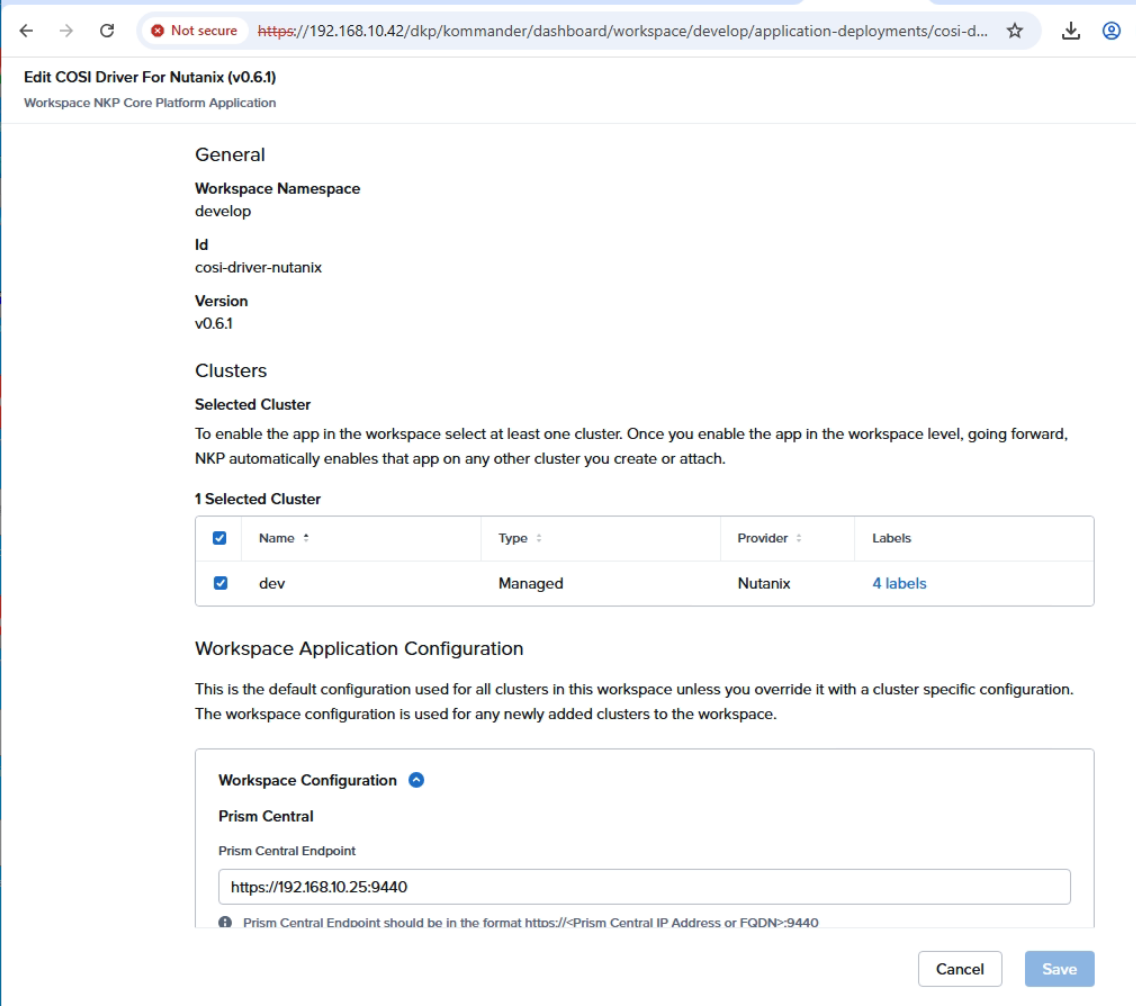
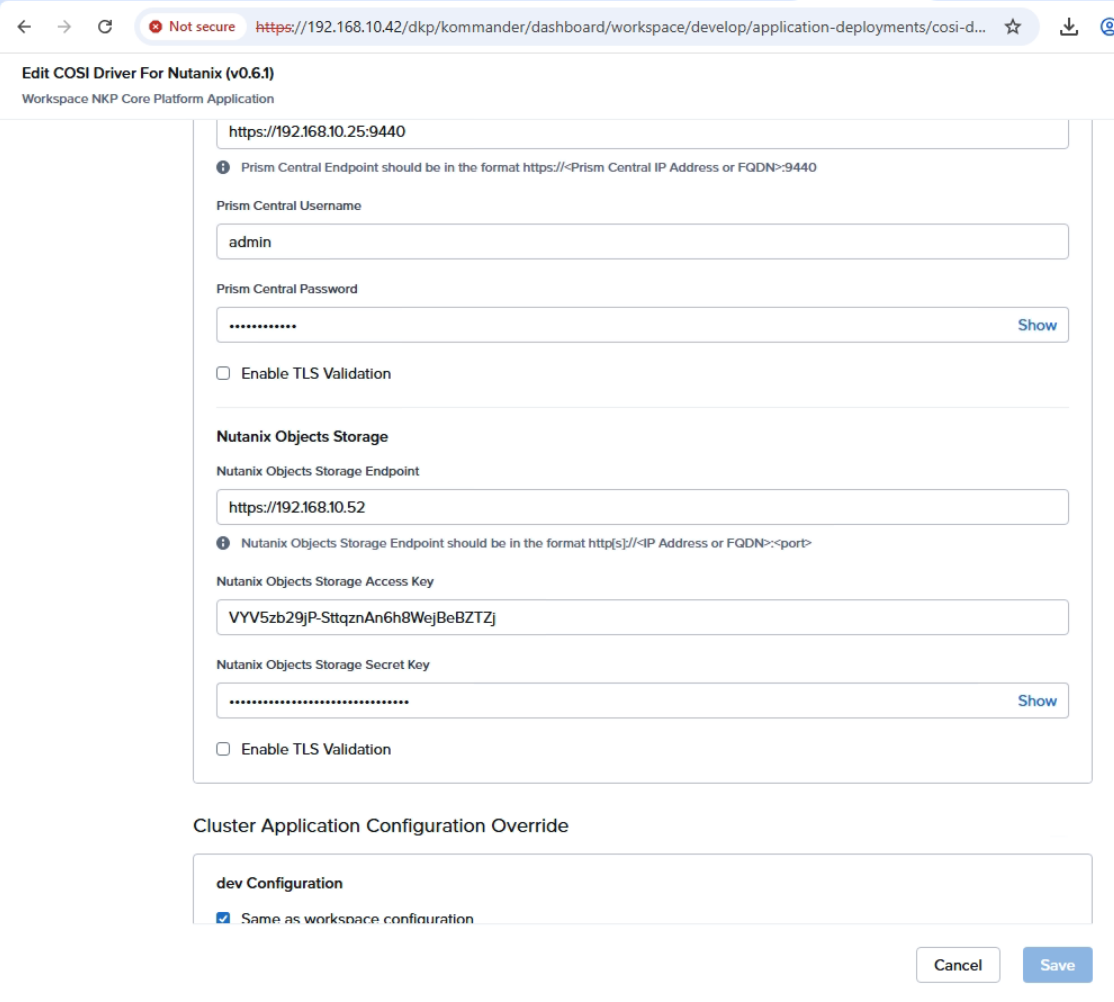
เข้าไปที่ enable option และกรอกข้อมูลที่จำเป็นตามตัวอย่าง

หลังจากกดปุ่ม Save ระบบจะติดตั้ง COSI CRD และ COSI Controller ไปยัง Kubernetes Cluster ที่เลือก โดยสามารถตรวจสอบได้จากตัวอย่าง

[root@guest-bastion-server-1 nutanix]# kubectl get crds | grep objectstorage
bucketaccessclasses.objectstorage.k8s.io 2026-02-13T14:37:53Z
bucketaccesses.objectstorage.k8s.io 2026-02-13T14:37:53Z
bucketclaims.objectstorage.k8s.io 2026-02-13T14:37:53Z
bucketclasses.objectstorage.k8s.io 2026-02-13T14:37:53Z
buckets.objectstorage.k8s.io 2026-02-13T14:37:53Z
[root@guest-bastion-server-1 nutanix]# kubectl get pod -n container-object-storage-system
NAME READY STATUS RESTARTS AGE
container-object-storage-controller-667886cd7f-l658v 1/1 Running 0 12h

NKP จะติดตั้ง BucketClass ให้อัตโนมัติ โดยตรวจสอบได้จาก cli

[root@guest-bastion-server-1 nutanix]# kubectl get bucketclasses
NAME AGE
cosi-nutanix-nkp 47m
[root@guest-bastion-server-1 nutanix]# kubectl get bucketclasses cosi-nutanix-nkp -o yaml
apiVersion: objectstorage.k8s.io/v1alpha1
deletionPolicy: Delete
driverName: ntnx.objectstorage.k8s.io
kind: BucketClass
metadata:
annotations:
meta.helm.sh/release-name: cosi-resources-nutanix
meta.helm.sh/release-namespace: develop
creationTimestamp: "2026-02-14T02:16:04Z"
generation: 1
labels:
app.kubernetes.io/managed-by: Helm
helm.toolkit.fluxcd.io/name: cosi-resources-nutanix
helm.toolkit.fluxcd.io/namespace: develop
name: cosi-nutanix-nkp
resourceVersion: "642878"
uid: 58023be3-9179-40c7-be4d-24219c4a7735

ตรวจสอบว่า NKP ได้สร้าง BucketAccessClass ให้

[root@guest-bastion-server-1 nutanix]# kubectl get BucketAccessClass
NAME AGE
cosi-nutanix-nkp 50m
[root@guest-bastion-server-1 nutanix]# kubectl get BucketAccessClass cosi-nutanix-nkp -o yaml
apiVersion: objectstorage.k8s.io/v1alpha1
authenticationType: KEY
driverName: ntnx.objectstorage.k8s.io
kind: BucketAccessClass
metadata:
annotations:
meta.helm.sh/release-name: cosi-resources-nutanix
meta.helm.sh/release-namespace: develop
creationTimestamp: "2026-02-14T02:16:04Z"
generation: 1
labels:
app.kubernetes.io/managed-by: Helm
helm.toolkit.fluxcd.io/name: cosi-resources-nutanix
helm.toolkit.fluxcd.io/namespace: develop
name: cosi-nutanix-nkp
resourceVersion: "642877"
uid: 4bd6a0e8-0a16-4039-8746-66e2c7c00a87

ทำการสร้าง BucketClaim (เหมือน PVC สำหรับ object storage)

YAML
apiVersion: objectstorage.k8s.io/v1alpha1
kind: BucketClaim
metadata:
name: test-bucketclaim
spec:
bucketClassName: cosi-nutanix-nkp
protocols:
- s3

สร้าง BucketAccess เพื่อให้ COSI Controller สร้าง credential สำหรับ connect ไปยัง S3 Bucket อัตโนมติ

YAML
apiVersion: objectstorage.k8s.io/v1alpha1
kind: BucketAccess
metadata:
name: nkp-test-bucketaccess
spec:
bucketAccessClassName: cosi-nutanix-nkp
bucketClaimName: test-bucketclaim
credentialsSecretName: nkp-test-objectstore-credentials

ตรวจสอบว่า cosi controller ได้ทำการสร้าง secret ตามที่กำหนดใน BucketAccess metadata

[root@guest-bastion-server-1 nutanix]# kubectl get secret nkp-test-objectstore-credentials
NAME TYPE DATA AGE
nkp-test-objectstore-credentials Opaque 1 47m
[root@guest-bastion-server-1 nutanix]# k get secret nkp-test-objectstore-credentials -o yaml
apiVersion: v1
data:
BucketInfo: eyJtZXRhZGF0YSI6eyJuYW1lIjoiYmMtNTM3OTBlOGQtZDMzMC00N2QzLWE2MjAtOWI4ODVmYTEwNTQ3IiwiY3JlYXRpb25UaW1lc3RhbXAiOm51bGx9LCJzcGVjIjp7ImJ1Y2tldE5hbWUiOiJjb3NpLW51dGFuaXgtbmtwYjE5Y2EwZTItNzRjNC00YmNmLWE3YjctMmUzN2U2MDY5YWM2IiwiYXV0aGVudGljYXRpb25UeXBlIjoiS0VZIiwic2VjcmV0UzMiOnsiZW5kcG9pbnQiOiJodHRwczovLzE5Mi4xNjguMTAuNTI6NDQzIiwicmVnaW9uIjoidXMtZWFzdC0xIiwiYWNjZXNzS2V5SUQiOiJMc2pDRG9ZeTREX09wRl9sVmo5UkNQRERnUS1SOG1NXyIsImFjY2Vzc1NlY3JldEtleSI6ImVpZW45bjdUM1pHZ2oxSGtydVZvVmNOM1VuUlAybnBjIn0sInNlY3JldEF6dXJlIjpudWxsLCJwcm90b2NvbHMiOlsiIl19fQ==
kind: Secret
metadata:
creationTimestamp: "2026-02-14T03:46:44Z"
finalizers:
- cosi.objectstorage.k8s.io/secret-protection
name: nkp-test-objectstore-credentials
namespace: default
resourceVersion: "727116"
uid: 1d6c999c-6605-4580-9db4-e18c7fe1a41c
type: Opaque
[root@guest-bastion-server-1 nutanix]# kubectl get secret nkp-test-objectstore-credentials -o jsonpath='{.data.BucketInfo}' | base64 -d | jq .
{
"metadata": {
"name": "bc-53790e8d-d330-47d3-a620-9b885fa10547",
"creationTimestamp": null
},
"spec": {
"bucketName": "cosi-nutanix-nkpb19ca0e2-74c4-4bcf-a7b7-2e37e6069ac6",
"authenticationType": "KEY",
"secretS3": {
"endpoint": "https://192.168.10.52:443",
"region": "us-east-1",
"accessKeyID": "LsjCDoYy4D_OpF_lVj9RCPDDgQ-R8mM_",
"accessSecretKey": "eien9n7T3ZGgj1HkruVoVcN3UnRP2npc"
},
"secretAzure": null,
"protocols": [
""

Deploy cosi-test container เพื่อทดสอบอ่านเขียนข้อมูลลงใน bucket storage ได้ถูกต้อง

YAML
apiVersion: v1
kind: Pod
metadata:
name: cosi-test
namespace: default
spec:
containers:
- name: test
image: amazon/aws-cli:latest
command: ["/bin/sh", "-c"]
args:
- |
echo "=== COSI Bucket Test ==="
# Install jq
yum install -y jq 2>/dev/null || apk add jq 2>/dev/null
# Parse BucketInfo JSON
BUCKET_INFO=$(cat /cosi/BucketInfo)
export AWS_ACCESS_KEY_ID=$(echo $BUCKET_INFO | jq -r '.spec.secretS3.accessKeyID')
export AWS_SECRET_ACCESS_KEY=$(echo $BUCKET_INFO | jq -r '.spec.secretS3.accessSecretKey')
BUCKET_NAME=$(echo $BUCKET_INFO | jq -r '.spec.bucketName')
ENDPOINT=$(echo $BUCKET_INFO | jq -r '.spec.secretS3.endpoint')
echo "Bucket: $BUCKET_NAME"
echo "Endpoint: $ENDPOINT"
# Write test
echo "Hello from COSI!" > /tmp/testfile.txt
aws s3 cp /tmp/testfile.txt s3://$BUCKET_NAME/testfile.txt \
--endpoint-url $ENDPOINT --no-verify-ssl
# List bucket
aws s3 ls s3://$BUCKET_NAME/ --endpoint-url $ENDPOINT --no-verify-ssl
# Read test
aws s3 cp s3://$BUCKET_NAME/testfile.txt /tmp/downloaded.txt \
--endpoint-url $ENDPOINT --no-verify-ssl
cat /tmp/downloaded.txt
echo "=== Test Complete ==="
sleep 3600
volumeMounts:
- name: cosi-credentials
mountPath: /cosi
readOnly: true
volumes:
- name: cosi-credentials
secret:
secretName: nkp-test-objectstore-credentials

ตรวจสอบการทำงาน จาก log ของ pod cosi-test

[root@guest-bastion-server-1 nutanix]# kubectl logs cosi-test
=== COSI Bucket Test ===
Amazon Linux 2023 repository 23 MB/s | 54 MB 00:02
Last metadata expiration check: 0:00:09 ago on Sat Feb 14 04:46:32 2026.
Package jq-1.7.1-51.amzn2023.x86_64 is already installed.
Dependencies resolved.
Nothing to do.
Complete!
Bucket: cosi-nutanix-nkpb19ca0e2-74c4-4bcf-a7b7-2e37e6069ac6
Endpoint: https://192.168.10.52:443

Gateway API in NKP

Gateway API เป็นมาตรฐานใหม่ที่จะมาทดแทน Ingress Controller แบบเดิมในการ Expose Kubernetes service ในรูปแบบของ http url เนื่องจากความสามารถของ Ingress Controller มีจำกัดเช่นทำได้แค่ map url path ไปยัง service ภายใน kubernetes ไม่รองรับความต้องการใหม่ๆ สำหรับการเข้าถึง modern application เช่น การจัดการ http header, query parameter routing, traffic splitting เป็นต้น รวมถึงรูปแบบ routing อื่นๆ เช่น GRPC, TLS, TCP และ UDP เป็นต้น

บทความนี้จะมาลองใช้ Gateway API ที่อยู่ใน NKP เพื่อเปรียบเทียบให้เห็นความสามารถที่มากขึ้น โดยจะใช้ wordpress app เป็นตัวอย่าง

script สำหรับ deploy wordpress

YAML
apiVersion: v1
kind: Secret
metadata:
name: mysql-pass
type: Opaque
stringData:
password: nutanix
---
apiVersion: v1
kind: Service
metadata:
name: wordpress-mysql
labels:
app: wordpress
spec:
ports:
- port: 3306
selector:
app: wordpress
tier: mysql
clusterIP: None
---
apiVersion: v1
kind: PersistentVolumeClaim
metadata:
name: mysql-pv-claim
labels:
app: wordpress
spec:
storageClassName: nutanix-files
accessModes:
- ReadWriteOnce
resources:
requests:
storage: 20Gi
---
apiVersion: apps/v1
kind: Deployment
metadata:
name: wordpress-mysql
labels:
app: wordpress
spec:
selector:
matchLabels:
app: wordpress
tier: mysql
strategy:
type: Recreate
template:
metadata:
labels:
app: wordpress
tier: mysql
spec:
containers:
- image: mysql:latest
name: mysql
env:
- name: MYSQL_ROOT_PASSWORD
valueFrom:
secretKeyRef:
name: mysql-pass
key: password
- name: MYSQL_DATABASE
value: wordpress
- name: MYSQL_USER
value: wordpress
- name: MYSQL_PASSWORD
valueFrom:
secretKeyRef:
name: mysql-pass
key: password
ports:
- containerPort: 3306
name: mysql
volumeMounts:
- name: mysql-persistent-storage
mountPath: /var/lib/mysql
volumes:
- name: mysql-persistent-storage
persistentVolumeClaim:
claimName: mysql-pv-claim
---
apiVersion: v1
kind: Service
metadata:
name: wordpress
labels:
app: wordpress
spec:
ports:
- port: 80
selector:
app: wordpress
tier: frontend
type: ClusterIP
---
apiVersion: v1
kind: PersistentVolumeClaim
metadata:
name: wp-pv-claim
labels:
app: wordpress
spec:
storageClassName: nutanix-files
accessModes:
- ReadWriteOnce
resources:
requests:
storage: 20Gi
---
apiVersion: apps/v1
kind: Deployment
metadata:
name: wordpress
labels:
app: wordpress
spec:
selector:
matchLabels:
app: wordpress
tier: frontend
strategy:
type: Recreate
template:
metadata:
labels:
app: wordpress
tier: frontend
spec:
containers:
- image: wordpress:latest
name: wordpress
env:
- name: WORDPRESS_DB_HOST
value: wordpress-mysql
- name: WORDPRESS_DB_PASSWORD
valueFrom:
secretKeyRef:
name: mysql-pass
key: password
- name: WORDPRESS_DB_USER
value: wordpress
- name: WORDPRESS_DB_NAME
value: wordpress
- name: WORDPRESS_DEBUG
value: "1"
ports:
- containerPort: 80
name: wordpress
volumeMounts:
- name: wordpress-persistent-storage
mountPath: /var/www/html
volumes:
- name: wordpress-persistent-storage
persistentVolumeClaim:
claimName: wp-pv-claim

หลังจากติดตั้งแล้ว สร้าง tls secret สำหรับ https service สำหรับให้บริการ wordpress

Shell
# 1. First, check if a TLS secret already exists
kubectl get secrets -n default | grep tls
# 2. If no TLS secret, create a self-signed one for testing
openssl req -x509 -nodes -days 365 -newkey rsa:2048 \
-keyout tls.key -out tls.crt \
-subj "/CN=*.192.168.10.42.sslip.io"
kubectl create secret tls wordpress-tls \
--cert=tls.crt --key=tls.key -n default

สร้าง Gateway สำหรับ wordpress application

YAML
apiVersion: gateway.networking.k8s.io/v1
kind: Gateway
metadata:
name: kommander-gateway
namespace: default
spec:
gatewayClassName: traefik
listeners:
- name: web
protocol: HTTP
port: 8000
hostname: "*.192.168.10.42.sslip.io"
allowedRoutes:
namespaces:
from: All
- name: websecure
protocol: HTTPS
port: 8443
hostname: "*.192.168.10.42.sslip.io"
allowedRoutes:
namespaces:
from: All
tls:
mode: Terminate
certificateRefs:
- name: wordpress-tls

สร้าง http routing service เพื่อให้ผู้ใช้เรียก http/https service มายัง wordpress ได้ โดยจะมีความสัมพันธ์กับ gateway ที่สร้างในข้างต้น ซึ่งกำหนดใน sectionName ตามตัวอย่าง

YAML
apiVersion: gateway.networking.k8s.io/v1
kind: HTTPRoute
metadata:
name: wordpress
namespace: default
spec:
parentRefs:
- name: kommander-gateway
namespace: default
sectionName: web
- name: kommander-gateway
namespace: default
sectionName: websecure
hostnames:
- wordpress.192.168.10.42.sslip.io
rules:
- matches:
- path:
type: PathPrefix
value: /
backendRefs:
- name: wordpress
port: 80

หลังจาก apply เข้าไปยัง kubernetes แล้ว wordpress ก็จะสามารถเรียกได้จาก url : http://wordpress.192.168.10.42.sslip.io

นอกจากจะทำ path routing แล้ว Gateway API ยังสามารถทำ routing ในรูปแบบอื่นๆ ได้ดังนี้

  1. Header-Based Routing
    rules:
    - matches:
    - headers:
    - name: X-Version
    value: v2
    backendRefs:
    - name: wordpress-v2
    port: 80

    2. Method-Based Routing

    rules:
    - matches:
    - method: POST
    path:
    type: PathPrefix
    value: /api
    backendRefs:
    - name: api-write
    port: 80

    3. Query Parameter Routing

    rules:
    - matches:
    - queryParams:
    - name: env
    value: debug
    backendRefs:
    - name: debug-service
    port: 80

    4. Traffic Splitting (Canary/Blue-Green)

    rules:
    - matches:
    - path:
    type: PathPrefix
    value: /
    backendRefs:
    - name: wordpress-v1
    port: 80
    weight: 90
    - name: wordpress-v2
    port: 80
    weight: 10

    5. Request Header Modification

    rules:
    - matches:
    - path:
    type: PathPrefix
    value: /
    filters:
    - type: RequestHeaderModifier
    requestHeaderModifier:
    add:
    - name: X-Custom-Header
    value: my-value
    set:
    - name: Host
    value: internal-service
    remove:
    - X-Unwanted-Header
    backendRefs:
    - name: wordpress
    port: 80

    6. Response Header Modification

    filters:
    - type: ResponseHeaderModifier
    responseHeaderModifier:
    add:
    - name: X-Frame-Options
    value: DENY
    set:
    - name: Cache-Control
    value: no-cache

    7. URL Redirect

    rules:
    - matches:
    - path:
    type: PathPrefix
    value: /old-blog
    filters:
    - type: RequestRedirect
    requestRedirect:
    scheme: https
    hostname: new-blog.example.com
    port: 443
    statusCode: 301

    8. URL Rewrite

    rules:
    - matches:
    - path:
    type: PathPrefix
    value: /api/v1
    filters:
    - type: URLRewrite
    urlRewrite:
    hostname: backend-api.internal
    path:
    type: ReplacePrefixMatch
    replacePrefixMatch: /v1
    backendRefs:
    - name: api-service
    port: 80

    9. Request Mirroring

    rules:
    - matches:
    - path:
    type: PathPrefix
    value: /
    filters:
    - type: RequestMirror
    requestMirror:
    backendRef:
    name: wordpress-shadow
    port: 80
    backendRefs:
    - name: wordpress
    port: 80

    10. Multiple Matches Combined

    rules:
    - matches:
    - path:
    type: PathPrefix
    value: /api
    headers:
    - name: X-Version
    value: v2
    method: POST
    backendRefs:
    - name: api-v2
    port: 80

    นอกจากนี้ยังมี Router type อื่นๆ เช่น GRPCRoute, TLSRoute, TCPRoute และ UDPRoute ตามตัวอย่าง

    1. GRPCRoute
    YAML
    apiVersion: gateway.networking.k8s.io/v1
    kind: GRPCRoute
    metadata:
    name: grpc-route
    namespace: default
    spec:
    parentRefs:
    - name: my-gateway
    sectionName: grpc
    hostnames:
    - grpc.example.com
    rules:
    # Route by service name
    - matches:
    - method:
    service: myapp.UserService
    method: GetUser
    backendRefs:
    - name: user-service
    port: 50051
    # Route by header
    - matches:
    - headers:
    - name: x-api-version
    value: v2
    backendRefs:
    - name: api-v2
    port: 50051
    # Traffic splitting for gRPC
    - matches:
    - method:
    service: myapp.OrderService
    backendRefs:
    - name: order-service-v1
    port: 50051
    weight: 80
    - name: order-service-v2
    port: 50051
    weight: 20
    ---
    # Gateway listener for gRPC
    apiVersion: gateway.networking.k8s.io/v1
    kind: Gateway
    metadata:
    name: my-gateway
    spec:
    gatewayClassName: traefik
    listeners:
    - name: grpc
    protocol: HTTPS
    port: 8443
    hostname: "grpc.example.com"
    tls:
    mode: Terminate
    certificateRefs:
    - name: grpc-tls-secret
    allowedRoutes:
    kinds:
    - kind: GRPCRoute
    namespaces:
    from: All

    2. TLSRoute (TLS Passthrough)

    YAML
    apiVersion: gateway.networking.k8s.io/v1alpha2
    kind: TLSRoute
    metadata:
    name: tls-passthrough
    namespace: default
    spec:
    parentRefs:
    - name: my-gateway
    sectionName: tls
    hostnames:
    - secure.example.com
    rules:
    - backendRefs:
    - name: secure-backend
    port: 8443
    ---
    # Gateway listener for TLS passthrough
    apiVersion: gateway.networking.k8s.io/v1
    kind: Gateway
    metadata:
    name: my-gateway
    spec:
    gatewayClassName: traefik
    listeners:
    - name: tls
    protocol: TLS
    port: 8443
    hostname: "secure.example.com"
    tls:
    mode: Passthrough # TLS is NOT terminated, passed directly to backend
    allowedRoutes:
    kinds:
    - kind: TLSRoute
    namespaces:
    from: All

    3. TCPRoute

    YAML
    apiVersion: gateway.networking.k8s.io/v1alpha2
    kind: TCPRoute
    metadata:
    name: tcp-database
    namespace: default
    spec:
    parentRefs:
    - name: my-gateway
    sectionName: postgres
    rules:
    - backendRefs:
    - name: postgres-service
    port: 5432
    ---
    # Another TCPRoute for Redis
    apiVersion: gateway.networking.k8s.io/v1alpha2
    kind: TCPRoute
    metadata:
    name: tcp-redis
    namespace: default
    spec:
    parentRefs:
    - name: my-gateway
    sectionName: redis
    rules:
    - backendRefs:
    - name: redis-service
    port: 6379
    ---
    # Gateway with TCP listeners
    apiVersion: gateway.networking.k8s.io/v1
    kind: Gateway
    metadata:
    name: my-gateway
    spec:
    gatewayClassName: traefik
    listeners:
    - name: postgres
    protocol: TCP
    port: 5432
    allowedRoutes:
    kinds:
    - kind: TCPRoute
    namespaces:
    from: All
    - name: redis
    protocol: TCP
    port: 6379
    allowedRoutes:
    kinds:
    - kind: TCPRoute
    namespaces:
    from: All

    4. UDPRoute

    YAML
    apiVersion: gateway.networking.k8s.io/v1alpha2
    kind: UDPRoute
    metadata:
    name: udp-dns
    namespace: default
    spec:
    parentRefs:
    - name: my-gateway
    sectionName: dns
    rules:
    - backendRefs:
    - name: coredns
    port: 53
    ---
    # Another UDPRoute for game server
    apiVersion: gateway.networking.k8s.io/v1alpha2
    kind: UDPRoute
    metadata:
    name: udp-game
    namespace: default
    spec:
    parentRefs:
    - name: my-gateway
    sectionName: game
    rules:
    - backendRefs:
    - name: game-server
    port: 27015
    ---
    # Gateway with UDP listeners
    apiVersion: gateway.networking.k8s.io/v1
    kind: Gateway
    metadata:
    name: my-gateway
    spec:
    gatewayClassName: traefik
    listeners:
    - name: dns
    protocol: UDP
    port: 53
    allowedRoutes:
    kinds:
    - kind: UDPRoute
    namespaces:
    from: All
    - name: game
    protocol: UDP
    port: 27015
    allowedRoutes:
    kinds:
    - kind: UDPRoute
    namespaces:
    from: All

    Nutanix File Storage Class

    วิธีการ config ให้ Nutanix CSI เชื่อมต่อไปยัง File Service (NUS) ทำให้สามารถสร้าง persistent volume บน File Share ได้ ขั้นตอนการสร้าง Storage Class ทำได้ตามตัวอย่างดังนี้

    สร้าง secret เพื่อเชื่อมต่อไปยัง Nutanix File server ผ่าน Prism Central

    YAML
    apiVersion: v1
    kind: Secret
    metadata:
    name: pc-files-secret
    namespace: ntnx-system
    stringData:
    # Provide Nutanix File Server credentials which is a REST API user created on File server UI separated by colon in "files-key:".
    key: "<<PC IP Address>>:9440:<<PC userid>>:<<password>>"
    files-key: "<<File Server IP>>:<<REST API userid>>:<<password>>"

    ตัวอย่าง secret ที่สร้างจากข้อมูลที่ได้จาก lab

    YAML
    apiVersion: v1
    kind: Secret
    metadata:
    name: nutanix-csi-credentials-files
    namespace: ntnx-system
    stringData:
    # Provide Nutanix File Server credentials which is a REST API user created on File server UI separated by colon in "files-key:".
    key: "192.168.10.25:9440:admin:P@ssw0rd123!"
    files-key: "nas.nutanix.poc:tao:nutanix/4u"

    สร้าง Storage Class ด้วยข้อมูลดังนี้

    YAML
    kind: StorageClass
    apiVersion: storage.k8s.io/v1
    metadata:
    name: nfs-pc-sc
    provisioner: csi.nutanix.com
    parameters:
    csi.storage.k8s.io/node-publish-secret-name: pc-files-secret
    csi.storage.k8s.io/node-publish-secret-namespace: ntnx-system
    csi.storage.k8s.io/controller-expand-secret-name: pc-files-secret
    csi.storage.k8s.io/controller-expand-secret-namespace: ntnx-system
    dynamicProv: ENABLED
    nfsServer: <<IP address of file server>>
    nfsServerName: <<file server name>>
    csi.storage.k8s.io/provisioner-secret-name: pc-files-secret
    csi.storage.k8s.io/provisioner-secret-namespace: ntnx-system
    storageType: NutanixFiles
    squashType: root-squash
    reclaimPolicy: Delete
    volumeBindingMode: Immediate
    allowVolumeExpansion: true

    ตัวอย่างการสร้าง file storage class ด้วยการใช้ข้อมูลจาก lab

    YAML
    kind: StorageClass
    apiVersion: storage.k8s.io/v1
    metadata:
    name: nutanix-files
    provisioner: csi.nutanix.com
    parameters:
    csi.storage.k8s.io/node-publish-secret-name: nutanix-csi-credentials-files
    csi.storage.k8s.io/node-publish-secret-namespace: ntnx-system
    csi.storage.k8s.io/controller-expand-secret-name: nutanix-csi-credentials-files
    csi.storage.k8s.io/controller-expand-secret-namespace: ntnx-system
    dynamicProv: ENABLED
    nfsServer: nas.nutanix.poc
    nfsServerName: nas
    csi.storage.k8s.io/provisioner-secret-name: nutanix-csi-credentials-files
    csi.storage.k8s.io/provisioner-secret-namespace: ntnx-system
    storageType: NutanixFiles
    reclaimPolicy: Delete
    volumeBindingMode: Immediate
    allowVolumeExpansion: true

    deploy workload เพื่อทดสอบสร้าง file volume ทำการเขียนและอ่านไฟล์จาก file volume

    YAML
    ---
    # 1. PVC
    apiVersion: v1
    kind: PersistentVolumeClaim
    metadata:
    name: test-fileshare-pvc
    namespace: default
    spec:
    accessModes:
    - ReadWriteMany
    storageClassName: nutanix-files # Change this
    resources:
    requests:
    storage: 1Gi
    ---
    # 2. Writer Pod - writes a file
    apiVersion: v1
    kind: Pod
    metadata:
    name: test-writer
    namespace: default
    spec:
    containers:
    - name: writer
    image: busybox
    command: ["/bin/sh", "-c"]
    args:
    - |
    echo "Hello from writer pod at $(date)" > /data/testfile.txt
    echo "Write successful!"
    cat /data/testfile.txt
    sleep 3600
    volumeMounts:
    - name: shared-vol
    mountPath: /data
    volumes:
    - name: shared-vol
    persistentVolumeClaim:
    claimName: test-fileshare-pvc
    ---
    # 3. Reader Pod - reads the same file (proves RWX works)
    apiVersion: v1
    kind: Pod
    metadata:
    name: test-reader
    namespace: default
    spec:
    containers:
    - name: reader
    image: busybox
    command: ["/bin/sh", "-c"]
    args:
    - |
    echo "Waiting for file..."
    until [ -f /data/testfile.txt ]; do sleep 2; done
    echo "Read successful!"
    cat /data/testfile.txt
    sleep 3600
    volumeMounts:
    - name: shared-vol
    mountPath: /data
    volumes:
    - name: shared-vol
    persistentVolumeClaim:
    claimName: test-fileshare-pvc

    script สำหรับทดสอบ

    Shell
    # 1. Check available storage classes
    kubectl get storageclass
    # 2. Deploy (replace <your-storage-class> first)
    kubectl apply -f test-fileshare.yaml
    # 3. Check PVC is bound
    kubectl get pvc test-fileshare-pvc
    # 4. Check both pods are running
    kubectl get pods test-writer test-reader
    # 5. Verify writer wrote the file
    kubectl logs test-writer
    # 6. Verify reader can read the same file
    kubectl logs test-reader
    # 7. Extra test - write from reader pod too
    kubectl exec test-reader -- sh -c 'echo "Hello from reader" >> /data/testfile.txt'
    kubectl exec test-writer -- cat /data/testfile.txt

    ข้อควรระวัง

    CIS hardening จะทำการ disable/masks rpcbind ทำให้ Storage Class ไม่สามารถ mount volume NFSv3 บน worker node ได้ โดยมีทางเลือกดังนี้

    Option 1 แนะนำให้ใช้ NFSv4 เนื่องจาก NFSv4 ไม่ต้องการ rpcbind หรือ rpc-statd เนื่องจากสามารถทำกระบวนการ locking file ได้ด้วยตัวเอง รวมทั้งเป็นไปตามข้อกำหนดของ CIS hardening

    Shell
    # Test NFSv4 mount
    mount -t nfs -o vers=4 files.ntnxlab.local:/test /mnt/test

    สำหรับ Nutanix CSI, ทำการ force ให้ใช้ NFSv4 ได้ตามตัวอย่าง

    YAML
    apiVersion: storage.k8s.io/v1
    kind: StorageClass
    metadata:
    name: nutanix-files-nfsv4
    provisioner: csi.nutanix.com
    parameters:
    nfsServerName: nas
    storageType: NutanixFiles
    mountOptions: "vers=4"
    mountOptions:
    - vers=4
    - nolock

    Option 2 ทำการ Unmask rpcbind ซึ่งจะมีผลต่อความปลอดภัย โดยจะต้องทำการ unmask ในทุกๆ kubernetes node

    Shell
    systemctl unmask rpcbind.socket
    systemctl unmask rpcbind.service
    systemctl enable rpcbind --now

    Option 3 ทำการ mount volume ด้วย option nolock ในกรณีที่ CSI support ด้วยวิธีนี้จะข้าม rpc-statd แต่ disable file locking

    YAML
    mountOptions:
    - nolock
    - vers=3

    note – install wordpress โดยใช้ file volume

    YAML
    apiVersion: v1
    kind: Secret
    metadata:
    name: mysql-pass
    type: Opaque
    stringData:
    password: nutanix
    ---
    apiVersion: v1
    kind: Service
    metadata:
    name: wordpress-mysql
    labels:
    app: wordpress
    spec:
    ports:
    - port: 3306
    selector:
    app: wordpress
    tier: mysql
    clusterIP: None
    ---
    apiVersion: v1
    kind: PersistentVolumeClaim
    metadata:
    name: mysql-pv-claim
    labels:
    app: wordpress
    spec:
    storageClassName: nutanix-files
    accessModes:
    - ReadWriteOnce
    resources:
    requests:
    storage: 20Gi
    ---
    apiVersion: apps/v1
    kind: Deployment
    metadata:
    name: wordpress-mysql
    labels:
    app: wordpress
    spec:
    selector:
    matchLabels:
    app: wordpress
    tier: mysql
    strategy:
    type: Recreate
    template:
    metadata:
    labels:
    app: wordpress
    tier: mysql
    spec:
    containers:
    - image: https://10.38.16.169/docker.io/mysql:latest
    name: mysql
    env:
    - name: MYSQL_ROOT_PASSWORD
    valueFrom:
    secretKeyRef:
    name: mysql-pass
    key: password
    - name: MYSQL_DATABASE
    value: wordpress
    - name: MYSQL_USER
    value: wordpress
    - name: MYSQL_PASSWORD
    valueFrom:
    secretKeyRef:
    name: mysql-pass
    key: password
    ports:
    - containerPort: 3306
    name: mysql
    volumeMounts:
    - name: mysql-persistent-storage
    mountPath: /var/lib/mysql
    volumes:
    - name: mysql-persistent-storage
    persistentVolumeClaim:
    claimName: mysql-pv-claim
    ---
    apiVersion: v1
    kind: Service
    metadata:
    name: wordpress
    labels:
    app: wordpress
    spec:
    ports:
    - port: 80
    selector:
    app: wordpress
    tier: frontend
    type: ClusterIP
    ---
    apiVersion: v1
    kind: PersistentVolumeClaim
    metadata:
    name: wp-pv-claim
    labels:
    app: wordpress
    spec:
    storageClassName: nutanix-files
    accessModes:
    - ReadWriteOnce
    resources:
    requests:
    storage: 20Gi
    ---
    apiVersion: apps/v1
    kind: Deployment
    metadata:
    name: wordpress
    labels:
    app: wordpress
    spec:
    selector:
    matchLabels:
    app: wordpress
    tier: frontend
    strategy:
    type: Recreate
    template:
    metadata:
    labels:
    app: wordpress
    tier: frontend
    spec:
    containers:
    - image: wordpress:latest
    name: wordpress
    env:
    - name: WORDPRESS_DB_HOST
    value: wordpress-mysql
    - name: WORDPRESS_DB_PASSWORD
    valueFrom:
    secretKeyRef:
    name: mysql-pass
    key: password
    - name: WORDPRESS_DB_USER
    value: wordpress
    - name: WORDPRESS_DB_NAME
    value: wordpress
    - name: WORDPRESS_DEBUG
    value: "1"
    ports:
    - containerPort: 80
    name: wordpress
    volumeMounts:
    - name: wordpress-persistent-storage
    mountPath: /var/www/html
    volumes:
    - name: wordpress-persistent-storage
    persistentVolumeClaim:
    claimName: wp-pv-claim
    ---
    apiVersion: networking.k8s.io/v1
    kind: Ingress
    metadata:
    name: wordpress-ingress
    spec:
    ingressClassName: kommander-traefik
    rules:
    - host: wordpress.10.55.42.19.sslip.io
    http:
    paths:
    - path: /
    pathType: Prefix
    backend:
    service:
    name: wordpress
    port:
    number: 80

    Stress Test Kubernetes

    Script สำหรับ stress test kubernetes เพื่อ consume resource ทั้งหมดของ kubernetes

    YAML
    apiVersion: apps/v1
    kind: Deployment
    metadata:
    name: resource-test
    spec:
    replicas: 10
    selector:
    matchLabels:
    app: resource-test
    template:
    metadata:
    labels:
    app: resource-test
    spec:
    containers:
    - name: stress-test
    image: 10.38.53.107/docker/nginx
    resources:
    requests:
    memory: "1Gi"
    cpu: "5000m"
    limits:
    memory: "2Gi"
    cpu: "10000m"

    Install ArgoCD

    ArgoCD เป็น Tool สำหรับทำ GitOps ช่วยติดตั้ง Application Deployment (metadata fie) ที่เป็น yaml file, kustomize หรือ helm package ที่เก็บอยู่ใน Git Repository ไปยัง Kubernetes ปลายทางได้ทั้งแบบ auto deploy และ manual deploy

    Script สำหรับ install ArgoCD

    Shell
    #!/bin/bash
    # 1. Create the namespace
    kubectl create namespace argocd
    # 2. Apply the official Argo CD manifests
    echo "Installing Argo CD..."
    kubectl apply -n argocd -f https://raw.githubusercontent.com/argoproj/argo-cd/stable/manifests/install.yaml
    # 3. Change the server service type to LoadBalancer (optional, but helpful for UI access)
    echo "Patching service to LoadBalancer..."
    kubectl patch svc argocd-server -n argocd -p '{"spec": {"type": "LoadBalancer"}}'
    # 4. Wait for the rollout to complete
    echo "Waiting for Argo CD components to be ready..."
    kubectl wait --for=condition=available --timeout=600s deployment/argocd-server -n argocd
    # 5. Retrieve the initial admin password
    PASS=$(kubectl -n argocd get secret argocd-initial-admin-secret -o jsonpath="{.data.password}" | base64 -d)
    echo "------------------------------------------------------"
    echo "Argo CD Installation Complete!"
    echo "Admin Username: admin"
    echo "Admin Password: $PASS"
    echo "------------------------------------------------------"
    echo "Note: If you are on a local cluster without a LoadBalancer,"
    echo "run: kubectl port-forward svc/argocd-server -n argocd 8080:443"

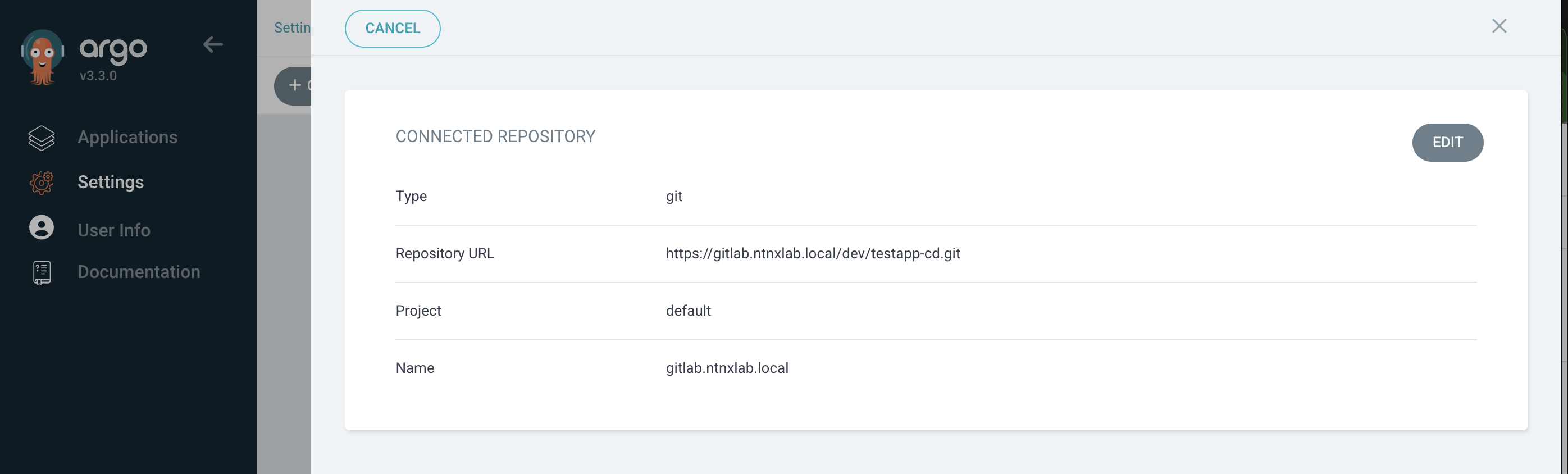
    หลังจาก login เข้าหน้าหลักแล้วต้องสร้าง gitrepository สำหรับเชื่อต่อ project และ gitrepository ก่อน

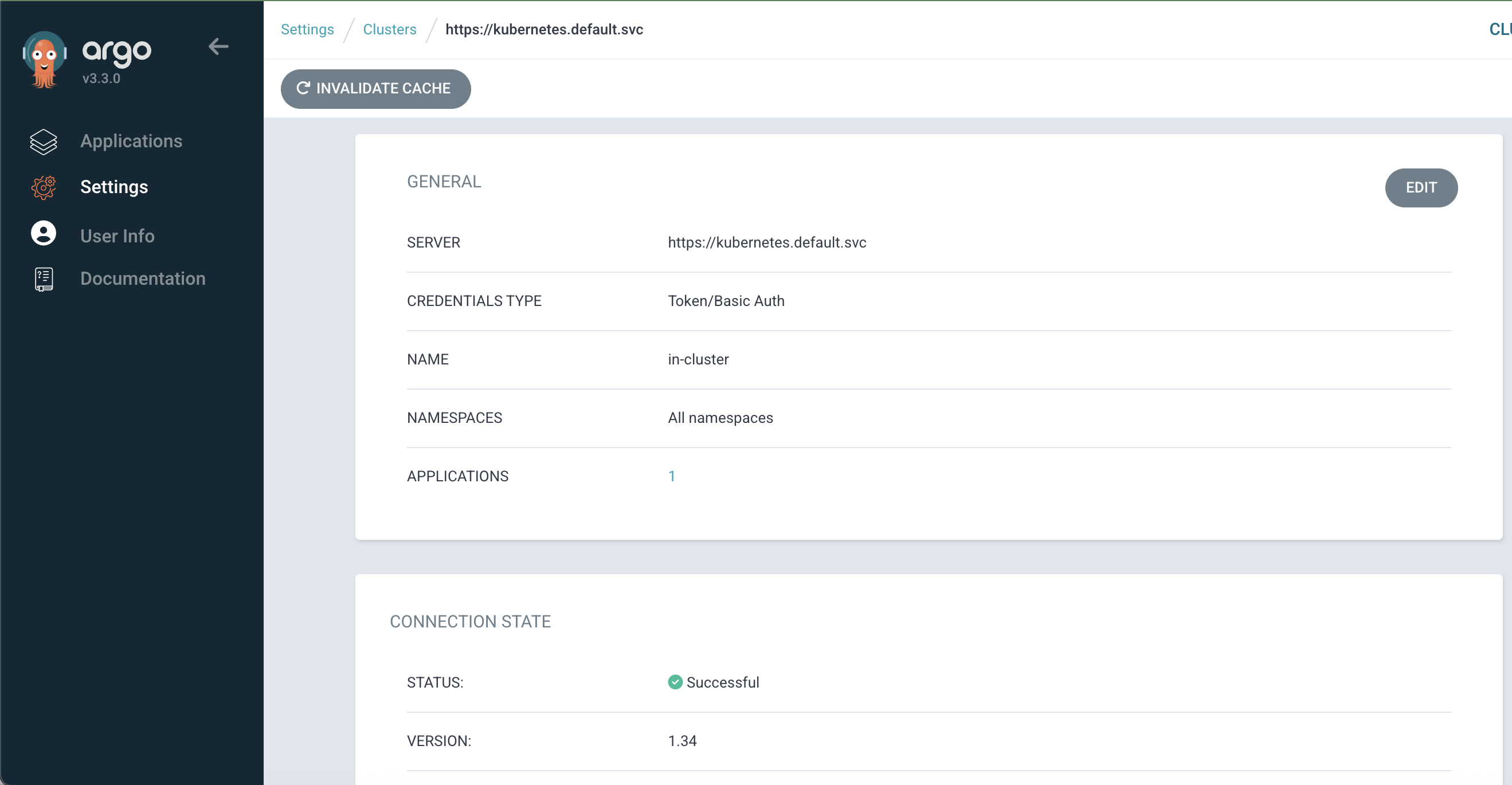
    เชื่อต่อ kubernetes cluster ที่ต้องการ deploy application

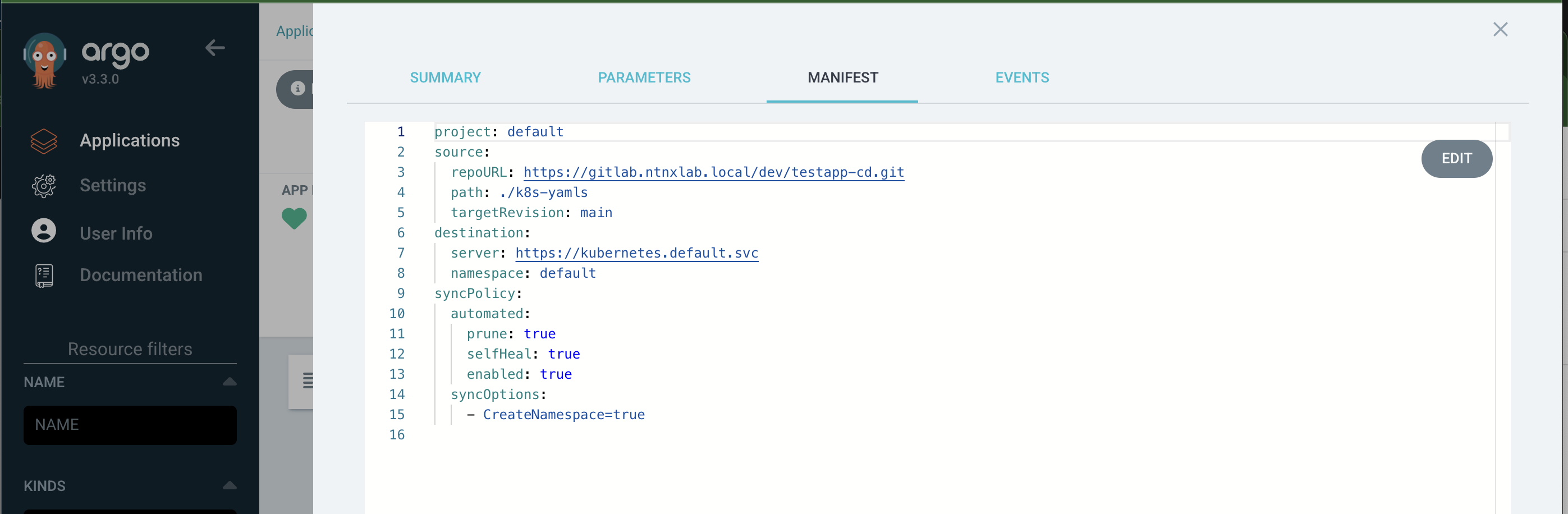
    ทำการสร้าง application เพื่อให้ ArgoCD ทำการ deploy application ให้อัตโนมัติ

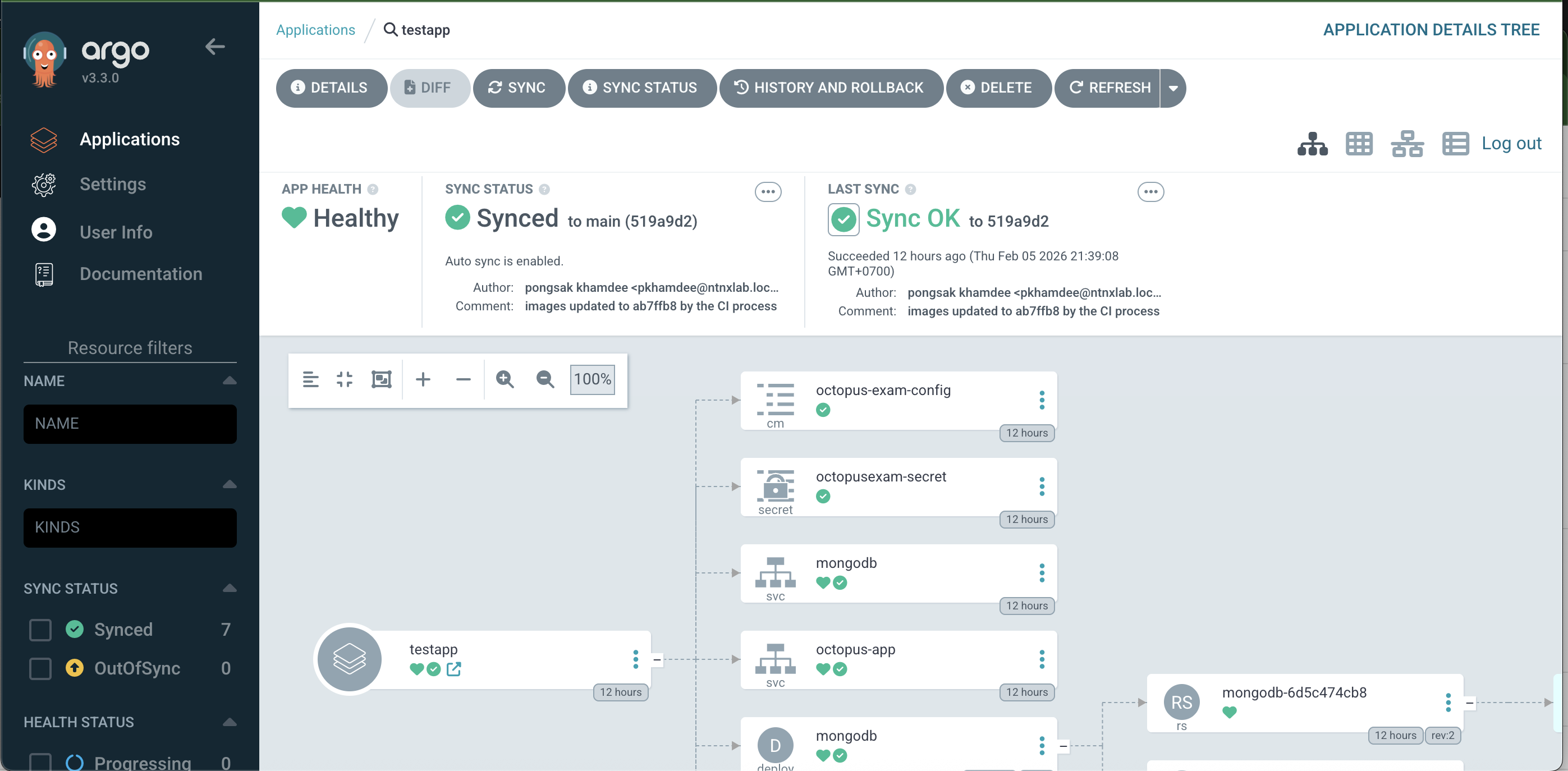
    ArgoCD จะ sync ข้อมูลจาก gitrepository แล้ว deploy application ใน kubernetes ตามที่ config ไว้

    External Secrets Operator

    External Secrets Operator เป็น Kubernetes Operator ที่ช่วย Integrate Kubernetes Secret กับ KMS ภายนอกโดย Operator จะทำการ sync credential จาก KMS ภายนอกและทำการ update secret ของ Kubernetes อัตโนมัติ ช่วยให้การจัดการ credential สามารถจัดการแก้ไขจากระบบ KMS ได้จากที่เดียว

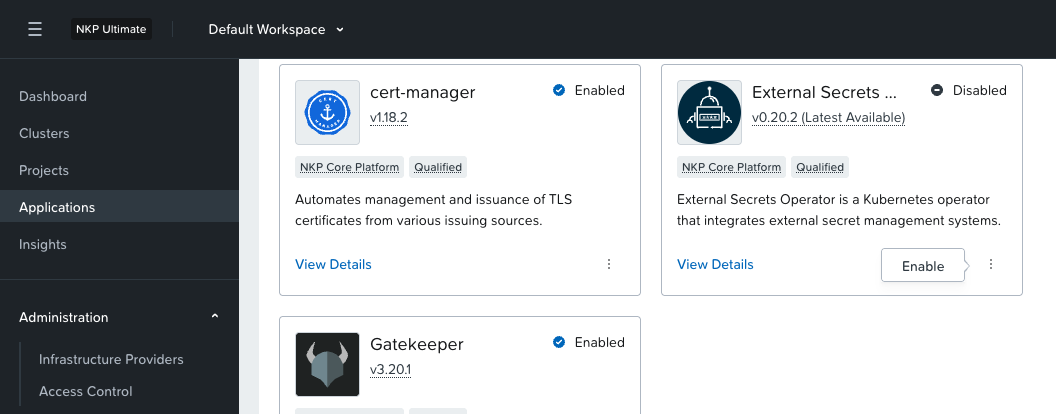
    สำหรับ NKP สามารถ Enable ได้จากหน้า Applications Catalog

    หลังจาก enable แล้ว เราจะต้องทำให้ Vault trust Kubernetes จากนั้นสร้าง SecretStore เพื่อเป็นสะพานเชื่อมระหว่าง Kubernetes และ Vault หลังจากนั้นสร้าง ExternalSecret เพื่อ Sync Secret ให้กับ Kubernetes

    ขั้นตอนการทำให้ Vault trust Kubernetes

    Shell
    # Exec into your vault-0 pod
    kubectl exec -it vault-0 -n vault -- sh
    vault login hvs.SMpvYTqteXW6Vjup8HWIB972
    # 1. Enable Kubernetes auth
    vault auth enable kubernetes
    # 2. Configure it to talk to the local K8s API
    vault write auth/kubernetes/config \
    kubernetes_host="https://kubernetes.default.svc:443"
    # 3. Create a policy for ESO to read secrets
    vault policy write eso-read-policy - <<EOF
    path "secret/data/*" {
    capabilities = ["read"]
    }
    EOF
    # 4. Create a role that binds the ESO ServiceAccount to the policy
    # Assuming ESO is in 'external-secrets' namespace with SA name 'external-secrets'
    vault write auth/kubernetes/role/eso-role \
    bound_service_account_names=external-secrets \
    bound_service_account_namespaces=external-secrets \
    policies=eso-read-policy \
    ttl=1h

    สร้าง SecretStore ด้วย yaml file ดังนี้

    YAML
    apiVersion: external-secrets.io/v1
    kind: ClusterSecretStore
    metadata:
    name: vault-backend
    spec:
    provider:
    vault:
    server: "http://vault.vault.svc.cluster.local:8200"
    path: "secret"
    version: "v2"
    auth:
    kubernetes:
    # This must match the role name you created in Vault Step 1.4
    role: "eso-role"
    mountPath: "kubernetes"
    serviceAccountRef:
    name: "external-secrets"
    namespace: "external-secrets"

    สร้าง External Secret store สำหรับ sync secret กับ Vault มายัง Kubernetes ด้วย yaml file ดังนี้

    YAML
    apiVersion: external-secrets.io/v1
    kind: ExternalSecret
    metadata:
    name: my-app-secret
    namespace: default
    spec:
    refreshInterval: "1h" # How often to sync
    secretStoreRef:
    name: vault-backend
    kind: ClusterSecretStore
    target:
    name: k8s-app-secret # The name of the resulting K8s Secret
    creationPolicy: Owner
    data:
    - secretKey: DATABASE_PASSWORD # Key in the K8s Secret
    remoteRef:
    key: my-app/db-creds # Path in Vault
    property: password # Key inside the Vault JSON

    ตรวจสอบว่ามีการสร้าง secret k8s-app-secret ที่ namespace default จากคำสั่งข้างต้นจริง

    kubectl get secret
    NAME TYPE DATA AGE
    k8s-app-secret Opaque 1 31s

    ดูข้อมูลของ secret จะพบว่ามีการ sync DATABASE_PASSWORD จาก Vault มาให้

    kubectl get secret k8s-app-secret -o yaml
    apiVersion: v1
    data:
    DATABASE_PASSWORD: cGFzc3dvcmQxMjM=
    kind: Secret
    metadata:
    annotations:
    kubectl.kubernetes.io/last-applied-configuration: |
    {"apiVersion":"external-secrets.io/v1","kind":"ExternalSecret","metadata":{"annotations":{},"name":"my-app-secret","namespace":"default"},"spec":{"data":[{"remoteRef":{"key":"my-app/db-creds","property":"password"},"secretKey":"DATABASE_PASSWORD"}],"refreshInterval":"1h","secretStoreRef":{"kind":"ClusterSecretStore","name":"vault-backend"},"target":{"creationPolicy":"Owner","name":"k8s-app-secret"}}}
    reconcile.external-secrets.io/data-hash: 69b12d606fda3589324b709f341cf77986d7128c2fb089486fe84d76
    creationTimestamp: "2026-02-05T11:21:32Z"
    labels:
    reconcile.external-secrets.io/created-by: ea4461eb1de01e986cc8315e7fc9b7bdbdf0204590c521bfc076aa6e
    reconcile.external-secrets.io/managed: "true"
    name: k8s-app-secret
    namespace: default
    ownerReferences:
    - apiVersion: external-secrets.io/v1
    blockOwnerDeletion: true
    controller: true
    kind: ExternalSecret
    name: my-app-secret
    uid: 084595bf-cef5-417f-9a98-2f77b82512ec
    resourceVersion: "949692"
    uid: c0a8c2aa-e0c7-44c3-86bc-dcfacc7190a0
    type: Opaque

    Install Hashicorp Vault to Kubernetes

    ติดตั้ง KMS สำหรับจัดการ credential ใน Kubernetes ด้วย Hashicorp vault

    ติดตั้ง vault cli สำหรับ ubuntu linux

    # 1. Add HashiCorp repo
    sudo apt update
    sudo apt install -y gpg
    wget -O- https://apt.releases.hashicorp.com/gpg | sudo gpg --dearmor -o /usr/share/keyrings/hashicorp-archive-keyring.gpg
    echo "deb [signed-by=/usr/share/keyrings/hashicorp-archive-keyring.gpg] https://apt.releases.hashicorp.com $(lsb_release -cs) main" | sudo tee /etc/apt/sources.list.d/hashicorp.list
    # 2. Install Vault
    sudo apt update
    sudo apt install -y vault
    # 3. Verify
    vault --version

    สำหรับ Rocky Linux

    # 1. Add HashiCorp repo
    sudo yum install -y yum-utils
    sudo yum-config-manager --add-repo https://rpm.releases.hashicorp.com/RHEL/hashicorp.repo
    # 2. Install Vault
    sudo yum install -y vault
    # 3. Verify
    vault --version

    ติดตั้ง helm cli สำหรับ ubuntu linux

    curl https://raw.githubusercontent.com/helm/helm/main/scripts/get-helm-3 | bash
    helm version

    สำหรับการติดตั้งนี้จะไม่ enable tls เพื่อให้ง่ายในการทดสอบ โดยจะสร้าง Load balancer สำหรับเข้าถึง vault และมีการสร้าง volume เพื่อเก็บข้อมูลระบบ การติดตั้งจะติดตั้ง vaultในแบบ high availability โดยมีจำนวน vault instance ที่ 3 instance แต่เนื่องจากกระบวนการ initialize ของ pod จะทำพร้อมกันไม่ได้ จึงสร้างขึ้นมาหนึ่งตัวก่อนแล้วค่อย scale เป็น 3 instance ในภายหลัง

    สร้าง script สำหรับติดตั้ง install-vault.sh

    Shell
    #!/bin/bash
    # 1. Add the HashiCorp Helm Repository
    helm repo add hashicorp https://helm.releases.hashicorp.com
    helm repo update
    # 2. Create a dedicated namespace
    kubectl create namespace vault
    # 3. Deploy Vault in High Availability (HA) mode with Raft storage
    # We use a custom values file for production-like settings
    cat <<EOF > vault-values.yaml
    server:
    affinity: ""
    service:
    type: LoadBalancer
    dataStorage:
    enabled: true
    size: 500Mi
    ha:
    enabled: true
    replicas: 1 # Start with 1
    raft:
    enabled: true
    setNodeId: true
    config: |
    ui = true
    disable_mlock = true
    listener "tcp" {
    tls_disable = 1
    address = "[::]:8200"
    cluster_address = "[::]:8201"
    }
    storage "raft" {
    path = "/vault/data"
    retry_join {
    leader_api_addr = "http://vault-0.vault-internal:8200"
    }
    retry_join {
    leader_api_addr = "http://vault-1.vault-internal:8200"
    }
    retry_join {
    leader_api_addr = "http://vault-2.vault-internal:8200"
    }
    }
    service_registration "kubernetes" {}
    ui:
    enabled: true
    injector:
    enabled: true
    replicas: 1
    EOF
    helm install vault hashicorp/vault \
    --namespace vault \
    -f vault-values.yaml

    ตรวจสอบว่า Vault ได้ install และมี status Running ดังรูป โดย status จะยังเป็น 0/1 Ready เพราะว่าต้องทำการ Initial และ Unseal ก่อน pod ถึงจะทำงาน

    nutanix@harbor ~]$ kubectl get pod -n vault
    NAME READY STATUS RESTARTS AGE
    vault-0 0/1 Running 0 19m
    vault-agent-injector-5b7dd85f5c-cht5p 1/1 Running 0 19m

    เข้าไปที่ vault-0 เพื่อทำการ initial ด้วยคำสั่ง

    kubectl exec -it vault-0 -n vault -- vault operator init

    คำสั่ง init จะทำการสร้าง Unseal Keys และ Initial Root Token ซึ่งจะต้องเก็บผลลัพธ์ไว้ เพราะต้องใช้ในการ unseal ในกรณี pod restart ถ้าข้อมูลนี้หายจะไม่สามารถ unseal และดึงข้อมูลที่เก็บใน vault ได้

    Unseal Key 1: n80kTk1a0QUsd5XJIVQ+SVF+cmjDj5H0AX8HkDd4xgZg
    Unseal Key 2: pu2+W0CZWOHcl6xyD77mzip1BeUZOcq9aRW8NwXx5m10
    Unseal Key 3: 9vGGqh02ZnOvc7T7P45EpPyFeX+KMEYGhv69B/qERaBL
    Unseal Key 4: 8gbpjijpBLViLDXnfJF7me32ts2pborEyiOH5wHLIHef
    Unseal Key 5: 0YaO4FKto4I+5ZyV2VGtQrUHJFpLS73bYsQeU153J39I
    Initial Root Token: hvs.SMpvYTqteXW6Vjup8HWIB972
    Vault initialized with 5 key shares and a key threshold of 3. Please securely
    distribute the key shares printed above. When the Vault is re-sealed,
    restarted, or stopped, you must supply at least 3 of these keys to unseal it
    before it can start servicing requests.
    Vault does not store the generated root key. Without at least 3 keys to
    reconstruct the root key, Vault will remain permanently sealed!
    It is possible to generate new unseal keys, provided you have a quorum of
    existing unseal keys shares. See "vault operator rekey" for more information.

    ขั้นตอนการ Unseal ใช้คำสั่งดังนี้

    # Repeat this 3 times with different keys for each pod
    kubectl exec -it vault-0 -n vault -- vault operator unseal <YOUR_UNSEAL_KEY-1>
    kubectl exec -it vault-0 -n vault -- vault operator unseal <YOUR_UNSEAL_KEY-2>
    kubectl exec -it vault-0 -n vault -- vault operator unseal <YOUR_UNSEAL_KEY-3>

    ทำการ scale vault เป็น 3 instance

    helm upgrade vault hashicorp/vault -n vault -f vault-values-dev.yaml --set server.ha.replicas=3

    รอจนกว่า pod จะมีสถานะ running

    nutanix@harbor ~]$ kubectl get pod -n vault
    NAME READY STATUS RESTARTS AGE
    vault-0 1/1 Running 0 19m
    vault-1 0/1 Running 0 19m
    vault-2 0/1 Running 0 19m
    vault-agent-injector-5b7dd85f5c-cht5p 1/1 Running 0 19m

    ทำการ unseal vault-1 และ vault-2

    kubectl exec -n vault vault-1 -- vault operator unseal <key-1>
    kubectl exec -n vault vault-1 -- vault operator unseal <key-2>
    kubectl exec -n vault vault-1 -- vault operator unseal <key-3>
    kubectl exec -n vault vault-2 -- vault operator unseal <key-1>
    kubectl exec -n vault vault-2 -- vault operator unseal <key-2>
    kubectl exec -n vault vault-2 -- vault operator unseal <key-3>

    ตรวจสอบว่า vault cluster ได้ถูกสร้างและมี leader follower ถูกต้องด้วย cli, vault operator raft list-peers ตามตัวอย่าง

    [nutanix@nkp-boot ~]$ kubectl exec -it vault-0 -n vault -- sh
    / $ vault login hvs.j5wj9UsLG6lQqNS3nsdyBZN6
    Success! You are now authenticated. The token information displayed below
    is already stored in the token helper. You do NOT need to run "vault login"
    again. Future Vault requests will automatically use this token.
    Key Value
    --- -----
    token hvs.j5wj9UsLG6lQqNS3nsdyBZN6
    token_accessor ZuIthb5THmCqy6q9leSVCFHK
    token_duration ∞
    token_renewable false
    token_policies ["root"]
    identity_policies []
    policies ["root"]
    / $ vault operator raft list-peers
    Node Address State Voter
    ---- ------- ----- -----
    vault-0 vault-0.vault-internal:8201 leader true
    vault-1 vault-1.vault-internal:8201 follower true
    vault-2 vault-2.vault-internal:8201 follower true

    และเมื่อกลับมาดู status ของ pod อีกครั้งจะพบว่า pod ได้ทำงานครบตามจำนวน

    [nutanix@harbor ~]$ kubectl get pod -n vault
    NAME READY STATUS RESTARTS AGE
    vault-0 1/1 Running 0 23m
    vault-1 1/1 Running 0 23m
    vault-2 1/1 Running 0 23m
    vault-agent-injector-5b7dd85f5c-cht5p 1/1 Running 0 23m

    คำสั่งที่ใช้สำหรับ ตรวจสอบ status, login และ access ui

    kubectl exec -it vault-0 -n vault -- vault status
    kubectl exec -it vault-0 -n vault -- vault login <ROOT_TOKEN>
    kubectl port-forward service/vault 8200:8200 -n vault (Visit http://localhost:8200)

    ตรวจสอบ status ของ cluster

    # Login first
    kubectl exec -it vault-0 -n vault -- vault login <YOUR_ROOT_TOKEN>
    # Check Raft members
    kubectl exec -it vault-0 -n vault -- vault operator raft list-peers

    ตั้งค่าเพิ่มเติมเพื่อให้สามารถเรียก vault ผ่าน cli ข้างนอก และ GUI

    ตรวจสอบว่า vault service ทำงานที่ ip อะไร

    [nutanix@nkp-boot ~]$ kubectl get svc -n vault
    NAME TYPE CLUSTER-IP EXTERNAL-IP PORT(S) AGE
    vault LoadBalancer 10.104.183.81 10.55.39.61 8200:30127/TCP,8201:31217/TCP 23m
    vault-active LoadBalancer 10.97.61.209 10.55.39.59 8200:30121/TCP,8201:31694/TCP 23m
    vault-agent-injector-svc ClusterIP 10.108.165.252 <none> 443/TCP 23m
    vault-internal ClusterIP None <none> 8200/TCP,8201/TCP 23m
    vault-standby LoadBalancer 10.102.165.84 10.55.39.60 8200:31514/TCP,8201:32039/TCP 23m
    vault-ui ClusterIP 10.103.236.126 <none> 8200/TCP 23m

    การใช้งานต้องใช้ loadbalancer ip ของ vault-active เพราะจะ route ไปยัง leader node ทำให้สามารถ read/white ได้

    • Vault (10.55.39.61) จะ load balance ไปยังทุกๆ pod อาจจะส่ง request ไปที่ standby node และถูก redirect
    • Vault-standby (10.55.39.60) เป็น standby node ไม่ได้ถูกใช้งาน
    • Vault-active (10.55.39.59) เป็น leader, ใช้ทั้งเขียนและอ่าน

    ใช้งานผ่าน UI ด้วย load balancer ip (vault-active) http://10.55.39.59:8200/ui

    เข้าใช้งานผ่าน cli ตามตัวอย่าง

    [nutanix@nkp-boot ~]$ export VAULT_ADDR="http://10.55.39.59:8200"
    [nutanix@nkp-boot ~]$ vault login hvs.j5wj9UsLG6lQqNS3nsdyBZN6
    Success! You are now authenticated. The token information displayed below
    is already stored in the token helper. You do NOT need to run "vault login"
    again. Future Vault requests will automatically use this token.
    Key Value
    --- -----
    token hvs.j5wj9UsLG6lQqNS3nsdyBZN6
    token_accessor ZuIthb5THmCqy6q9leSVCFHK
    token_duration ∞
    token_renewable false
    token_policies ["root"]
    identity_policies []
    policies ["root"]
    [nutanix@nkp-boot ~]$ vault status
    Key Value
    --- -----
    Seal Type shamir
    Initialized true
    Sealed false
    Total Shares 5
    Threshold 3
    Version 1.21.2
    Build Date 2026-01-06T08:33:05Z
    Storage Type raft
    Cluster Name vault-cluster-a0bae969
    Cluster ID af1cf2cf-192d-3e43-d7ae-80871b7b84e8
    Removed From Cluster false
    HA Enabled true
    HA Cluster https://vault-0.vault-internal:8201
    HA Mode active
    Active Since 2026-02-27T00:57:32.952130776Z
    Raft Committed Index 45
    Raft Applied Index 45

    สิ่งที่ควรต้องพิจารณา

    1. Storage ที่ใช้ใน Script จะต้องมี StorageClass เพื่อ provision persistent volume
    2. การ Auto-Unseal สามารถใช้ Cloud KMS (AWS KMS, GCP KMS หรือ Azure Key Vault) ให้ช่วยขั้นตอนการ unseal ได้ ในกรณีที่ pod มีการ restart โดยไม่ต้องทำแบบ manual
    3. TLS ใน script install ทำการ disable ไว้ (tls_disable =1) เพื่อความง่ายในการติดตั้ง สำหรับ production ต้อง integrate กับ cert-manager เพื่อจัดการ life cycle ของ certificate

    ตัวอย่างการสร้าง secret

    ssh เข้าไปที่ vault instance

    kubectl exec -it vault-0 -n vault -- sh

    Login ด้วย root token

    # Ensure you are logged in first
    vault login hvs.SMpvYTqteXW6Vjup8HWIB972
    # Enable the KV-v2 engine at the path 'secret'
    vault secrets enable -path=secret kv-v2

    สร้าง secret

    # vault kv put <PATH> <KEY>=<VALUE>
    vault kv put secret/my-app/db-creds password="YourSuperSecurePassword123!"

    ตรวจสอบ secret ว่าสามารถเรียกดูได้ถูกต้อง

    vault kv get secret/my-app/db-creds
    ======= Secret Path =======
    secret/data/my-app/db-creds
    ======= Metadata =======
    Key Value
    --- -----
    created_time 2026-02-05T11:13:56.470489651Z
    custom_metadata <nil>
    deletion_time n/a
    destroyed false
    version 1
    ====== Data ======
    Key Value
    --- -----
    password password123