Monthly Archives: March 2024

Database performance tuning for App Dev

บทความนี้เกี่ยวกับการ tuning database สำหรับ Application Developer เพื่อเป็นแนวทาง และสร้างความเข้าใจในการใช้งาน database ให้มีประสิทธิภาพ ตัวอย่างนี้จะใช้ PostgreSQL ซึ่งสามารถ apply ใช้กับ database อื่นๆ ได้

เริ่มจาก connect ไปยัง PostgreSQL และสร้าง table financial พร้อมกับ insert ข้อมูล 100,000,000 random records ตาม script (สามารถใช้ PostgreSQL ที่ run ด้วย container ในบทความ Template for PostgreSQL HA with Patroni and HA test)

“แก้จำนวน random records ให้เหลือ 10,000,000 เพื่อที่จะไม่ต้องรอนานในแต่ละคำสั่ง”

$ psql -h localhost -p 5000 -U postgres
Password for user postgres:
psql (16.1, server 16.2 (Debian 16.2-1.pgdg120+2))
Type "help" for help.

postgres=# create database test;
CREATE DATABASE

postgres=# \c test
$ psql (16.1, server 16.2 (Debian 16.2-1.pgdg120+2))
You are now connected to database "test" as user "postgres".

test=# CREATE TABLE transactions (id SERIAL PRIMARY KEY,
test(# acc_from TEXT NOT NULL,
test(# acc_to TEXT NOT NULL,
test(# value INT NOT NULL);
CREATE TABLE

test=# INSERT INTO transactions (acc_from, acc_to, value) SELECT 'person' || CAST(FLOOR(RANDOM() * 10000) AS TEXT), 'person' || CAST(FLOOR(RANDOM() * 10000) AS TEXT), FLOOR(RANDOM() * RANDOM() * 1000000) + 1 FROM GENERATE_SERIES(1, 100000000) AS i;

INSERT 0 100000000

test=#
test=# select count(*) from transactions;
count
-----------
100000000
(1 row)

test=# select * from transactions limit 1;
id | acc_from | acc_to | value
----+------------+------------+-------
1 | person1633 | person8258 | 2914

ทดสอบ query เพื่อให้ return ค่า account ที่ถูกโอนจาก person1633

test=# SELECT * FROM transactions WHERE acc_from='person1633' limit 2;
id | acc_from | acc_to | value
------+------------+------------+--------
1 | person1633 | person8258 | 2914
7276 | person1633 | person6042 | 214390
(2 rows)

PostgreSQL มี feature ที่ทำให้เราสามารถเห็น plan สำหรับ query ได้ด้วยการเพิ่ม EXPLAIN ไว้หน้า query statement

test=# EXPLAIN SELECT * FROM transactions WHERE acc_from='person1633';
QUERY PLAN
-------------------------------------------------------------------------------------
Gather (cost=1000.00..1258126.36 rows=9974 width=28)
Workers Planned: 2
-> Parallel Seq Scan on transactions (cost=0.00..1256128.96 rows=4156 width=28)
Filter: (acc_from = 'person1633'::text)
JIT:
Functions: 2
Options: Inlining true, Optimization true, Expressions true, Deforming true
(7 rows)

สิ่งที่น่าสนใจของ query นี้คือ plan จะ run ในแบบ “Sequential Scan” ด้วย Filter condition โดยการทำงานจะ loop ในทุกๆ row เพื่อเช็ค criteria ว่าตรงกับที่ต้องการค้นหาหรือไม่

นอกจากการใช้ EXPLAIN เพื่อดู plan แล้ว เราสามารถเพิ่ม option ANALYSE เพื่อให้ query ทำงานจริงและได้ข้อมูลเวลาที่ใช้ในการทำงาน query ออกมาด้วย

test=# EXPLAIN (ANALYSE) SELECT * FROM transactions WHERE acc_from='person1633';
QUERY PLAN
--------------------------------------------------------------------------------------------------------------------------------------
Gather (cost=1000.00..1258126.36 rows=9974 width=28) (actual time=38.793..3755.765 rows=10037 loops=1)
Workers Planned: 2
Workers Launched: 2
-> Parallel Seq Scan on transactions (cost=0.00..1256128.96 rows=4156 width=28) (actual time=57.632..3710.918 rows=3346 loops=3)
Filter: (acc_from = 'person1633'::text)
Rows Removed by Filter: 33329988
Planning Time: 0.249 ms
JIT:
Functions: 6
Options: Inlining true, Optimization true, Expressions true, Deforming true
Timing: Generation 1.361 ms, Inlining 127.730 ms, Optimization 22.775 ms, Emission 19.870 ms, Total 171.737 ms
Execution Time: 3757.601 ms
(12 rows)

ข้อมูล Execution Time: 3757.601 ms (3.8 sec) คือเวลาที่ใช้ในการ run query และข้อมูล actual time=57.632..3710.918 แบ่งเป็นเวลาสำหรับ first result คือ 57.632 ms และเวลาของผลลัพธ์ทั้งหมดคือ 3710.918 ms จากการที่ first result เป็นค่าที่ไม่มากนักคือ 58 ms เมื่อเทียบกับเวลาทั้งหมด โดยทั่วไป developer มักจะรอให้ได้ result ทั้งหมดเพื่อส่งกลับให้กับ Users แต่ถ้าเป็น application ลักษณะ streaming data จะได้ประโยชน์จากตรงนี้มาก

ค่าต่อไปที่ควรพิจารณาคือค่าประมาณ (predict) และค่าจริง (actual) ที่ได้จาก plan ตามข้อมูล result ค่า predict ได้ข้อมูลกลับมาจำนวน 9974 rows แต่ได้กลับมาจริง 10047 rows

อีกค่าที่เห็นได้จาก sub-query เป็นค่า predict ที่จะได้ผลลัพธ์กลับมาที่จำนวน 4156 rows แต่ได้กลับมาจริงที่จำนวน 3346 rows

ทั้งนี้ค่าดังกล่าวได้มาจากสถิติ (stat) ที่ควรจะไม่ต่างกันมากนัก ค่า stat ได้มาจาก PostgreSQL คาดการณ์และคำนวณกับ table ซึ่งเกิดขึ้นอัตโนมัติในทุกครั้งที่มีการ query บางครั้งค่าสถิติอาจจะไม่ล่าสุด เลยจำเป็นต้อง refresh เพื่อ update ค่าใหม่เสมอ และจำเป็นต้องทำทุกครั้งก่อนที่จะทำ performance tuning ด้วย cmd analyse

test=# analyse transactions;
ANALYZE

ทดลองดึงค่า plan และ result อีกรอบหลังจาก update stat

test=# EXPLAIN (ANALYSE) SELECT * FROM transactions WHERE acc_from='person1633';
QUERY PLAN
--------------------------------------------------------------------------------------------------------------------------------------
Gather (cost=1000.00..1258126.26 rows=9973 width=28) (actual time=64.676..3620.414 rows=10037 loops=1)
Workers Planned: 2
Workers Launched: 2
-> Parallel Seq Scan on transactions (cost=0.00..1256128.96 rows=4155 width=28) (actual time=57.300..3593.221 rows=3346 loops=3)
Filter: (acc_from = 'person1633'::text)
Rows Removed by Filter: 33329988
Planning Time: 0.588 ms
JIT:
Functions: 6
Options: Inlining true, Optimization true, Expressions true, Deforming true
Timing: Generation 0.534 ms, Inlining 140.111 ms, Optimization 13.482 ms, Emission 14.104 ms, Total 168.231 ms
Execution Time: 3707.546 ms
(12 rows)

ค่าที่ได้จะสังเกตุว่าค่า predict กับ actual time มีค่าที่ใกล้เคียงกัน อย่างไรก็ตาม query นี้ก็ยังใช้เวลาค่อนข้างนาน ถ้าดูที่ filter จะเห็นว่ามีถึง 33,329,988 rows ที่ถูก remove จาก filter ซึ่งทำให้เสียเวลาสำหรับการ query จากข้อมูลที่ได้รับจริงเพียง 3346 rows ถ้าเราสามารถจำกัดข้อมูลให้มีการ load เฉพาะบางส่วนของ data แทนที่จะดึงมาทั้งหมดก็น่าจะช่วยในการค้นหาได้เร็วยิ่งขึ้น ซึ่งตรงนี้คือการทำ index ของ table นั่นเอง

test=# CREATE INDEX transactions_from_idx ON transactions (acc_from);
CREATE INDEX
test=# ANALYSE transactions;
ANALYZE

ทดสอบดึงค่า plan และ stat อีกรอบหลังจากสร้าง index

test=# EXPLAIN (ANALYSE) SELECT * FROM transactions WHERE acc_from='person1633';
QUERY PLAN
---------------------------------------------------------------------------------------------------------------------------------------
Bitmap Heap Scan on transactions (cost=114.02..36486.62 rows=9994 width=28) (actual time=5.034..296.537 rows=10037 loops=1)
Recheck Cond: (acc_from = 'person1633'::text)
Heap Blocks: exact=9975
-> Bitmap Index Scan on transactions_from_idx (cost=0.00..111.52 rows=9994 width=0) (actual time=2.109..2.109 rows=10037 loops=1)
Index Cond: (acc_from = 'person1633'::text)
Planning Time: 1.519 ms
Execution Time: 297.486 ms
(7 rows)

จากข้อมูลใหม่จะเห็นว่า Execution Time ลดลงจาก 3757.601 ms เหลือ 297.486 ms เร็วขึ้นมากกว่า 12 เท่า

การใช้ Index จะเหมาะสำหรับ table ขนาดใหญ่ สำหรับ table ขนาดเล็กและ query ข้อมูลที่ตรงกับข้อมูลส่วนใหญ่นั้น การใช้วิธีการแบบ Sequential Scan อาจจะได้ความเร็วมากกว่า และการเลือกว่าจะใช้ index หรือไม่ควรมีข้อมูล stat ของ table ณ​ เวลานั้นด้วยเสมอ

กรณีที่ query มีความซับซ้อนมากขึ้น เราอาจจำเป็นต้องมี index มากกว่าหนึ่ง index

test=# EXPLAIN (ANALYSE) SELECT * FROM transactions WHERE acc_from='person1633' AND acc_to='person6042';
QUERY PLAN
---------------------------------------------------------------------------------------------------------------------------------------
Bitmap Heap Scan on transactions (cost=111.52..36509.10 rows=1 width=28) (actual time=3.898..34.561 rows=2 loops=1)
Recheck Cond: (acc_from = 'person1633'::text)
Filter: (acc_to = 'person6042'::text)
Rows Removed by Filter: 10035
Heap Blocks: exact=9975
-> Bitmap Index Scan on transactions_from_idx (cost=0.00..111.52 rows=9994 width=0) (actual time=1.257..1.257 rows=10037 loops=1)
Index Cond: (acc_from = 'person1633'::text)
Planning Time: 0.304 ms
Execution Time: 34.643 ms
(9 rows)

จะเห็นว่ามีการเรียกใช้ index เพื่อให้ได้ข้อมูลชุดแรก แล้วส่งต่อให้ heap scan เพื่อวนหา person6042 และมีการ filter ข้อมูลออกถึง 10035 rows กรณีนี้เราสามารถสร้าง index ที่ column acc_to เพื่อให้การ filter ทำงานได้เร็วขึ้น

test=# CREATE INDEX transactions_to_idx ON transactions (acc_to);
CREATE INDEX
test=# ANALYSE transactions;
ANALYZE

ทดสอบดึงค่า stat หลังจากสร้าง index

test=# EXPLAIN (ANALYSE) SELECT * FROM transactions WHERE acc_from='person1633' AND acc_to='person6042';
QUERY PLAN
---------------------------------------------------------------------------------------------------------------------------------------------
Bitmap Heap Scan on transactions (cost=223.18..227.20 rows=1 width=28) (actual time=11.115..11.150 rows=2 loops=1)
Recheck Cond: ((acc_from = 'person1633'::text) AND (acc_to = 'person6042'::text))
Heap Blocks: exact=2
-> BitmapAnd (cost=223.18..223.18 rows=1 width=0) (actual time=10.941..10.943 rows=0 loops=1)
-> Bitmap Index Scan on transactions_from_idx (cost=0.00..111.33 rows=9969 width=0) (actual time=5.265..5.265 rows=10037 loops=1)
Index Cond: (acc_from = 'person1633'::text)
-> Bitmap Index Scan on transactions_to_idx (cost=0.00..111.60 rows=10004 width=0) (actual time=4.751..4.751 rows=9912 loops=1)
Index Cond: (acc_to = 'person6042'::text)
Planning Time: 1.313 ms
Execution Time: 11.391 ms
(10 rows)

ผลลัพธ์ที่ได้มีการใช้ bitmap เพื่อ matching rows ของทั้งสอง index ที่สร้างขึ้นแล้วใช้ BitmapAnd เพื่อรวมผลลัพธ์ ซึ่งผลลัพธ์ที่ได้ Execution Time: 11.3191 ms ดีกว่าใช้แค่ index เดียว

ทั้งนี้ มีอีกวิธีที่จะทำให้ผลลัพธ์ดีกว่าการแยก index คือการใช้ compound index การใช้ index แบบนี้จะเป็นการสร้าง index จากการรวมกันของหลายๆ column

test=# CREATE INDEX transactions_from_to_idx ON transactions (acc_from, acc_to);
CREATE INDEX
test=# ANALYSE transactions;
ANALYZE

ทดสอบดึงค่า stat หลังจากสร้าง index

test=# EXPLAIN (ANALYSE) SELECT * FROM transactions WHERE acc_from='person1633' AND acc_to='person6042';
QUERY PLAN
----------------------------------------------------------------------------------------------------------------------------------------
Index Scan using transactions_from_to_idx on transactions (cost=0.57..8.59 rows=1 width=28) (actual time=1.159..1.172 rows=2 loops=1)
Index Cond: ((acc_from = 'person1633'::text) AND (acc_to = 'person6042'::text))
Planning Time: 0.582 ms
Execution Time: 1.239 ms
(4 rows)

ผลลัพธ์ที่ได้จะเร็วกว่าเดิมมาก และ plan ที่ได้ก็ดูง่ายไม่ซับซ้อนด้วย

ต่อไปลองเปลี่ยน operation จาก AND เป็น OR หรือ UNION ALL เพื่อดูว่า transactions_from_to_idx จะถูกเรียกใช้หรือไม่

test=# EXPLAIN (ANALYSE) SELECT * FROM transactions WHERE acc_from='person1633' OR acc_to='person6042';
QUERY PLAN
----------------------------------------------------------------------------------------------------------------------------------------------
Bitmap Heap Scan on transactions (cost=232.97..69698.17 rows=19978 width=28) (actual time=13.400..596.243 rows=19947 loops=1)
Recheck Cond: ((acc_from = 'person1633'::text) OR (acc_to = 'person6042'::text))
Heap Blocks: exact=19692
-> BitmapOr (cost=232.97..232.97 rows=19979 width=0) (actual time=4.631..4.633 rows=0 loops=1)
-> Bitmap Index Scan on transactions_from_idx (cost=0.00..111.60 rows=10004 width=0) (actual time=3.021..3.021 rows=10037 loops=1)
Index Cond: (acc_from = 'person1633'::text)
-> Bitmap Index Scan on transactions_to_idx (cost=0.00..111.38 rows=9975 width=0) (actual time=1.607..1.607 rows=9912 loops=1)
Index Cond: (acc_to = 'person6042'::text)
Planning Time: 0.510 ms
Execution Time: 597.583 ms
(10 rows)

test=# EXPLAIN (ANALYSE) SELECT * FROM transactions WHERE acc_from='person1633' UNION ALL SELECT * FROM transactions WHERE acc_from='person6042';
QUERY PLAN
---------------------------------------------------------------------------------------------------------------------------------------------------
Append (cost=114.10..73143.22 rows=20008 width=28) (actual time=3.422..412.339 rows=19879 loops=1)
-> Bitmap Heap Scan on transactions (cost=114.10..36521.59 rows=10004 width=28) (actual time=3.419..126.569 rows=10037 loops=1)
Recheck Cond: (acc_from = 'person1633'::text)
Heap Blocks: exact=9975
-> Bitmap Index Scan on transactions_from_idx (cost=0.00..111.60 rows=10004 width=0) (actual time=1.444..1.444 rows=10037 loops=1)
Index Cond: (acc_from = 'person1633'::text)
-> Bitmap Heap Scan on transactions transactions_1 (cost=114.10..36521.59 rows=10004 width=28) (actual time=4.545..284.231 rows=9842 loops=1)
Recheck Cond: (acc_from = 'person6042'::text)
Heap Blocks: exact=9789
-> Bitmap Index Scan on transactions_from_idx (cost=0.00..111.60 rows=10004 width=0) (actual time=3.600..3.600 rows=9842 loops=1)
Index Cond: (acc_from = 'person6042'::text)
Planning Time: 0.531 ms
Execution Time: 413.466 ms
(13 rows)

ผลลัพธ์ที่ได้จะพบว่าไม่สามารถใช้ compound index ในกรณีที่เป็นลักษณะการรวมผลลัพธ์ (OR , UNION) แต่ plan สามารถเลือกใช้ index ที่มีอยู่ แล้วใช้ BitmapOR เพื่อรวมผลลัพธ์

กรณีที่ไม่มี index เลยหรือมีแค่ index เดียว การทำงานจะกลับไปเป็นแบบ Sequential scan กับ data ทั้งหมด ซึ่งทำให้ได้ผลลัพธ์ช้ามาก ถึงแม้จะมี index เดียว แต่การเชื่อมด้วย OR ก็ยังเกิด Sequential scan ของ column ที่เหลือ

การมี index จะช่วยให้การอ่านสามารถทำได้อย่างรวดเร็ว แต่จะส่งผลเสียกับการเขียนที่ช้าลง เพราะต้องเสียเวลากับการ update ข้อมูล index ดังนั้น ต้องใช้ index ให้เหมาะสมกับงาน เช่น ใช้หลาย index สำหรับงาน Data Warehouse แต่งานที่เป็น online application ที่ต้องมีการเขียนบ่อยๆ ก็จะไม่เหมาะ เพราะจะส่งผลต่อ performance ของ write transaction

การสร้าง index เองก็ต้องระวังเรื่องความซ้ำซ้อน (overlapping)

test=# SELECT indexname, indexdef FROM pg_indexes WHERE tablename='transactions';
indexname | indexdef
--------------------------+---------------------------------------------------------------------------------------------
transactions_pkey | CREATE UNIQUE INDEX transactions_pkey ON public.transactions USING btree (id)
transactions_from_idx | CREATE INDEX transactions_from_idx ON public.transactions USING btree (acc_from)
transactions_to_idx | CREATE INDEX transactions_to_idx ON public.transactions USING btree (acc_to)
transactions_from_to_idx | CREATE INDEX transactions_from_to_idx ON public.transactions USING btree (acc_from, acc_to)
(4 rows)

การสร้าง index ของ postgresql จะใช้ btree ซึ่งเป็น default ของ SQL index type และ Sorted list ดังนั้นค่า index ของ column จะถูก sort ตามลำดับ ตัวอย่างที่ผ่านมาเมื่อเราใช้ compound index จะได้ผลลัพธ์ดีกว่าเพราะการ sort จะทำที่ column แรกแล้ว sort ที่ column ที่สองสัมพันธ์กับ column แรก การค้นหาในลักษณะนี้จะได้ผลลัพธ์เร็วกว่าเพราะข้อมูลถูกเรียงไว้ให้แล้ว เมื่อเทียบกับข้อมูลที่ถูกเรียงแต่ไม่สัมพันธ์กันเหมือนแบบแรก

ขณะเดียวกัน ถ้าเราดู index ที่สร้างขึ้นมาจะพบว่า index column acc_from ถูกสร้างไว้สองที่ คือ transactions_from_idx และ transactions_from_to_idx เราสามารถลดความซ้ำซ้อนนี้ได้ด้วยการ drop transactions_from_idx และให้ plan เลือกใช้ index ของ column acc_from จาก index transactions_from_to_idx

test=# DROP INDEX transactions_from_idx;
DROP INDEX

test=# EXPLAIN (ANALYSE) SELECT * FROM transactions WHERE acc_from='person1633';
QUERY PLAN
---------------------------------------------------------------------------------------------------------------------------------------------
Bitmap Heap Scan on transactions (cost=234.10..36641.59 rows=10004 width=28) (actual time=18.149..224.544 rows=10037 loops=1)
Recheck Cond: (acc_from = 'person1633'::text)
Heap Blocks: exact=9975
-> Bitmap Index Scan on transactions_from_to_idx (cost=0.00..231.60 rows=10004 width=0) (actual time=16.133..16.133 rows=10037 loops=1)
Index Cond: (acc_from = 'person1633'::text)
Planning Time: 0.793 ms
Execution Time: 225.338 ms
(7 rows)

จากผลลัพธ์ที่ได้ plan มีการใช้ index transactions_from_to_idx และผลลัพธ์ Execution Time ก็ไม่ต่างจากการมี index transactions_from_idx

กรณีนี้ไม่สามารถใช้กับ transactions_to_idx เพราะ transactions_from_to_idx เป็นการ sort column acc_to ตาม column acc_from จึงไม่ได้เป็นการ sort แบบอิสระเหมือน column acc_from ที่ไม่สนใจ column acc_to ดังนั้นกรณีนี้จึงใช้ได้เฉพาะ column แรกของ compound index เท่านั้น

ตัวอย่างที่ผ่านมาเรา query ข้อมูลทุกอย่างใน record ด้วย ‘*’ จะพบว่ามีสองขั้นตอนคืออ่านข้อมูลที่ตรงกับ index แล้วจึงดึงข้อมูลจาก heap (main table) ซึ่งก็คือ Bitmap Heap Scan on transactions

ถ้าเราเปลี่ยนจากอ่านข้อมูลทุกอย่างใน record เป็นอ่านเฉพาะ index column

test=# EXPLAIN (ANALYSE) SELECT acc_from, acc_to FROM transactions WHERE acc_from='person1633';
QUERY PLAN
--------------------------------------------------------------------------------------------------------------------------------------------------------
Index Only Scan using transactions_from_to_idx on transactions (cost=0.57..335.64 rows=10004 width=20) (actual time=0.460..10.586 rows=10037 loops=1)
Index Cond: (acc_from = 'person1633'::text)
Heap Fetches: 0
Planning Time: 0.358 ms
Execution Time: 11.276 ms
(5 rows)

ผลลัพธ์จะได้ Execution Time ที่น้อยมาก เพราะมีแค่ขั้นตอนเดียวคือ match ข้อมูลตาม index โดยไม่ต้องอ่านข้อมูลใน main table โดยใน plan จะเห็นว่ามีการใช้ Index Only Scan

การใช้ Index Only Scan จะได้ performance ที่ดีมากๆ โดยที่เราไม่ต้องกังวลว่า data ที่ได้มาจะตรงกับ main table หรือไม่ เพราะกระบวนการ update ใดๆ ข้อมูล index และ main table จะมีการ update ให้ตรงกันอยู่แล้ว แต่ถ้าเมื่อไรที่เราเพิ่ม column ที่ไม่ใช่ index ใน select statement จะทำให้ plan กับมาใช้ Bitmap Heap Scan ซึ่งจะทำให้ query กลับมาอ่านข้อมูลใน main table และจะทำให้ query เรากลับมาช้าเหมือนเดิม

test=# EXPLAIN (ANALYSE) SELECT acc_from, acc_to, value FROM transactions WHERE acc_from='person1633';
QUERY PLAN
-------------------------------------------------------------------------------------------------------------------------------------------
Bitmap Heap Scan on transactions (cost=234.10..36641.59 rows=10004 width=24) (actual time=6.518..99.584 rows=10037 loops=1)
Recheck Cond: (acc_from = 'person1633'::text)
Heap Blocks: exact=9975
-> Bitmap Index Scan on transactions_from_to_idx (cost=0.00..231.60 rows=10004 width=0) (actual time=4.501..4.502 rows=10037 loops=1)
Index Cond: (acc_from = 'person1633'::text)
Planning Time: 0.319 ms
Execution Time: 100.680 ms
(7 rows)

วิธีที่จะจัดการปัญหานี้คือการใช้ Index-only queries (+INCLUDE) ซึ้งเป็นวิธีทั่วไปที่ support ใน database อื่นๆ นอกจาก PostgreSQL ด้วย

test=# DROP INDEX transactions_from_to_idx;
DROP INDEX
test=# CREATE INDEX transactions_from_to_idx
test-# ON transactions (acc_from, acc_to)
test-# INCLUDE (value);
CREATE INDEX
test=# ANALYSE transactions;
ANALYZE

test=# EXPLAIN (ANALYSE) SELECT acc_from, acc_to, value FROM transactions WHERE acc_from='person1633';
QUERY PLAN
------------------------------------------------------------------------------------------------------------------------------------------------------
Index Only Scan using transactions_from_to_idx on transactions (cost=0.57..422.66 rows=9948 width=24) (actual time=2.391..8.608 rows=10037 loops=1)
Index Cond: (acc_from = 'person1633'::text)
Heap Fetches: 0
Planning Time: 4.168 ms
Execution Time: 9.156 ms
(5 rows)

เมื่อทดสอบอีกครั้งจะพบว่า plan กลับมาใช้ index only scan และ Execution Time ทำงานได้เวลาที่ดีเช่นเดิม

ทีนี้อาจจะเกิดความสงสัยว่าเราน่าจะมีอีกวิธีคือใช้ compound index ให้มี column value เข้าไปด้วย เช่น CREATE INDEX transactions_from_to_idx ON transactions (acc_from, acc_to, value); วิธีนี้มีข้อเสียคือ column value จะต้องถูก sort ด้วย จะเป็นการเพิ่ม process เทียบกับการที่ไม่ต้อง sort จะทำให้ลดขั้นตอนและสูญเสียเวลาน้อยกว่า

วิธีการใช้ INCLUDE เป็นการบอก database ว่าไม่ต้อง order column ซึ่งจะช่วยลดงานในขั้นตอน rebalance ของ Tree

INCLUDE สามารถใช้กับ UNIQUE indices ได้ แต่ต้องไม่ถูกใช้ใน unique constraint

สิ่งที่ต้องระวังอีกอย่างคือ Cache Memory เนื่องจาก index เองก็มี limit เกี่ยวกับ data ที่จะจัดเก็บใน record การเก็บ data ทุกอย่างไว้ใน index จะทำให้ index ใหญ่เกินไป และส่งผลทั้งต่อการเขียน และอ่านได้ ต้องพิจารณาการใช้งานอย่างเหมาะสม

นอกจากการ Tuning ด้วย index แล้วต้องพิจารณาเรื่อง Pages และ Processor Cache เพราะการ load data จาก main table จะต้องอ่าน file ที่อยู่ใน Disk มาที่ RAM ที่ละส่วน (chunks) หรือเรียกว่า pages (blocks ของ data มีขนาดมาตรฐานที่ 4 kB) ปัจุบัน CPU รุ่นใหม่ๆ สามารถอ่านข้อมูลขนาดใหญ่ (megabytes) ได้จึงควร tuning ให้เหมาะสม

การบันทึกข้อมูล PostgreSQL ทำการเก็บข้อมูลของ Table ในรูปแบบของ pages โดยที่ 1 record จะอยู่ใน page เดียวเท่านั้น และใน 1 page อาจจะมีหลาย 100 records ขึ้นอยู่กับขนาดของ record

กรณีอ่านข้อมูล page ที่ต้องการจะถูกอ่านจาก Disk ไปยัง RAM โดยที่ performance จะขึ้นอยู่กับความเร็วการอ่านของ Disk เมื่อมีการเรียกใช้ page เดิม ข้อมูลจะถูกอ่านจาก RAM แทนที่จะอ่านจาก Disk อีกรอบ แต่ถ้า space ของ RAM มีน้อย database จะทำการลบข้อมูลจาก RAM เพื่อให้ได้เนื้อที่กลับมาในการ load page ใหม่เข้ามาที่ RAM การลบข้อมูล page เก่าจาก RAM และการอ่านจาก Disk ส่งผลต่อ performance โดยรวมของ database เป็นอย่างมาก

การเพิ่มขนาดของ RAM ให้เหมาะสมเช่น database ขนาดเล็กทุก pages อาจจะอยู่ใน RAM ทำให้ทำงานเร็ว แต่ถ้า data มีขนาดใหญ่จะเกิดการอ่านจาก disk และขณะเดียวกันก็ต้องลบ pages จาก RAM ด้วย performance ก็จะช้า จึงต้อง assign RAM ให้เหมาะสม

การ query ข้อมูล อย่างเช่น SELECT * FROM transactions WHERE acc_from=’person1633′; อาจจะต้องการข้อมูลจากทั้ง page 1 และ page 2 โดยแต่ละ page อาจจะมีหลาย 100 records ซึ่งจะใช้เวลามากถ้าต้องอ่านจาก page ทั้งหมด กลับกันถ้า query ต้องการข้อมูลจาก page เดียวก็จะได้ผลลัพธ์ที่ดีกว่า จึงเป็นที่มาว่าทำไม index-only ถึงเร็ว เพราะการที่ index ถูก sort จะทำให้โอกาสข้อมูลจะกระจายไปยังหลายๆ page นั้นน้อยกว่านั่นเอง

ย้อนกลับไปดู analysis เดิม จะพบข้อมูลที่น่าสนใจคือ

test=# EXPLAIN (ANALYSE) SELECT * FROM transactions WHERE acc_from='person1633';
QUERY PLAN
---------------------------------------------------------------------------------------------------------------------------------------------
Bitmap Heap Scan on transactions (cost=234.10..36641.59 rows=10004 width=28) (actual time=18.149..224.544 rows=10037 loops=1)
Recheck Cond: (acc_from = 'person1633'::text)
Heap Blocks: exact=9975
-> Bitmap Index Scan on transactions_from_to_idx (cost=0.00..231.60 rows=10004 width=0) (actual time=16.133..16.133 rows=10037 loops=1)
Index Cond: (acc_from = 'person1633'::text)
Planning Time: 0.793 ms
Execution Time: 225.338 ms
(7 rows)

จะพบว่ามีการดึงข้อมูลจำนวน 10037 records จาก table transactions ที่กระจายอยู่ใน page จำนวน 9975 pages หมายความว่าข้อมูลที่ต้องการถูกกระจายไปยังทุกๆ page page ละ 1 record query จะเร็วขึ้นมากถ้าข้อมูลไม่กระจายและถูก pack อยู่ในไม่กี่ page

การจัดการปัญหานี้ค่อนข้างยาก วิธีที่ง่ายคือการแยก read/write ข้อมูล และการ archive data ที่ไม่มีการเปลี่ยนแปลง แยก node เฉพาะสำหรับงาน อีกข้อแนะนำคือการลดขนาดของ record ให้เล็กลงเพื่อให้ 1 page สามารถเก็บ records ได้มากที่สุด

การกระจายของข้อมูลใน table เองก็มีผลต่อ performance ของการอ่านข้อมูล สามารถทดสอบได้จากการสร้าง table ใหม่คือ transaction2 แต่ทำการ order column acc_from หลังจากนั้น create index และดูผลลัพธ์ของ Execution Time

test=# CREATE TABLE transactions2 (id INT PRIMARY KEY,
acc_from TEXT NOT NULL,
acc_to TEXT NOT NULL,
value INT NOT NULL);

test=# INSERT INTO transactions2 (id, acc_from, acc_to, value)
SELECT id, acc_from, acc_to, value FROM transactions
ORDER BY acc_from;

test=# CREATE INDEX transactions2_from_idx ON transactions2 (acc_from);

test=# ANALYSE transactions2;
ANALYZE

test=# EXPLAIN (ANALYSE) SELECT * FROM transactions2 WHERE acc_from='person1633';

อีกปัจจัยที่มีผลต่อ performance ของ database คือ data fragment ที่เกิดจากการ delete หรือ update บาง record ใน table ทั้งนี้ข้อมูล master table จะมี column ID ที่บอกว่า record นั้นถูกเขียนที่ page number และ record index อะไร เพื่อให้อ่านข้อมูลได้ถูกที่ ซึ่งจริงๆ แล้วข้อมูลไม่ได้ถูกลบออกทันที แต่จะถูก mark ว่า record นั้นเป็น dead record และข้อมูลใหม่หรือข้อมูล update จะถูกเพิ่มเข้าไป PostgreSQL เพิ่มกระบวนการในตรวจสอบ dead record ที่อยู่ใน page ด้วยการ track ข้อมูล dead record จาก memory ซึ่งในกระบวนการอ่านข้อมูลจาก page ถ้าพบว่า page นั้นมี dead record ก็จะมีกระบวนการตรวจสอบเพิ่มเติม แต่ถ้าเช็คแล้ว page นั้นไม่มี dead record ก็จะ return ทั้ง page ได้เลย ทำให้ performance จะดีขึ้นมาก

กระบวนการที่จะ scan dead record แล้วนำ space มาใช้ใหม่เรียกว่า Vacuum โดยที่กระบวนการนี้จะทำให้สามารถเขียนข้อมูลใหม่ที่ตำแหน่ง dead record ได้ แต่ก็ต้องเป็น record ของ table เดียวกันถึงจะใช้ space นี้ได้พอดี

ดังนั้นจำเป็นต้อง run process Vacuum อย่างสม่ำเสมอ เพื่อให้ได้ space กลับมาใช้อีกครั้ง อีกอย่างคือการที่ page มี space ว่างเยอะจากการที่ space ไม่ได้ถูกใช้เพราะไม่มี record ของ table เดียวกันสร้างใหม่ ก็จะเกิด space ใน page มากเกินไป ทำให้ 1 page มีจำนวน record น้อยลง ส่งผลให้การอ่านต้องอ่านจากหลาย page ซึ่งก็จะส่งผลต่อ performance เป็นเหตุการณ์ data fragmentation เช่นเดียวกับ Disk ที่เราต้องใช้ defragmenter utiltity ในการลด fragmentation ของ drive

การป้องกันปัญหานี้ จะต้องหลีกเลี่ยงการใช้งาน live data (เปลี่ยนแปลงบ่อย) กับ achived data (data ที่ไม่ค่อยเปลี่ยนแปลง) ใน node เดียวกัน การแยก node จะทำให้ปัญหานี้น้อยลง

…end…

Template for PostgreSQL HA with Patroni and HA test

ในการเริ่มต้นสร้าง PostgreSQL ด้วย patroni จะพบว่ามี config ค่อนข้างเยอะ จะมีวิธีไหนบ้างที่ง่ายๆ ที่จะ start database เพื่อทดลอง feature และ evaluate การทำงานใน case ต่างๆ เช่น กรณี fail over, read split-brain รวมถึงการ tuning เพื่อหา parameter ที่เหมาะสมไปใช้สำหรับงานจริง ในลักษณะของ sandbox ส่วนตัว แนะนำให้ใช้ template จาก Patroni: A Template for PostgreSQL HA with ZooKeeper, etcd or Consul โดยขั้นตอนตาม script ดังนี้

$ git clone https://github.com/zalando/patroni.git
$ cd patroni
$ docker build -t patroni .
$ docker-compose up -d

$ docker ps
CONTAINER ID IMAGE COMMAND CREATED STATUS PORTS NAMES
4505a559a9e3 patroni "/bin/sh /entrypoint…" 43 seconds ago Up 42 seconds demo-etcd2
3b5183d6cee9 patroni "/bin/sh /entrypoint…" 43 seconds ago Up 42 seconds demo-etcd1
bd982fed4baa patroni "/bin/sh /entrypoint…" 43 seconds ago Up 42 seconds demo-patroni1
425d51032cb2 patroni "/bin/sh /entrypoint…" 43 seconds ago Up 42 seconds 0.0.0.0:5000-5001->5000-5001/tcp demo-haproxy
07cc2bfec72c patroni "/bin/sh /entrypoint…" 43 seconds ago Up 42 seconds demo-etcd3
cfa97b608d07 patroni "/bin/sh /entrypoint…" 43 seconds ago Up 42 seconds demo-patroni3
96a5b49cd787 patroni "/bin/sh /entrypoint…" 43 seconds ago Up 42 seconds demo-patroni2

จะเห็นว่า docker-compose.yml ได้ start patroni ขึ้นมา 3 node, etcd 3 node และ haproxy 1 node โดย expose port 5000 สำหรับ write และ 5001 สำหรับ read มาให้เลย

ทดสองเรียกใช้ cmd ของ patroni ใน cluster

$ docker exec -it demo-patroni1 patronictl list
+ Cluster: demo (7351235807499665431) --------+----+-----------+
| Member | Host | Role | State | TL | Lag in MB |
+----------+------------+---------+-----------+----+-----------+
| patroni1 | 172.19.0.6 | Leader | running | 1 | |
| patroni2 | 172.19.0.7 | Replica | streaming | 1 | 0 |
| patroni3 | 172.19.0.5 | Replica | streaming | 1 | 0 |
+----------+------------+---------+-----------+----+-----------+

ทดสอบ edit config ของ postgresql instance

$ docker exec -i demo-patroni1 patronictl edit-config --apply - --force <<'JSON'
{
synchronous_mode: "on",
synchronous_mode_strict: "on",
"postgresql":
{
"parameters":{
"synchronous_commit": "on",
"synchronous_standby_names": "*"
}
}
}
JSON

$ docker exec -it demo-patroni2 patronictl show-config
loop_wait: 10
maximum_lag_on_failover: 1048576
postgresql:
parameters:
max_connections: 100
synchronous_commit: 'on'
synchronous_standby_names: '*'
pg_hba:
- local all all trust
- host replication replicator all md5
- host all all all md5
use_pg_rewind: true
retry_timeout: 10
synchronous_mode: 'on'
synchronous_mode_strict: 'on'
ttl: 30

ทดสอบ switch over primary node

$ docker exec -it demo-patroni1 patronictl list
+ Cluster: demo (7351235807499665431) -+-----------+----+-----------+
| Member | Host | Role | State | TL | Lag in MB |
+----------+------------+--------------+-----------+----+-----------+
| patroni1 | 172.19.0.6 | Sync Standby | streaming | 3 | 0 |
| patroni2 | 172.19.0.7 | Leader | running | 3 | |
| patroni3 | 172.19.0.5 | Replica | streaming | 3 | 0 |
+----------+------------+--------------+-----------+----+-----------+

$ docker exec -it demo-patroni1 patronictl switchover --candidate patroni1 --force
Current cluster topology
+ Cluster: demo (7351235807499665431) -+-----------+----+-----------+
| Member | Host | Role | State | TL | Lag in MB |
+----------+------------+--------------+-----------+----+-----------+
| patroni1 | 172.19.0.6 | Sync Standby | streaming | 3 | 0 |
| patroni2 | 172.19.0.7 | Leader | running | 3 | |
| patroni3 | 172.19.0.5 | Replica | streaming | 3 | 0 |
+----------+------------+--------------+-----------+----+-----------+
2024-03-28 03:11:15.87873 Successfully switched over to "patroni1"
+ Cluster: demo (7351235807499665431) ------+----+-----------+
| Member | Host | Role | State | TL | Lag in MB |
+----------+------------+---------+---------+----+-----------+
| patroni1 | 172.19.0.6 | Leader | running | 3 | |
| patroni2 | 172.19.0.7 | Replica | stopped | | unknown |
| patroni3 | 172.19.0.5 | Replica | running | 3 | 0 |
+----------+------------+---------+---------+----+-----------+

ทดสอบใช้งาน postgresql

$ docker exec -i demo-patroni1 psql <<'SQL'
create table test(name varchar(50));
insert into test(name) values ('tao');
SQL
CREATE TABLE
INSERT 0 1

$ docker exec -i demo-patroni1 psql <<'SQL'
select * from test;
SQL
name
------
tao
(1 row)

ทดสอบ Postgresql HA ที่ setup ด้วย Patroni

Standby Server Tests

No.Test ScenarioObservation
1Kill Postgresql processPatroni จะ start process Postgresql เองโดยอัตโนมัติเมื่อเจอว่า postgresql process หายไป จากกระบวนการ health check
– เนื่องจากเป็น process ที่ standby server จะไม่ส่งผลต่อ application ขณะทำการ write data
2Stop Postgresql processPatroni ทำการ start process เช่นเดียวกับ case 1 โดยไม่ส่งผลต่อ application ขณะทำการ write data
3Reboot serverกรณีนี้จะต้อง set patroni service ให้เริ่มทำงานหลังจาก server boot เสร็จแล้ว ซึ่ง postgresql จะทำงานตามปกติหลังจาก service start
– ไม่ส่งผลต่อ application ขณะทำการ write data
4Stop patroni process – Postgresql process ยังคงทำงานปกติ
– ไม่สามารถใช้ cmd patronictl
– ไม่ส่งผลต่อ application ขณะทำการ write data

Primary Server Tests

NoTest ScenarioObservation
1Kill Postgresql processPatroni ทำการ start postgresql process จากกระบวนการ health check แต่เนื่องจากเป็น node primary ที่มี primary lock อยู่แล้ว จึงไม่เกิดการกระบวนการ switch over ไปยัง replica node
– ส่งผลต่อ application ไม่สามารถ write data ได้ในขณะ start process
2Reboot serverทำการ fail over ไปยัง standby server ด้วยกระบวนการเลือก standby server ที่อยู่ใน member หลังจากที่ server boot และ process postgresql ของ primary เดิมเริ่มทำงาน postgresql จะทำกระบวนการ pg_rewind เพื่อ update ข้อมูลล่าสุดและเปลี่ยนสถานะตัวเองเป็น standby server
– ส่งผลต่อ application ไม่สามารถ write data ได้
3Stop/kill patroni process – Standby Server จะ promote ตัวเองเป็น primary จากกระบวนการ acquired DCS Lock
– Primary server เดิมยังคงทำงาน รวมถึงการเขียนก็ยังเขียนที่ Primary server เดิม ซึ่งทำให้เกิด 2 Primary server ทำงานในเวลาเดียวกัน
– หลังจากที่ Patroni กลับมาทำงานอีกครั้งที่ Primary Server เดิม จะมีกระบวนการ pg_rewind เพื่อ update ข้อมูลล่าสุด และเปลี่ยนสถานะตัวเองเป็น Follower

* ในระหว่างที่เกิดเหตุการณ์ 2 primary server ทำงานพร้อมกันอาจจะมี data loss ได้ จะต้อง set replication parameter ให้เหมาะสม

Network Isolation Tests

No.Test ScenarioObservation
1Primary server ไม่สามารถ connect กับ Standby server ได้ – Postgresql หลุดจากการเป็น Primary server
– เกิดกระบวนการเลือก Primary server ใหม่จาก member ที่เหลืออยู่
– ส่งผลให้ application ไม่สามารถเขียนข้อมูลได้
2Standby server ไม่สามารถ connect กับ Server ใน member ได้ – Postgresql ยังคงทำงาน แต่จะไม่ถูกเลือกในกระบวนการเลือก Primary server ใหม่
– ไม่ส่งผลต่อการเขียนข้อมูลของ Applicaiton

Reference

Patroni for PostgreSQL

Patroni: A Template for PostgreSQL HA with ZooKeeper, etcd or Consul

Postgresql with Patroni installation recipe

เนื้อหาในบทความนี้เกี่ยวกับการ Install database postgresql ในแบบ HA mode ที่ใช้ Patroni ซึ่งเป็น package ที่ช่วยในการ replicate data และ fail over ระหว่าง node รวมถึงการจัดการ configuration ของ Postgresql หลาย node ไว้ที่เดียว โดยใช้ etcd เพื่อเป็น distributed configuration store (ใช้ sotfware ตัวอื่นได้ เช่น consul หรือ zookeeper) และมีการใช้ pgbackrest สำหรับ solution การ back up และ restore database

Requirements:

  1. จำนวน Host ทั้งหมด 4 Host โดยจะมีการ set Postgresql node จำนวน 3 host และ 1 Host สำหรับ haproxy
  2. S3 storage สำหรับเก็บ backup ของ Postgresql
  3. Network connectivity ระหว่าง Host
  4. Root access
  5. Internet access สำหรับ system update และ download 3rd party packages

Installation Diagram

ทำการ tuning OS เพื่อให้มี config ที่เหมาะสำหรับ run database ตามคำแนะนำ Configuring your systems สรุปเป็น script ได้ดังนี้

# check selinux status
sestatus

#disable selinux
/etc/selinux/config
SELINUX=disabled

/etc/sssd/sssd.conf
selinux_provider=none

# check firewall and stop firewall
/sbin/chkconfig --list iptables
/sbin/chkconfig iptables off
# systemctl stop firewalld.service
# systemctl disable firewalld.service

#tuning OS parameter
/etc/sysctl.conf
kernel.shmall = echo $(expr $(getconf _PHYS_PAGES) / 2)
kernel.shmmax = echo $(expr $(getconf _PHYS_PAGES) / 2 \* $(getconf PAGE_SIZE))
kernel.shmmni = 4096
vm.overcommit_memory = 2
vm.overcommit_ratio = 95
net.ipv4.ip_local_port_range = 10000 65535 # See Port Settings
kernel.sem = 500 2048000 200 4096
kernel.sysrq = 1
kernel.core_uses_pid = 1
kernel.msgmnb = 65536
kernel.msgmax = 65536
kernel.msgmni = 2048
net.ipv4.tcp_syncookies = 1
net.ipv4.conf.default.accept_source_route = 0
net.ipv4.tcp_max_syn_backlog = 4096
net.ipv4.conf.all.arp_filter = 1
net.core.netdev_max_backlog = 10000
net.core.rmem_max = 2097152
net.core.wmem_max = 2097152
vm.swappiness = 10
vm.zone_reclaim_mode = 0
vm.dirty_expire_centisecs = 500
vm.dirty_writeback_centisecs = 100
vm.dirty_background_bytes = 1610612736
vm.dirty_bytes = 4294967296

vm.dirty_background_ratio = 3
vm.dirty_ratio = 10

$ awk 'BEGIN {OFMT = "%.0f";} /MemTotal/ {print "vm.min_free_kbytes =", $2 * .03;}'
/proc/meminfo >> /etc/sysctl.conf

#tuning process and file open
# /etc/security/limits.conf
* soft nofile 524288
* hard nofile 524288
* soft nproc 131072
* hard nproc 131072

# check /etc/security/limits.d/20-nproc.conf
# same as above or nothing

#create disk for postgres seperate from OS, this is for performance improvement
# XFS Mount Options
rw,nodev,noatime,nobarrier,inode64

#CHECK
# /sbin/blockdev --getra devname
# chmod +x /etc/rc.d/rc.local
# /sbin/blockdev --setra 16384 /dev/sdb

# CHECK
# cat /sys/block/devname/queue/scheduler
# check for deadline

# CHECK
$ cat /sys/kernel/mm/*transparent_hugepage/enabled
always [never]

#CHECK
/etc/systemd/logind.conf
RemoveIPC=no

ถ้าไม่ disable firewall จะต้อง manual open port ของแต่ละ components เช่น

$ sudo ufw allow 2379 && sudo ufw allow 2380 && sudo ufw allow 5432 && sudo ufw allow 8008

setup host file เพื่อให้ host สามารถเรียกผ่านชื่อได้ หรืออาจจะใช้ DNS แต่กรณีนี้เพื่อให้ง่ายจึงเพิ่ม host file ในทุกเครื่อง หลักการตั้งชื่อจะใช้ชื่อ host ตามด้วยตัวเลขลำดับของ host และ “-” แล้วตามด้วยลำดับ postgres instance กรณีถ้าต้องการมี postgresql มากกว่าหนึ่ง instance ใน เครื่องเดียวกัน

เพิ่ม ip และ host name ใน file /etc/hosts โดยทำทุกเครื่อง pg1-1, pg2-1 , pg3-1

[ec2-user@ip-172-31-47-229 ~]$ sudo vim /etc/hosts
172.31.47.229 pg1-1 pg1-1.example.com
172.31.34.169 pg2-1 pg2-1.example.com
172.31.39.118 pg3-1 pg3-1.example.com

Download VMware Postgres RPM package จาก VMware Tanzu Network ซึ่ง version ที่ใช้จะเป็น version 16.2.0 ข้อดีของการใช้ package จาก VMware เพราะ tools ที่ต้องใช้ในการ setup ได้ถูก pack มาครบแล้วไม่ต้อง download module เพิ่มเติม รวมถึงเป็น package ที่ได้มีการ verify จาก vendor และแหล่งที่มาที่ปลอดภัยในการนำไปใช้จริงบน Production

file format ที่ download ได้จะอยู่ในรูปแบบ vmware-postgres<version>-<vmware-version>.<platform>.<architecture>.zip ตัวอย่างที่ download ได้คือ vmware-postgres-16.2.0.el9.x86_64.zip โดยที่ RPM จะอยู่ใน zip file ให้ unzip แล้ว install postgres ด้วย yum command

yum install ./vmware-postgres16-16.2-1.el9.x86_64.rpm

command yum install จะสร้าง user postgres และ set environment path ไว้ที่ user path ~postgres/.bash_profile พร้อมทั้งสร้าง dir /var/lib/pgsql/data สำหรับ user postgres ให้ด้วย ขั้นตอนต่อไป ทำการ login ไปที่ user postgres และเรียกใช้ path

su --login postgres
source ~/.bash_profile

ติดตั้ง patroni เพื่อให้ patroni สร้าง และจัดการ postgres instance

yum install ./vmware-postgres16-patroni-3.2.2-1.el9.x86_64.rpm

เป็นการเสร็จขั้นตอนการ install postgresql และ patroni ก่อนที่จะเริ่มใช้งาน postgresql จะต้องติดตั้ง etcd ก่อน เพื่อเป็นที่เก็บ state และ config ที่ patroni ต้องใช้ และ dir /var/lib/pgsql/data ต้องถูกสร้างและไม่มีข้อมูลใดๆ เนื่องจากเมื่อ patroni start ขึ้นมาแล้วไม่เจอข้อมูลใน dir /var/lib/pgsql/data จะทำการเรียก initdb เพื่อสร้าง database และ start database ขึ้นมาให้ แต่ถ้ามีข้อมูล patroni จะไม่สร้าง database

Download etcd version ล่าสุดจาก repository โดยใช้ script

ETCD_RELEASE=$(curl -s https://api.github.com/repos/etcd-io/etcd/releases/latest|grep tag_name | cut -d '"' -f 4)
echo $ETCD_RELEASE
wget https://github.com/etcd-io/etcd/releases/download/${ETCD_RELEASE}/etcd-${ETCD_RELEASE}-linux-amd64.tar.gz

unzip และย้าย binary file ไปยัง bin directory

tar xvf etcd-${ETCD_RELEASE}-linux-amd64.tar.gz
cd etcd-${ETCD_RELEASE}-linux-amd64
sudo mv etcd* /usr/local/bin

ตรวจสอบว่า file etcd etcdctl และ etcdutl ถูกย้ายไปที่ /usr/local/bin ตรวจเช็ค version ของ etcd binary file

[ec2-user@ip-172-31-47-229 ~]$ etcd --version
etcd Version: 3.5.12
Git SHA: e7b3bb6cc
Go Version: go1.20.13
Go OS/Arch: linux/amd64

[ec2-user@ip-172-31-47-229 ~]$ etcdctl version
etcdctl version: 3.5.12
API version: 3.5

[ec2-user@ip-172-31-47-229 ~]$ etcdutl version
etcdutl version: 3.5.12
API version: 3.5

เพื่อให้ง่ายในการจัดการ etcd service เราจะ config systemd เพื่อจัดการ etcd service ตาม script ดังนี้

#create data directory for etcd.
$ sudo mkdir -p /var/lib/etcd/
$ sudo mkdir /etc/etcd

#Create etcd system user
$ sudo groupadd --system etcd
$ sudo useradd -s /sbin/nologin --system -g etcd etcd

#Set /var/lib/etcd/ directory ownership to etcd user.
$ sudo chown -R etcd:etcd /var/lib/etcd/
$ sudo chmod 0775 /var/lib/etcd/

#Create a new config file for etcd.

[ec2-user@ip-172-31-47-229 ~]$ sudo vim /etc/etcd/etcd.conf
ETCD_NAME=pg1-1.example.com
ETCD_LISTEN_PEER_URLS=http://172.31.47.229:2380
ETCD_LISTEN_CLIENT_URLS=http://172.31.47.229:2379,http://127.0.0.1:2379
ETCD_INITIAL_ADVERTISE_PEER_URLS=http://172.31.47.229:2380
ETCD_ADVERTISE_CLIENT_URLS=http://172.31.47.229:2379
ETCD_INITIAL_CLUSTER=pg1-1.example.com=http://172.31.47.229:2380,pg2-1.example.com=http://172.31.34.169:2380,pg3-1.example.com=http://172.31.3
9.118:2380
ETCD_INITIAL_CLUSTER_STATE=new
ETCD_INITIAL_CLUSTER_TOKEN=etcd-cluster

#Create a new systemd service file for etcd
[ec2-user@ip-172-31-47-229 ~]$ sudo vim /etc/systemd/system/etcd.service
[Unit]
Description=etcd key-value store
Documentation=https://github.com/etcd-io/etcd
After=network.target

[Service]
User=etcd
Type=notify
Environment=ETCD_DATA_DIR=/var/lib/etcd
EnvironmentFile=/etc/etcd/etcd.conf
ExecStart=/usr/local/bin/etcd --enable-v2=true
Restart=always
RestartSec=10s
LimitNOFILE=40000

[Install]
WantedBy=multi-user.target

ทำการ reload config และ start etcd service ทุกครั้งที่ start host

#Reload systemd service and start etcd
$ sudo systemctl daemon-reload
$ sudo systemctl start etcd.service

#Enable service to start when system is rebooted
$ sudo systemctl enable etcd.service
Created symlink /etc/systemd/system/multi-user.target.wants/etcd.service → /etc/systemd/system/etcd.servic

#Check service status to confirm it is running.
[ec2-user@ip-172-31-47-229 ~]$ systemctl status etcd
● etcd.service - etcd key-value store
Loaded: loaded (/etc/systemd/system/etcd.service; enabled; preset: disabled)
Active: active (running) since Tue 2024-03-26 04:52:56 UTC; 1h 38min ago
Docs: https://github.com/etcd-io/etcd
Main PID: 673 (etcd)
Tasks: 7 (limit: 4329)
Memory: 182.2M
CPU: 38.828s
CGroup: /system.slice/etcd.service
└─673 /usr/local/bin/etcd --enable-v2=true

#The service will start on localhost address port 2379
[ec2-user@ip-172-31-47-229 ~]$ ss -tunelp | grep 2379
tcp LISTEN 0 4096 127.0.0.1:2379 0.0.0.0:* uid:990 ino:20857 sk:3 cgroup:/system.slice/etcd.service <->
tcp LISTEN 0 4096 172.31.47.229:2379 0.0.0.0:* uid:990 ino:20858 sk:7 cgroup:/system.slice/etcd.service <->

[ec2-user@ip-172-31-47-229 ~]$ etcdctl -w table member list
+------------------+---------+-------------------+---------------------------+---------------------------+------------+
| ID | STATUS | NAME | PEER ADDRS | CLIENT ADDRS | IS LEARNER |
+------------------+---------+-------------------+---------------------------+---------------------------+------------+
| 380e452f5fdbe4c2 | started | pg2-1.example.com | http://172.31.34.169:2380 | http://172.31.34.169:2379 | false |
| 7fe19ee2a7299906 | started | pg3-1.example.com | http://172.31.39.118:2380 | http://172.31.39.118:2379 | false |
| 8787d70676a8fc71 | started | pg1-1.example.com | http://172.31.47.229:2380 | http://172.31.47.229:2379 | false |
+------------------+---------+-------------------+---------------------------+---------------------------+------------+

#Checking health status of the etcd node:
[ec2-user@ip-172-31-47-229 ~]$ etcdctl -w table endpoint health
+----------------+--------+------------+-------+
| ENDPOINT | HEALTH | TOOK | ERROR |
+----------------+--------+------------+-------+
| 127.0.0.1:2379 | true | 4.518605ms | |
+----------------+--------+------------+-------+

[ec2-user@ip-172-31-47-229 ~]$ etcdctl -w table endpoint status
+----------------+------------------+---------+---------+-----------+------------+-----------+------------+--------------------+--------+
| ENDPOINT | ID | VERSION | DB SIZE | IS LEADER | IS LEARNER | RAFT TERM | RAFT INDEX | RAFT APPLIED INDEX | ERRORS |
+----------------+------------------+---------+---------+-----------+------------+-----------+------------+--------------------+--------+
| 127.0.0.1:2379 | 8787d70676a8fc71 | 3.5.12 | 33 kB | false | false | 29 | 434175 | 434175 | |
+----------------+------------------+---------+---------+-----------+------------+-----------+------------+--------------------+--------+

[ec2-user@ip-172-31-47-229 ~]$ ETCDCTL_API=3 etcdctl endpoint status --cluster -w table
+---------------------------+------------------+---------+---------+-----------+------------+-----------+------------+--------------------+--------+
| ENDPOINT | ID | VERSION | DB SIZE | IS LEADER | IS LEARNER | RAFT TERM | RAFT INDEX | RAFT APPLIED INDEX | ERRORS |
+---------------------------+------------------+---------+---------+-----------+------------+-----------+------------+--------------------+--------+
| http://172.31.34.169:2379 | 380e452f5fdbe4c2 | 3.5.12 | 37 kB | false | false | 29 | 434341 | 434341 | |
| http://172.31.39.118:2379 | 7fe19ee2a7299906 | 3.5.12 | 25 kB | true | false | 29 | 434341 | 434341 | |
| http://172.31.47.229:2379 | 8787d70676a8fc71 | 3.5.12 | 33 kB | false | false | 29 | 434341 | 434341 | |
+---------------------------+------------------+---------+---------+-----------+------------+-----------+------------+--------------------+--------+

#check log
journalctl -xeu etcd.service -l --no-pager|less

ทดสอบใช้งาน etcd service

$ etcdctl put welcome "Hello World"
OK
Read the value of message back:

$ etcdctl get welcome
welcome
Hello World
To delete the key run:

$ etcdctl del welcome
1

$ etcdctl get welcome
Empty-output

เนื่องจากต้องทำที่ทุกเครื่อง เพื่อลดขึ้นตอนการพิมพ์ สามารถทำเป็น script โดยแก้ variable instance_hostname, instance_address ก่อนหน้าบรรทัด cat – <<HEREDOC > etcd.conf ให้ตรงตามเครื่องที่จะ generate อ่านข้อมูลเพิ่มเติมได้จาก Setup and Run etcd

instance_hostname=pg3-1.example.com
instance_address=172.31.39.118
etcd_hostname_a=pg2-1.example.com
etcd_address_a=172.31.34.169
etcd_hostname_b=pg1-1.example.com
etcd_address_b=172.31.47.229
cat - <<HEREDOC > etcd.conf
ETCD_DATA_DIR=/var/lib/etcd
ETCD_NAME=$instance_hostname
ETCD_LISTEN_PEER_URLS=http://$instance_address:2380
ETCD_LISTEN_CLIENT_URLS=http://$instance_address:2379,http://127.0.0.1:2379
ETCD_INITIAL_ADVERTISE_PEER_URLS=http://$instance_address:2380
ETCD_ADVERTISE_CLIENT_URLS=http://$instance_address:2379
ETCD_INITIAL_CLUSTER=$instance_hostname=http://$instance_address:2380,$etcd_hostname_a=http://$etcd_address_a:2380,$etcd_hostname_b=http://$etcd_address_b:2380
ETCD_INITIAL_CLUSTER_STATE=new
ETCD_INITIAL_CLUSTER_TOKEN=etcd-cluster
HEREDOC
sudo mv etcd.conf /etc/etcd/etcd.conf

หลังจากที่ etcd ทำงานได้แล้ว ต่อไปคือการ setup Patroni และ pgbackrest สำหรับ backup solution ทำการติดตั้งตาม script นี้ของทุกเครื่อง

$ yum install -y python3 python3-devel gcc
$ su - postgres
$ cat - <<HEREDOC > requirements.txt
PyYAML
click>=4.1
prettytable>=0.7
psutil>=2.0.0
python-dateutil
python-etcd>=0.4.3,<0.5
requests
six >= 1.7
urllib3>=1.19.1,!=1.21
ydiff>=1.2.0
HEREDOC

#install an extra package required to connect etcd
$ pip3 install --user -r requirements.txt

สร้าง patroni.yml file โดยแก้ ip ให้ตรงตามเครื่องที่ติดตั้ง ทั้งสามเครื่อง

[postgres@ip-172-31-47-229 ~]$ vim patroni.yml
scope: pg_cluster
name: pg1-1
restapi:
listen: '172.31.47.229:8008'
connect_address: '172.31.47.229:8008'
etcd:
hosts: 'pg1-1.example.com:2379,pg2-1.example.com:2379,pg3-1.example.com:2379'
bootstrap:
dcs:
ttl: 30
loop_wait: 10
retry_timeout: 10
maximum_lag_on_failover: 1048576
postgresql:
use_pg_rewind: true
use_slots: true
parameters:
hot_standby: 'on'
wal_keep_segments: 20
max_wal_senders: 8
max_replication_slots: 8
archive_command: pgbackrest --stanza=pg_cluster archive-push "%p"
archive_mode: 'on'
recovery_conf:
recovery_target_timeline: latest
restore_command: pgbackrest --stanza=pg_cluster archive-get %f "%p"
slots:
patroni_standby_leader:
type: physical
initdb:
- encoding: UTF8
- locale: en_US.UTF-8
- data-checksums
pg_hba:
- local all all trust
- host all postgres 0.0.0.0/0 trust
- host replication replicator 172.31.47.229/32 md5
- host replication replicator 172.31.34.169/32 md5
- host replication replicator 172.31.39.118/32 md5
- host all all 0.0.0.0/0 md5
users:
admin:
password: admin
options:
- createrole
- createdb
postgresql:
listen: '172.31.47.229:5432'
connect_address: '172.31.47.229:5432'
data_dir: /var/lib/pgsql/data
pgpass: /tmp/pgpass0
authentication:
replication:
username: replicator
password: rep-pass
superuser:
username: postgres
password: postgres
rewind:
username: rewind_user
password: rewind_password
create_replica_methods:
- pgbackrest
- basebackup
pgbackrest:
command: pgbackrest --stanza=pg_cluster --delta restore
keep_data: true
no_params: true
basebackup:
checkpoint: 'fast'
tags:
nofailover: false
noloadbalance: false
clonefrom: false
nosync: false

สร้าง config file สำหรับ pgbackrest ตาม script

$ sudo mkdir -p /var/log/pgbackrest
$ sudo mkdir -p /etc/pgbackrest
$ sudo mkdir -p /var/lib/pgbackrest

$ sudo chmod 0750 /var/lib/pgbackrest
$ sudo chmod 770 /var/log/pgbackrest

$ sudo touch /etc/pgbackrest/pgbackrest.conf
$ sudo chmod 640 /etc/pgbackrest/pgbackrest.conf

$ sudo chown -R postgres:postgres /var/lib/pgbackrest
$ sudo chown -R postgres:postgres /var/log/pgbackrest
$ sudo chown postgres:postgres /etc/pgbackrest/pgbackrest.conf

ตัวอย่าง configuration สำหรับ pgbackrest โดยตัวอย่างนี้จะใช้ s3 สำหรับเก็บ backup file ของ postgres ถ้าไม่มี s3 สามารถใช้ minio ทดแทนได้

[postgres@ip-172-31-47-229 ~]$ more /etc/pgbackrest/pgbackrest.conf
[pg_cluster]
pg1-path=/var/lib/pgsql/data
pg1-port=5432
pg1-user=postgres

[global]
start-fast=y
process-max=4
archive-timeout=300

repo1-type=s3
repo1-s3-uri-style=path
repo1-path=/var/lib/pgbackrest
repo1-retention-full=4
repo1-s3-bucket=pgbackrest1
repo1-s3-endpoint=s3.ap-southeast-1.amazonaws.com
repo1-s3-key=xxx
repo1-s3-key-secret=xxxx
repo1-s3-region=ap-southeast-1
log-level-console=info
log-level-file=debug
log-path=/var/log/pgbackrest

[global:archive-push]
compress-level=3

สร้างไฟล์ systemd service สำหรับจัดการ patroni service

[postgres@ip-172-31-47-229 ~]$ vim /etc/systemd/system/patroni.service
[Unit]
Description=Runners to orchestrate a high-availability PostgreSQL
After=syslog.target network.target

[Service]
Type=simple
User=postgres
Group=postgres
Environment=PATH=/opt/vmware/postgres/16/bin:/sbin:/bin:/usr/sbin:/usr/bin:/usr/X11R6/bin
Environment=PGDATA=/var/lib/pgsql/data
ExecStart=/opt/vmware/postgres/16/bin/patroni /var/lib/pgsql/patroni.yml
KillMode=process
TimeoutSec=30
Restart=no

[Install]
WantedBy=multi-user.target

Start Patroni service และกำหนดให้เริ่มทำงานเมื่อ start host

#Reload systemd service and start patroni
sudo systemctl daemon-reload
sudo systemctl start patroni.service

#Enable service to start when system is rebooted
$ sudo systemctl enable patroni.service
Created symlink /etc/systemd/system/multi-user.target.wants/etcd.service → /etc/systemd/system/etcd.service.

#check patroni log
sudo journalctl -xeu patroni -f

check patroni service status

[ec2-user@ip-172-31-47-229 etcd]$ sudo systemctl status patroni
● patroni.service - Runners to orchestrate a high-availability PostgreSQL
Loaded: loaded (/etc/systemd/system/patroni.service; enabled; preset: disabled)
Active: active (running) since Wed 2024-03-27 03:30:50 UTC; 1h 22min ago
Main PID: 678 (patroni)
Tasks: 12 (limit: 4329)
Memory: 158.2M
CPU: 4.086s
CGroup: /system.slice/patroni.service
├─ 678 /opt/vmware/postgres/16/python/bin/python3 /opt/vmware/postgres/16/bin/patroni /var/lib/pgsql/patroni.yml
├─1834 postgres -D /var/lib/pgsql/data --config-file=/var/lib/pgsql/data/postgresql.conf --listen_addresses=172.31.47.229 --port=5432 --cluster_n>
├─1835 "postgres: pg_cluster: checkpointer "
├─1836 "postgres: pg_cluster: background writer "
├─1837 "postgres: pg_cluster: startup recovering 000000020000000000000007"
├─1853 "postgres: pg_cluster: postgres postgres 172.31.47.229(46466) idle"
└─1858 "postgres: pg_cluster: walreceiver streaming 0/7009CD0"
[postgres@ip-172-31-47-229 ~]$ patronictl -c patroni.yml list
+ Cluster: pg_cluster (7350532227659130439) ---+----+-----------+
| Member | Host | Role | State | TL | Lag in MB |
+--------+---------------+---------+-----------+----+-----------+
| pg1-1 | 172.31.47.229 | Replica | streaming | 2 | 0 |
| pg2-1 | 172.31.34.169 | Leader | running | 2 | |
| pg3-1 | 172.31.39.118 | Replica | streaming | 2 | 0 |
+--------+---------------+---------+-----------+----+-----------+

ทำการทดสอบ WAL replication ด้วยการสร้าง database และ insert test data ที่ primary node และเรียกดู query ที่ replica node

[postgres@ip-172-31-47-229 ~]$ psql -c 'create database test;'
CREATE DATABASE

postgres=# \c test
You are now connected to database "test" as user "postgres".
test=# create table test(name varchar(50));
CREATE TABLE
test=# insert into test (name) values ('tao');
INSERT 0 1
test=# select * from test;
name
------
tao
(1 row)

#for each ost
$ psql -U postgres -d test -c "select * from test;"

ทดสอบ switch over ด้วยการย้าย primary node ไปยัง replica node

patronictl -c patroni.yml switchover

เนื่องจาก patroni จะเป็นตัวจัดการ postgres ดังนั้นข้อมูล config ต่างๆ จะถูกเก็บใน etcd แล้ว apply ไปยัง postgres ที่อยู่ใน member ดังนั้นการ manual แก้ไข postgres.conf จึงไม่ส่งผลต่อระบบ ถ้าต้องการแก้ไข config ต้องแก้ผ่าน patronictl

#change postgres config parameter
$ patronictl -c patroni.yml edit-config

#reload the change
patronictl -c patroni.yml reload pg_cluster

ตัวอย่าง edit config เพื่อให้การ replicate ข้อมูลระหว่าง primary กับ replica เป็นแบบ synchronize กรณีถ้ามีการแยกการอ่านข้อมูลที่ replica แต่เขียนที่ primary แล้ว mode การ replicate เป็น asynchronize จะทำให้ข้อมูลที่ได้จาก replica ไม่เป็นข้อมูล update ล่าสุดได้

patronictl -c patroni.yml edit-config --apply - --force <<'JSON'
{
synchronous_mode: "on",
synchronous_mode_strict: "on",
"postgresql":
{
"parameters":{
"synchronous_commit": "on",
"synchronous_standby_names": "*"
}
}
}
JSON

วิธีการ Manual backup database โดยใช้ pgbackrest

[postgres@ip-172-31-47-229 ~]$ pgbackrest --stanza=pg_cluster stanza-create
2024-03-26 05:03:30.425 P00 INFO: stanza-create command begin 2.50: --exec-id=1747-6d3c27b2 --log-level-console=info --log-level-file=debug --log-path=/var/log/pgbackrest --pg1-path=/var/lib/pgsql/data --pg1-port=5432 --pg1-user=postgres --repo1-path=/var/lib/pgbackrest --repo1-s3-bucket=pgbackrest1 --repo1-s3-endpoint=s3.ap-southeast-1.amazonaws.com --repo1-s3-key=<redacted> --repo1-s3-key-secret=<redacted> --repo1-s3-region=ap-southeast-1 --repo1-s3-uri-style=path --repo1-type=s3 --stanza=pg_cluster
2024-03-26 05:03:31.029 P00 INFO: stanza-create for stanza 'pg_cluster' on repo1
2024-03-26 05:03:31.297 P00 INFO: stanza-create command end: completed successfully (875ms)

[postgres@ip-172-31-47-229 ~]$ pgbackrest --stanza=pg_cluster backup
2024-03-26 05:09:06.384 P00 INFO: backup command begin 2.50: --archive-timeout=300 --exec-id=1779-d07de746 --log-level-console=info --log-level-file=debug --log-path=/var/log/pgbackrest --pg1-path=/var/lib/pgsql/data --pg1-port=5432 --pg1-user=postgres --process-max=4 --repo1-path=/var/lib/pgbackrest --repo1-retention-full=4 --repo1-s3-bucket=pgbackrest1 --repo1-s3-endpoint=s3.ap-southeast-1.amazonaws.com --repo1-s3-key=<redacted> --repo1-s3-key-secret=<redacted> --repo1-s3-region=ap-southeast-1 --repo1-s3-uri-style=path --repo1-type=s3 --stanza=pg_cluster --start-fast
WARN: no prior backup exists, incr backup has been changed to full
2024-03-26 05:09:07.209 P00 INFO: execute non-exclusive backup start: backup begins after the requested immediate checkpoint completes
2024-03-26 05:09:07.911 P00 INFO: backup start archive = 000000010000000000000005, lsn = 0/5000028
2024-03-26 05:09:07.911 P00 INFO: check archive for prior segment 000000010000000000000004
2024-03-26 05:09:14.194 P00 INFO: execute non-exclusive backup stop and wait for all WAL segments to archive
2024-03-26 05:09:14.399 P00 INFO: backup stop archive = 000000010000000000000005, lsn = 0/5000138
2024-03-26 05:09:14.544 P00 INFO: check archive for segment(s) 000000010000000000000005:000000010000000000000005
2024-03-26 05:09:14.734 P00 INFO: new backup label = 20240326-050907F
2024-03-26 05:09:15.072 P00 INFO: full backup size = 22.3MB, file total = 972
2024-03-26 05:09:15.073 P00 INFO: backup command end: completed successfully (8692ms)
2024-03-26 05:09:15.073 P00 INFO: expire command begin 2.50: --exec-id=1779-d07de746 --log-level-console=info --log-level-file=debug --log-path=/var/log/pgbackrest --repo1-path=/var/lib/pgbackrest --repo1-retention-full=4 --repo1-s3-bucket=pgbackrest1 --repo1-s3-endpoint=s3.ap-southeast-1.amazonaws.com --repo1-s3-key=<redacted> --repo1-s3-key-secret=<redacted> --repo1-s3-region=ap-southeast-1 --repo1-s3-uri-style=path --repo1-type=s3 --stanza=pg_cluster
2024-03-26 05:09:15.171 P00 INFO: expire command end: completed successfully (98ms)


[postgres@ip-172-31-47-229 ~]$ pgbackrest info
stanza: pg_cluster
status: ok
cipher: none

db (current)
wal archive min/max (16): 000000010000000000000001/000000010000000000000005

full backup: 20240326-050907F
timestamp start/stop: 2024-03-26 05:09:07+00 / 2024-03-26 05:09:14+00
wal start/stop: 000000010000000000000005 / 000000010000000000000005
database size: 22.3MB, database backup size: 22.3MB
repo1: backup set size: 3.0MB, backup size: 3.0MB

ถ้าต้องการตั้ง schedule backup สามารถใช้ crontab ได้ตามตัวอย่าง

00 01 * * 0 sudo -u postgres --type=full --stanza=pg_cluster backup &> /dev/null
00 01 * * 1-6 sudo -u postgres --type=diff --stanza=pg_cluster backup &> /dev/null
0 */4 * * * sudo -u postgres --type=incr --stanza=pg_cluster backup &> /dev/null

กรณีที่ต้องการ reinit postgres node ใหม่ ด้วย pgbackrest ทำได้จาก command reinit หลังจากนั้นระบบจะให้เลือก node ที่ต้องการ reinit

$ patronictl -c patroni.yml reinit pg_cluster

กรณีที่ต้องการสร้าง replica node ใหม่ด้วย pgbackrest จะต้องเพิ่ม bootstrap method เข้าไปใน patroni.yml เพื่อให้ patroni เลือกใช้ pgbackrest แทน pgbasebackup ซึ่งจะทำให้การสร้าง replica ใช้เวลาน้อยกว่า

bootstrap:
method: pgbackrest
pgbackrest:
command: /var/lib/pgsql/custom_bootstrap.sh
keep_existing_recovery_conf: True
no_params: False
recovery_conf:
recovery_target_timeline: latest
recovery_target_action: promote
restore_command: pgbackrest --stanza=pg_cluster --pg1-path=/var/lib/pgbackrest archive-get %f %p

#Create /var/lib/pgsql/custom_bootstrap.sh:

#!/bin/sh
mkdir -p /var/lib/pgbackrest
pgbackrest --stanza=pg_cluster --pg1-path=/var/lib/pgbackrest --log-level-console=info --delta restore
Note: You only have to add --pg1-path if your new PGDATA does not match the path from the old path

#Add execution permission to the script:
chmod +x /var/lib/pgsql/custom_bootstrap.sh

HAProxy

Install haproxy สำหรับเป็น loadbalancer ของ postgresql โดยที่สามารถแยก request ให้การเขียนทำงานอยู่บน primary node ส่วนการอ่านทำงานที่ replica node ทั้งนี้เพื่อให้ทุก node สามารถช่วยกันทำงานได้ การเลือกว่าเป็น primary หรือ replica haproxy จะ call Patroni REST API ของทุก node เพื่ออ่าน status

อีกทั้งการมี HAProxy จะทำให้ง่ายในการทำ migrate (switch ระหว่าง postgres version เดิม กับ version ใหม่) หรือ mantenance database ด้วยการให้ proxy เป็นตัว forward request ไปยัง Postgresql โดยการแยก port ตามตัวอย่างนี้ User สามารถเรียกเข้ามา ที่ port 5000 สำหรับการเขียน และ 5001 สำหรับการอ่าน การติดตั้งสามารถติดตั้ง haproxy ได้มากกว่าหนึ่ง host ทั้งแบบ active/standby หรือ active/active

ทำการติดตั้งที่เครื่อง haproxy

#install haproxy package
$ yum install -y epel-release
$ yum install -y haproxy

#config haproxy
[ec2-user@ip-172-31-21-208 ~]$ sudo vim /etc/haproxy/haproxy.cfg
global
maxconn 100
defaults
log global
mode tcp
retries 2
timeout client 30m
timeout connect 4s
timeout server 30m
timeout check 5s
listen stats
mode http
bind *:7000
stats enable
stats uri /
listen postgres
bind *:5000
option httpchk OPTIONS/master
http-check expect status 200
default-server inter 3s fall 3 rise 2 on-marked-down shutdown-sessions
server pg1-1 172.31.47.229:5432 maxconn 100 maxqueue 100 check port 8008
server pg2-1 172.31.34.169:5432 maxconn 100 maxqueue 100 check port 8008
server pg3-1 172.31.39.118:5432 maxconn 100 maxqueue 100 check port 8008
listen postgres_read
bind *:5001
balance leastconn
option httpchk OPTIONS/replica #/read-only
http-check expect status 200
default-server inter 3s fall 3 rise 2 on-marked-down shutdown-sessions
server pg1-1 172.31.47.229:5432 maxconn 100 maxqueue 100 check port 8008
server pg2-1 172.31.34.169:5432 maxconn 100 maxqueue 100 check port 8008
server pg3-1 172.31.39.118:5432 maxconn 100 maxqueue 100 check port 8008

start systemd haproxy service และตรวจสอบ status

systemctl start haproxy

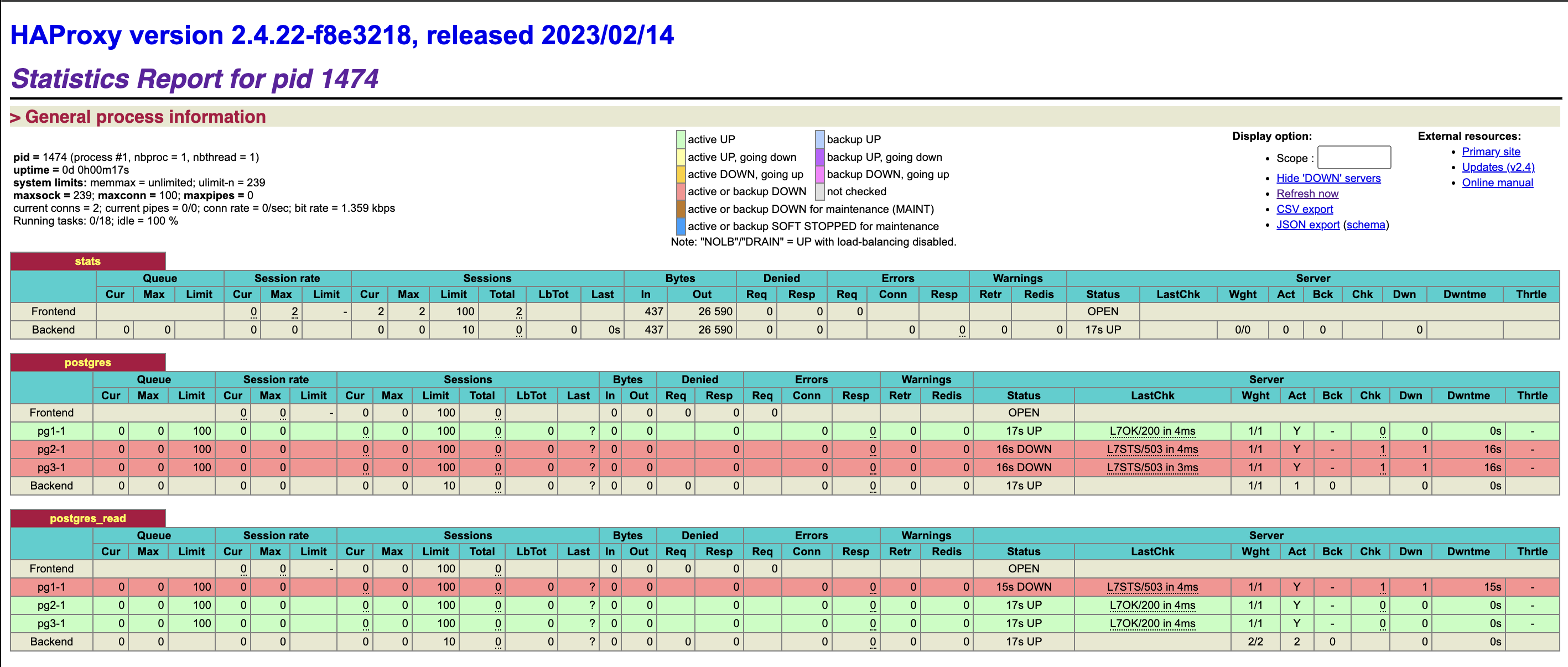
เรียกไปยัง url ของเครื่อง haproxy, http://haproxyip:7000 เพื่อดู status ของ enpoint สำหรับเขียนและอ่านข้อมูล postgresql

ข้อมูลอ้างอิง

Installing VMware Postgres

VMware Postgres High Availability with Patroni

How to configure a Patroni Cluster to use pgbackrest

How to use pgbackrest to bootstrap or add replica to HA Patroni

Create a High-Availability PostgreSQL Cluster with Patroni, Vultr Load Balancer, and Object Storage