
Nutanix Data Service for Kubernetes (NDK) เป็น service ที่ติดตั้งบน Kubernetes Cluster เพื่อทำการ backup application และ replicate ข้อมูลที่ถูก backup ไปยัง Kubernetes cluster ปลายทาง เพื่อให้สามารถ recovery ทั้ง application และข้อมูลได้ โดยใช้กับ use case เช่นการทำ DR โดยการ replicate ข้อมูลไปยังปลายทางมากกว่าหนึ่งปลายทาง การย้าย Application (Application migration) หรือ rebalancing application ไปยัง cluster ที่มี resource ที่เหมาะสม การ snapshots และ restore ภายใน cluster โดยสามารสร้าง schedule และรองรับการ replication ในแบบ near realtime ได้
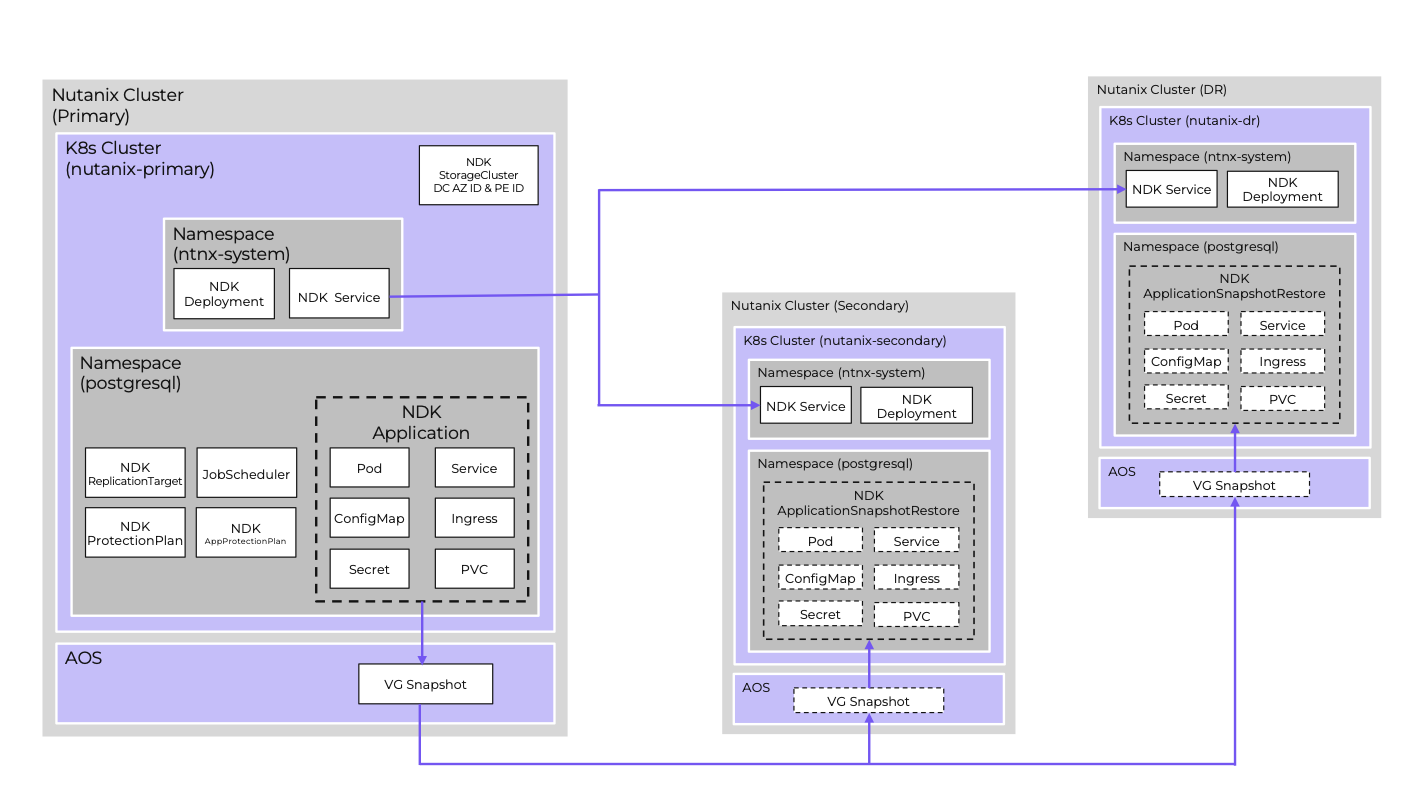
CRD ที่มาด้วยกับ NDK
Application สำหรับกำหนดกลุ่มของ resource ที่จะทำการ snapshot หรือ replicate
ApplicationSnapshot สร้าง application snapshot สำหรับ source ที่ระบุ (application)
Remote จับคู่ของ NKP instance ระหว่างสอง cluster
ReplicationTarget กำหนด cluster และ namespace ของ cluster ปลายทาง
ApplicationSnapshotReplication ทำการ replicate snapshot ระหร่วง cluster
ApplicationSnapshotRestore ทำการ restore snapshot ที่ local cluster หรือ remote cluster
JobScheduler, ProtectionPlan กำหนด snapshot policy และการจัดเก็บ (retention)
StorageCluster กำหนด Infrastructure ที่จะ support การทำ snapshot และ replication ระหว่าง cluster หรือภายใน cluster
การติดตั้ง NDK โดยต้องติดตั้งทั้ง Kuberntes Cluster ต้นทาง และ Kubernetes Cluster ปลายทาง
ขั้นตอนการติดตั้ง NDK ที่ Kubernetes ต้นทาง

เข้าไปที่ Nutanix Portal เพื่อ copy Download Link เพื่อทำการ download install package และทำการจัดเก็บไว้ใน private registry ภายในสำหรับใช้ในการการติดตั้ง
[nutanix@harbor ~]$ curl -o ndk-1.2.0.tar "https://download.nutanix.com/downloads/ndk/1.2.0/ndk-1.2.0.tar?Expires=1752582997&Key-Pair-Id=APKAJTTNCWPEI42QKMSA&Signature=CGOEgIDQHcJ1fTI8nIMbB5mcrM~5jPFcfS~5PyKDFGQyeNGlfBHyookKrzTTearX6L1aLLyEL6psYlkYIZdDlGIghHQuyb5qQBcxVGqiJ2ENuJD2MZKJkBFb6gnJ5s0JynyfkReAwPU5Ls4Vwb9yZXhzROm25Adezn-noLnkQUpLYQkyNl3~3n3X6xWR7qQQhHbo~QH3GEmYylmfsAcfx78WrH6-t9q3AV-2vhOGFNFz8k4gueqbRAjcLiKJBe7pJ-MlQ1KCo2ZYQMg3OACgqx7epi-2t0ImmpKs0I3rGa0lBqccOggX3n0tfaSED1cwTyjFRRpgFGYWZRX0qdrCvQ__"
  % Total    % Received % Xferd  Average Speed   Time    Time     Time  Current
                                 Dload  Upload   Total   Spent    Left  Speed
100  526M  100  526M    0     0  22.5M      0  0:00:23  0:00:23 --:--:-- 30.1M
unzip file ที่ทำการ download มา
[nutanix@harbor ~]$ tar -xvf ndk-1.2.0.tarLoad container เข้าไปยังระบบของ docker
[nutanix@harbor ~]$ docker image load -i ndk-1.2.0/ndk-1.2.0.tarทำการ tag container ที่ load เข้าไปในระบบและ push เข้าไปยัง container private registry ที่เตรียมไว้
[nutanix@harbor ~]$ docker image tag ndk/manager:1.2.0 10.38.53.107/ndk/manager:1.2.0
[nutanix@harbor ~]$ docker image tag ndk/infra-manager:1.2.0 10.38.53.107/ndk/infra-manager:1.2.0
[nutanix@harbor ~]$ docker image tag ndk/job-scheduler:1.2.0 10.38.53.107/ndk/job-scheduler:1.2.0
[nutanix@harbor ~]$ docker image tag ndk/kube-rbac-proxy:v0.17.0 10.38.53.107/ndk/kube-rbac-proxy:v0.17.0
[nutanix@harbor ~]$ docker image tag ndk/bitnami-kubectl:1.30.3

[nutanix@harbor ~]$ docker push 10.38.53.107/ndk/manager:1.2.0
[nutanix@harbor ~]$ docker push 10.38.53.107/ndk/infra-manager:1.2.0
[nutanix@harbor ~]$ docker push 10.38.53.107/ndk/job-scheduler:1.2.0
[nutanix@harbor ~]$ docker push 10.38.53.107/ndk/kube-rbac-proxy:v0.17.0
[nutanix@harbor ~]$ docker push 10.38.53.107/ndk/bitnami-kubectl:1.30.3
ทำการ set environment variable เพื่อ install ndk
[nutanix@harbor ~]$ cd ~/ndk-1.2.0
[nutanix@harbor ~]$ export CLUSTER_NAME=<<NKP cluster to install NDK on>>
[nutanix@harbor ~]$ export KUBECONFIG=~/nkp-v2.15.0/cli/${CLUSTER_NAME}.conf
[nutanix@harbor ~]$ export LOCAL_REG=<<registry hostname/IP>>:<<port>>
ตรวจสอบว่ามี Nutanix CSI credentials secret ในระบบแล้ว ทั้งนี้ nutanix-csi-credentials จะมีอยู่แล้วถ้า NKP ถูกติดตั้งใช้งานกับ Nutanix Infra Provider
kubectl get secret -n ntnx-systemถ้าไม่มีต้องสร้างด้วย yaml โดยที่ key คือ base64 encoding ของ “<<PC hostname/IP>>:9440:<<PC userid>>:<<PC userid password>>”
apiVersion: v1
data:
  key: <<encoded creds>>
kind: Secret
metadata:
  name: nutanix-csi-credentials
  namespace: ntnx-system
type: Opaque
ติดตั้ง ndk ด้วย helm cli
helm install ndk -n ntnx-system chart/ \
--set manager.repository=${LOCAL_REG}/ndk/manager \
--set manager.tag=1.2.0 \
--set infraManager.repository=${LOCAL_REG}/ndk/infra-manager \
--set infraManager.tag=1.2.0 \
--set kubeRbacProxy.repository=${LOCAL_REG}/ndk/kube-rbac-proxy \
--set kubeRbacProxy.tag=v0.17.0 \
--set bitnamiKubectl.repository=${LOCAL_REG}/ndk/bitnami-kubectl \
--set bitnamiKubectl.tag=1.30.3 \
--set jobScheduler.repository=${LOCAL_REG}/ndk/job-scheduler \
--set jobScheduler.tag=1.2.0 \
--set tls.server.clusterName=${CLUSTER_NAME} \
--set config.secret.name=nutanix-csi-credentials
ตัวอย่างค่าที่ใช้ในการติดตั้งครั้งนี้
[nutanix@harbor ndk-1.2.0]$ helm install ndk -n ntnx-system chart/ \
--set manager.repository=10.38.53.107/ndk/manager \
--set manager.tag=1.2.0 \
--set infraManager.repository=10.38.53.107/ndk/infra-manager \
--set infraManager.tag=1.2.0 \
--set kubeRbacProxy.repository=10.38.53.107/ndk/kube-rbac-proxy \
--set kubeRbacProxy.tag=v0.17.0 \
--set bitnamiKubectl.repository=10.38.53.107/ndk/bitnami-kubectl \
--set bitnamiKubectl.tag=1.30.3 \
--set jobScheduler.repository=10.38.53.107/ndk/job-scheduler \
--set jobScheduler.tag=1.2.0 \
--set tls.server.clusterName=nkp-at-next \
--set config.secret.name=nutanix-csi-credentials
ตรวจสอบการติดตั้งด้วยการ get pod ndk-controller-manager ว่าทำงานได้ปกติหรือไม่
[nutanix@harbor ndk-1.2.0]$ kubectl get pod -n ntnx-system
NAME                                      READY   STATUS    RESTARTS   AGE
ndk-controller-manager-79687849d5-8vxdh   4/4     Running   0          22s
สร้าง StorageCluster ของทั้งสอง Kubernetes Cluster ที่ต้องการทำ replication ระหว่างกัน โดย Kubernetes Cluster ที่สองจะต้องติดตั้ง NDK ให้สมบูรณ์ตามตัวอย่างข้างต้น
cd ~/nkp-v2.15.0/cli
export CLUSTER_NAME=<<NKP cluster name>>
export KUBECONFIG=~/nkp-v2.15.0/cli/${CLUSTER_NAME}.conf
export PE_UUID=<<PE UUID>>
export PC_UUID=<<PC UUID>>

cat << EOF >  ${CLUSTER_NAME}-storagecluster.yaml
apiVersion: dataservices.nutanix.com/v1alpha1
kind: StorageCluster
metadata:
 name: ${CLUSTER_NAME}
spec:
 storageServerUuid: ${PE_UUID}
 managementServerUuid: ${PC_UUID}
EOF
ตัวอย่างการสร้าง storage cluster
[nutanix@harbor ~]$ export KUBECONFIG=/home/nutanix/nkp-at-next.conf

[nutanix@harbor ~]$ cat << EOF >  nkp-at-next-storagecluster.yaml
apiVersion: dataservices.nutanix.com/v1alpha1
kind: StorageCluster
metadata:
 name: nkp-at-next
spec:
 storageServerUuid: 0006391e-0ad0-299a-70dd-ac1f6b3fddde
 managementServerUuid: f2b78299-aa10-43b9-94d5-faa3527e3897
EOF

[nutanix@harbor ~]$ k apply -f nkp-at-next-storagecluster.yaml
storagecluster.dataservices.nutanix.com/nkp-at-next created
[nutanix@harbor ~]$ k get storagecluster
NAME          AVAILABLE
nkp-at-next   true
สร้าง Storage Cluster ที่ Kubernetes Cluster ที่สอง
[nutanix@harbor ~]$ export KUBECONFIG=cluster2-kubeconfig.yaml

[nutanix@harbor ~]$ cat << EOF >  cluster2-storagecluster.yaml
apiVersion: dataservices.nutanix.com/v1alpha1
kind: StorageCluster
metadata:
 name: cluster2
spec:
 storageServerUuid: 0006391e-0ad0-299a-70dd-ac1f6b3fddde
 managementServerUuid: f2b78299-aa10-43b9-94d5-faa3527e3897
EOF

[nutanix@harbor ~]$ k apply -f cluster2-storagecluster.yaml
storagecluster.dataservices.nutanix.com/cluster2 created
[nutanix@harbor ~]$ k get storagecluster
NAME       AVAILABLE
cluster2   true
สร้าง application resource ที่ต้องการ snapshot หรือ replication โดยตัวอย่างนี้จะ backup resource ทั้งหมดที่อยู่ภายใต้ namespace แต่ถ้าต้องการ filter เฉพาะบาง resource สามารถกำหนดเพิ่มเติมได้ตามตัวอย่างที่ https://portal.nutanix.com/page/documents/details?targetId=Nutanix-Data-Services-for-Kubernetes-v1_2:top-app-cr-manual-create-cli-k8s-t.html
[nutanix@harbor ~]$ cat << EOF >  wordpress-app-cr.yaml
apiVersion: dataservices.nutanix.com/v1alpha1
kind: Application
metadata:
  name: wordpress-app-cr
  namespace: application
spec:
  applicationSelector:
EOF

[nutanix@harbor ~]$ k apply -f wordpress-app-cr.yaml
application.dataservices.nutanix.com/wordpress-app-cr created

[nutanix@harbor ~]$ k get application -A
NAMESPACE     NAME               AGE   ACTIVE   LAST-STATUS-UPDATE
application   wordpress-app-cr   20s            20s
สร้าง application snapshot ที่ cluster ต้นทาง
cd ~/nkp-v2.15.0/cli
export CLUSTER_NAME=<<NKP cluster name>>
export KUBECONFIG=~/nkp-v2.15.0/cli/${CLUSTER_NAME}.conf
export APP_NAME=<<application name>>
export APP_NAMESPACE=<<application namespace>>

cat << EOF >  ${APP_NAME}-snap.yaml
apiVersion: dataservices.nutanix.com/v1alpha1
kind: ApplicationSnapshot
metadata:
  name: ${APP_NAME}-snap
  namespace: ${APP_NAMESPACE}
spec:
  source:
    applicationRef:
     name: ${APP_NAME}-app-cr
  expiresAfter: <<#>>m
EOF
ตัวอย่างค่าที่ใช้ในตัวอย่างนี้
[nutanix@harbor ~]$ cat << EOF >  wordpress-snap.yaml
apiVersion: dataservices.nutanix.com/v1alpha1
kind: ApplicationSnapshot
metadata:
  name: wordpress-snap
  namespace: application
spec:
  source:
    applicationRef:
     name: wordpress-app-cr
  expiresAfter: 120m
EOF
[nutanix@harbor ~]$ k apply -f wordpress-snap.yaml
applicationsnapshot.dataservices.nutanix.com/wordpress-snap created

[nutanix@harbor ~]$ kubectl get applicationsnapshot -n application
NAME             AGE   READY-TO-USE   BOUND-SNAPSHOTCONTENT                      SNAPSHOT-AGE   CONSISTENCY-TYPE
wordpress-snap   69s   true           asc-531ae7ca-7afb-40a6-a4f6-403c8e732cfa   36s
ตรวจสอบสถานะของการ snapshot
[nutanix@harbor ~]$ kubectl get applicationsnapshotcontent
NAME                                       READY-TO-USE   AGE    APPLICATIONSNAPSHOT   SNAPSHOTCONTENT-AGE   CONSISTENCYTYPE
asc-531ae7ca-7afb-40a6-a4f6-403c8e732cfa   true           110s   wordpress-snap        77s
ทดสอบ restore application จาก snapshot ที่สร้างขึ้นภายใน cluster เดียวกัน แต่ต่าง namspace ตามตัวอย่างนี้ โดยต้องสร้าง reference grant
export APP_NAME=<<application name>>
export APP_NAMESPACE=<<application namespace>>
export TGT_NAMESPACE=<<target namespace>>
***NOTE: target namespace must exist on target cluster (create if necessary)***
~~~~~~~~~~~~~~~~~~~~~~~~~~~~~~~~~~~~~~~~~~~~~~~~~~~~~~~~~~~~~~~~~~~~~~~~~~~~
cat << EOF >  ${APP_NAME}-snap-rg.yaml
apiVersion: gateway.networking.k8s.io/v1beta1
kind: ReferenceGrant
metadata:
 name: ${APP_NAME}-snap-rg
 namespace: ${APP_NAMESPACE}
spec:
 from:
 - group: dataservices.nutanix.com
   kind: ApplicationSnapshotRestore
   namespace: ${TGT_NAMESPACE}
 to:
 - group: dataservices.nutanix.com
   kind: ApplicationSnapshot
   name: ${APP_NAME}-snap
EOF

~~~~~~~~~~~~~~~~~~~~~~~~~~~~~~~~~~~~~~~~~~~~~~~~~~~~~~~~~~~~~~~~~~~~~~~~~~~~
kubectl apply -f ${APP_NAME}-snap-rg.yaml
- verify reference grant exists:
kubectl get referencegrant -n ${APP_NAMESPACE}
--> ${APP_NAME}-snap-rg is in the list of reference grants
ตัวอย่างค่าที่ใช้ในการสร้าง reference grant
[nutanix@harbor ~]$ k create ns newapplication
namespace/newapplication created

[nutanix@harbor ~]$ cat << EOF >  wordpress-snap-rg.yaml
apiVersion: gateway.networking.k8s.io/v1beta1
kind: ReferenceGrant
metadata:
 name: wordpress-snap-rg
 namespace: application
spec:
 from:
 - group: dataservices.nutanix.com
   kind: ApplicationSnapshotRestore
   namespace: newapplication
 to:
 - group: dataservices.nutanix.com
   kind: ApplicationSnapshot
   name: wordpress-snap
EOF

[nutanix@harbor ~]$ k apply -f wordpress-snap-rg.yaml
referencegrant.gateway.networking.k8s.io/wordpress-snap-rg created

[nutanix@harbor ~]$ kubectl get referencegrant -n application
NAME                AGE
wordpress-snap-rg   35s
สร้าง application restore
cat << EOF >  ${APP_NAME}-rg-restore.yaml
apiVersion: dataservices.nutanix.com/v1alpha1
kind: ApplicationSnapshotRestore
metadata:
  name: ${APP_NAME}-rg-restore
  namespace: ${TGT_NAMESPACE}
spec:
  applicationSnapshotName: ${APP_NAME}-snap
  applicationSnapshotNamespace: ${APP_NAMESPACE}
EOF
~~~~~~~~~~~~~~~~~~~~~~~~~~~~~~~~~~~~~~~~~~~~~~~~~~~~~~~~~~~~~~~~~~~~~~~~~~~~
kubectl apply -f ${APP_NAME}-rg-restore.yaml
- verify restore operation completes successfully (can take a few minutes)
kubectl get applicationsnapshotrestore -n ${TGT_NAMESPACE}
--> ${APP_NAME}-rg-restore shows a COMPLETED status of 'true'
- verify all artifacts referenced in snapshot describe operation have been restored on the target namespace:
***For example***
kubectl get all -n ${TGT_NAMESPACE}
kubectcl get pvc -n ${TGT_NAMESPACE}
ตัวอย่างการ restore application
[nutanix@harbor ~]$ cat << EOF >  wordpress-rg-restore.yaml
apiVersion: dataservices.nutanix.com/v1alpha1
kind: ApplicationSnapshotRestore
metadata:
  name: wordpress-rg-restore
  namespace: newapplication
spec:
  applicationSnapshotName: wordpress-snap
  applicationSnapshotNamespace: application
EOF
[nutanix@harbor ~]$ k apply -f wordpress-rg-restore.yaml
applicationsnapshotrestore.dataservices.nutanix.com/wordpress-rg-restore created

[nutanix@harbor ~]$ kubectl get applicationsnapshotrestore -n newapplication
NAME                   SNAPSHOT-NAME    COMPLETED
wordpress-rg-restore   wordpress-snap   false

[nutanix@harbor ~]$ kubectl get applicationsnapshotrestore -n newapplication
NAME                   SNAPSHOT-NAME    COMPLETED
wordpress-rg-restore   wordpress-snap   true

[nutanix@harbor ~]$ k get all -n newapplication
NAME                                   READY   STATUS    RESTARTS   AGE
pod/wordpress-84f858d9fd-8mjdp         1/1     Running   0          2m24s
pod/wordpress-mysql-556f6f65cc-bjd8q   1/1     Running   0          2m24s

NAME                      TYPE        CLUSTER-IP     EXTERNAL-IP   PORT(S)    AGE
service/wordpress         ClusterIP   10.99.164.74   <none>        80/TCP     2m24s
service/wordpress-mysql   ClusterIP   None           <none>        3306/TCP   2m24s

NAME                              READY   UP-TO-DATE   AVAILABLE   AGE
deployment.apps/wordpress         1/1     1            1           2m24s
deployment.apps/wordpress-mysql   1/1     1            1           2m24s

NAME                                         DESIRED   CURRENT   READY   AGE
replicaset.apps/wordpress-84f858d9fd         1         1         1       2m24s
replicaset.apps/wordpress-mysql-556f6f65cc   1         1         1       2m24s
ตัวอย่างการ restore application snapshot ไปยัง kubernetes cluster ปลายทาง โดยต้องสร้าง Remote cluster ที่ cluster ต้นทางก่อน
- verify ndk intercom service is working on both source & target clusters:
cd ~/nkp-v2.15.0/cli
export SOURCE_NAME=<<NKP source cluster name>>
export TARGET_NAME=<<target cluster name>>
export APP_NAME=<<application name>>
export APP_NAMESPACE=<<application namespace>>
export KUBECONFIG=~/nkp-v2.15.0/cli/${SOURCE_NAME}.conf
kubectl get svc -n ntnx-system
--> load balancer service 'ndk-intercom-service' should exist and have an assigned external IP
kubectl get svc -n ntnx-system --kubeconfig ${TARGET_NAME}.conf
--> load balancer service 'ndk-intercom-service' should exist and have an assigned external IP
--> cache external IP (needed for the remote cr)
- verify an application snapshot exists and is ready:
kubectl get applicationsnapshot -n ${APP_NAMESPACE}
--> snapshot status for <<app name>>-snap should be "true"
- create remote custom resource:
~~~~~~~~~~~~~~~~~~~~~~~~~~~~~~~~~~~~~~~~~~~~~~~~~~~~~~~~~~~~~~~~~~~~~~~~~~~~
cat << EOF >  ndk-${TARGET_NAME}-remote.yaml
apiVersion: dataservices.nutanix.com/v1alpha1
kind: Remote
metadata:
  name: ndk-${TARGET_NAME}-remote
spec:
  clusterName: ${TARGET_NAME}
  ndkServiceIp: <<EXTERNAL IP of target cluster's 'ndk-intercom-service' LB service>>
  ndkServicePort: 2021
  tlsConfig:
    skipTLSVerify: true
EOF
~~~~~~~~~~~~~~~~~~~~~~~~~~~~~~~~~~~~~~~~~~~~~~~~~~~~~~~~~~~~~~~~~~~~~~~~~~~~
--> 'tlsConfig' section may not be needed or may need modified based on how NDK was installed, see following link: https://portal.nutanix.com/page/documents/details?targetId=Nutanix-Data-Services-for-Kubernetes-v1_2:top-remote-cr-create-cli-k8s.html
kubectl apply -f ndk-${TARGET_NAME}-remote.yaml
- verify remote cr is ready:
kubectl get remote
--> ndk-${TARGET_NAME}-remote should be listed and AVAILABLE status set to 'True'
ตัวอย่างการสร้าง Remote cluster
[nutanix@harbor ~]$ cat << EOF >  ndk-cluster2-remote.yaml
apiVersion: dataservices.nutanix.com/v1alpha1
kind: Remote
metadata:
  name: ndk-cluster2-remote
spec:
  clusterName: cluster2
  ndkServiceIp: 10.38.53.17
  ndkServicePort: 2021
  tlsConfig:
    skipTLSVerify: true
EOF
[nutanix@harbor ~]$ k apply -f ndk-cluster2-remote.yaml
remote.dataservices.nutanix.com/ndk-cluster2-remote created
[nutanix@harbor ~]$ k get remote
NAME                  ADDRESS       PORT   AVAILABLE
ndk-cluster2-remote   10.38.53.17   2021   True
สร้าง replication target ที่ต้องการให้ snapshot ทำการ replicate ไป
cat << EOF >  ${APP_NAME}-replicate-target.yaml
apiVersion: dataservices.nutanix.com/v1alpha1
kind: ReplicationTarget
metadata:
  name: ${TARGET_NAME}
  namespace: ${APP_NAMESPACE}
spec:
  namespaceName: ntnx-system
  remoteName: ndk-${TARGET_NAME}-remote
  serviceAccountName: default
EOF
ตัวอย่างการสร้าง Replication Target
[nutanix@harbor ~]$ cat << EOF >  wordpress-replicate-target.yaml
apiVersion: dataservices.nutanix.com/v1alpha1
kind: ReplicationTarget
metadata:
  name: cluster2
  namespace: application
spec:
  namespaceName: ntnx-system
  remoteName: ndk-cluster2-remote
  serviceAccountName: default
EOF
[nutanix@harbor ~]$ k apply -f wordpress-replicate-target.yaml
replicationtarget.dataservices.nutanix.com/cluster2 created
[nutanix@harbor ~]$ k get replicationtarget -A
NAMESPACE     NAME       REMOTE-NAME           REMOTE-NAMESPACE   AVAILABLE
application   cluster2   ndk-cluster2-remote   ntnx-system        True
สร้าง application snapshot replication ไปยัง cluster ปลายทาง
cat << EOF >  ${APP_NAME}-replicate.yaml
apiVersion: dataservices.nutanix.com/v1alpha1
kind: ApplicationSnapshotReplication
metadata:
  name: ${APP_NAME}-replicate
  namespace: ${APP_NAMESPACE}
spec:
  applicationSnapshotName: ${APP_NAME}-snap
  replicationTargetName: ${TARGET_NAME}
EOF

~~~~~~~~~~~~~~~~~~~~~~~~~~~~~~~~~~~~~~~~~~~~~~~~~~~~~~~~~~~~~~~~~~~~~~~~~~~~
kubectl apply -f ${APP_NAME}-replicate.yaml
- monitor an application snapshot replication:
kubectl get applicationsnapshotreplication -n ${APP_NAMESPACE}
--> within a few minutes AVAILABLE status for <<app name>>-snap should be "True"
kubectl get applicationsnapshot -n ntnx-system ${APP_NAME}-snap --kubeconfig ${TARGET_NAME}.conf
--> should list snapshot on target cluster with a READY-TO-USE status of "true"
ตัวอย่างการสร้าง application snapshot replication
***NOTE: This enables application snapshots saved in one cluster to be restored to their original namespace on another cluster***
- verify the NDK reference grant CRD exists on the 'target' cluster:
cd ~/nkp-v2.15.0/cli
export TARGET_NAME=<<NKP target cluster name>>
export KUBECONFIG=~/nkp-v2.15.0/cli/${TARGET_NAME}.conf
kubectl get crd | grep 'referencegrants'
--> the 'referencegrants.gateway.networking.k8s.io' cred should be listed
- create a reference grant:
export APP_NAME=<<application name>>
export TGT_NAMESPACE=<<application's namespace on source cluster>>
***NOTE: target namespace must exist on target cluster (create if necessary)***
~~~~~~~~~~~~~~~~~~~~~~~~~~~~~~~~~~~~~~~~~~~~~~~~~~~~~~~~~~~~~~~~~~~~~~~~~~~~
cat << EOF >  ${APP_NAME}-snap-rg-${TARGET_NAME}.yaml
apiVersion: gateway.networking.k8s.io/v1beta1
kind: ReferenceGrant
metadata:
 name: ${APP_NAME}-snap-rg-${TARGET_NAME}
 namespace: ntnx-system
spec:
 from:
 - group: dataservices.nutanix.com
   kind: ApplicationSnapshotRestore
   namespace: ${TGT_NAMESPACE}
 to:
 - group: dataservices.nutanix.com
   kind: ApplicationSnapshot
   name: ${APP_NAME}-snap
EOF
ตัวอย่างการสร้าง application snapshot replication
[nutanix@harbor ~]$ cat << EOF >  wordpress-replicate.yaml
apiVersion: dataservices.nutanix.com/v1alpha1
kind: ApplicationSnapshotReplication
metadata:
  name: wordpress-replicate
  namespace: application
spec:
  applicationSnapshotName: wordpress-snap
  replicationTargetName: cluster2
EOF
[nutanix@harbor ~]$ k apply -f wordpress-replicate.yaml
applicationsnapshotreplication.dataservices.nutanix.com/wordpress-replicate created
[nutanix@harbor ~]$ k get applicationsnapshotreplication -A
NAMESPACE     NAME                  AVAILABLE   APPLICATIONSNAPSHOT   REPLICATIONTARGET   AGE
application   wordpress-replicate   False       wordpress-snap        cluster2            12s

[nutanix@harbor ~]$ k get applicationsnapshotreplication -A
NAMESPACE     NAME                  AVAILABLE   APPLICATIONSNAPSHOT   REPLICATIONTARGET   AGE
application   wordpress-replicate   True        wordpress-snap        cluster2            6m57s

[nutanix@harbor ~]$ kubectl get applicationsnapshot -n ntnx-system
NAME             AGE     READY-TO-USE   BOUND-SNAPSHOTCONTENT                                  SNAPSHOT-AGE
wordpress-snap   9m46s   true           asc-531ae7ca-7afb-40a6-a4f6-403c8e732cfa-1980ca1b120   6m58s
สร้าง reference grant สำหรับการ restore โดยต้องสร้างที่ cluster ปลายทาง
- create a reference grant:
export APP_NAME=<<application name>>
export TGT_NAMESPACE=<<application's namespace on source cluster>>
***NOTE: target namespace must exist on target cluster (create if necessary)***
~~~~~~~~~~~~~~~~~~~~~~~~~~~~~~~~~~~~~~~~~~~~~~~~~~~~~~~~~~~~~~~~~~~~~~~~~~~~
cat << EOF >  ${APP_NAME}-snap-rg-${TARGET_NAME}.yaml
apiVersion: gateway.networking.k8s.io/v1beta1
kind: ReferenceGrant
metadata:
 name: ${APP_NAME}-snap-rg-${TARGET_NAME}
 namespace: ntnx-system
spec:
 from:
 - group: dataservices.nutanix.com
   kind: ApplicationSnapshotRestore
   namespace: ${TGT_NAMESPACE}
 to:
 - group: dataservices.nutanix.com
   kind: ApplicationSnapshot
   name: ${APP_NAME}-snap
EOF

~~~~~~~~~~~~~~~~~~~~~~~~~~~~~~~~~~~~~~~~~~~~~~~~~~~~~~~~~~~~~~~~~~~~~~~~~~~~
kubectl apply -f ${APP_NAME}-snap-rg-${TARGET_NAME}.yaml
- verify reference grant exists:
kubectl get referencegrant -n ntnx-system
--> ${APP_NAME}-snap-rg-${TARGET_NAME} is in the list of reference grants
ตัวอย่างการสร้าง reference grant
[nutanix@harbor ~]$ cat << EOF >  wordpress-snap-rg-cluster2.yaml
apiVersion: gateway.networking.k8s.io/v1beta1
kind: ReferenceGrant
metadata:
 name: wordpress-snap-rg-cluster2
 namespace: ntnx-system
spec:
 from:
 - group: dataservices.nutanix.com
   kind: ApplicationSnapshotRestore
   namespace: application
 to:
 - group: dataservices.nutanix.com
   kind: ApplicationSnapshot
   name: wordpress-snap
EOF
[nutanix@harbor ~]$ k apply -f wordpress-snap-rg-cluster2.yaml
referencegrant.gateway.networking.k8s.io/wordpress-snap-rg-cluster2 created
[nutanix@harbor ~]$ k get referencegrant -A
NAMESPACE     NAME                         AGE
ntnx-system   wordpress-snap-rg-cluster2   9s
ทำการ restore application ที่ cluster ปลายทาง
cat << EOF >  ${APP_NAME}-rg-restore-${TARGET_NAME}.yaml
apiVersion: dataservices.nutanix.com/v1alpha1
kind: ApplicationSnapshotRestore
metadata:
  name: ${APP_NAME}-rg-restore-${TARGET_NAME}
  namespace: ${TGT_NAMESPACE}
spec:
  applicationSnapshotName: ${APP_NAME}-snap
  applicationSnapshotNamespace: ntnx-system
EOF

~~~~~~~~~~~~~~~~~~~~~~~~~~~~~~~~~~~~~~~~~~~~~~~~~~~~~~~~~~~~~~~~~~~~~~~~~~~~
kubectl apply -f ${APP_NAME}-rg-restore-${TARGET_NAME}.yaml
- verify restore operation completes successfully (can take a few minutes)
kubectl get applicationsnapshotrestore -n ${TGT_NAMESPACE}
--> ${APP_NAME}-rg-restore-${TARGET_NAME} shows a COMPLETED status of 'true'
- verify all artifacts referenced in snapshot describe operation have been restored on the target namespace:
***For example***
kubectl get all -n ${TGT_NAMESPACE}
kubectcl get pvc -n ${TGT_NAMESPACE}
ตัวอย่างการ restore application
[nutanix@harbor ~]$ cat << EOF >  wordpress-rg-restore-cluster2.yaml
apiVersion: dataservices.nutanix.com/v1alpha1
kind: ApplicationSnapshotRestore
metadata:
  name: wordpress-rg-restore-cluster2
  namespace: application
spec:
  applicationSnapshotName: wordpress-snap
  applicationSnapshotNamespace: ntnx-system
EOF
[nutanix@harbor ~]$ k apply -f wordpress-rg-restore-cluster2.yaml
applicationsnapshotrestore.dataservices.nutanix.com/wordpress-rg-restore-cluster2 created
[nutanix@harbor ~]$ k get applicationsnapshotrestore -A
NAMESPACE     NAME                            SNAPSHOT-NAME    COMPLETED
application   wordpress-rg-restore-cluster2   wordpress-snap   false

[nutanix@harbor ~]$ k get applicationsnapshotrestore -A
NAMESPACE     NAME                            SNAPSHOT-NAME    COMPLETED
application   wordpress-rg-restore-cluster2   wordpress-snap   true
[nutanix@harbor ~]$ k get pod -n application
NAME                               READY   STATUS    RESTARTS   AGE
wordpress-84f858d9fd-zqtrt         1/1     Running   0          78s
wordpress-mysql-556f6f65cc-s2h8m   1/1     Running   0          78s
[nutanix@harbor ~]$ Tech Notes