
Nutanix Kubernetes Platform (NKP) สามารถกำหนดให้ Kubernetes worker node ทำการ scale ตัวเองโดยการเพิ่มจำนวน worker ได้อัตโนมัติเมื่อพบว่า cpu หรือ memory ไม่เพียงพอสำหรับการ start workload โดยสามารถเข้าไปที่ kubernetes cluster เลือก node pool และ edit worker ตามรูป
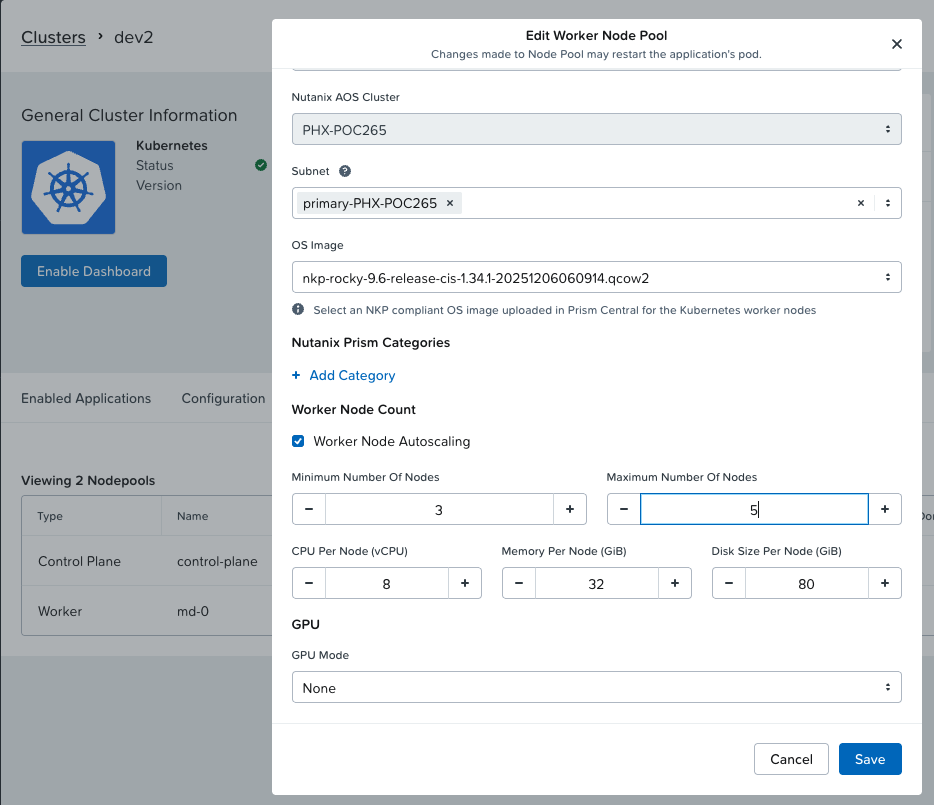
ตัวอย่างนี้กำหนด minimum ไว้ 3 node และ scale เพิ่มเป็น 5 node ถ้า resource ไม่เพียงพอสำหรับการ deploy workload ใหม่ ใน version ปัจจุบันยังเป็น autoscaling ตาม schedules ถ้า resource ไม่เพียงพอ ถ้าต้องการ Event driven autoscaling เช่น เมื่อ transaction เกิดค่าที่กำหนด โดยใช้ metric ที่ได้จาก prometheus ทำการ Trigger ให้ KEDA ทำการ scale POD ซึ่งเมื่อ resource ไม่เพียงพอ Node AutoScaler ก็จะทำงาน
หลังจาก set ค่า autoscaling แล้วตรวจสอบได้ด้วย kubectl cli
[nutanix@harbor ~]$ kubectl get cm cluster-autoscaler-status -n kube-system -o yamlapiVersion: v1data: status: | time: 2026-01-30 06:46:25.136551666 +0000 UTC autoscalerStatus: Running clusterWide: health: status: Healthy nodeCounts: registered: total: 4 ready: 4 notStarted: 0 longUnregistered: 0 unregistered: 0 lastProbeTime: "2026-01-30T06:46:25.136551666Z" lastTransitionTime: "2026-01-30T01:45:13.531234277Z" scaleUp: status: NoActivity lastProbeTime: "2026-01-30T06:46:25.136551666Z" lastTransitionTime: "2026-01-30T01:45:13.531234277Z" scaleDown: status: NoCandidates lastProbeTime: "2026-01-30T06:46:25.136551666Z" lastTransitionTime: "2026-01-30T01:45:13.531234277Z" nodeGroups: - name: MachineDeployment/kommander-default-workspace/dev2-md-0-rm6kd health: status: Healthy nodeCounts: registered: total: 3 ready: 3 notStarted: 0 longUnregistered: 0 unregistered: 0 cloudProviderTarget: 3 minSize: 3 maxSize: 5 lastProbeTime: "2026-01-30T06:46:25.136551666Z" lastTransitionTime: "2026-01-30T01:45:13.531234277Z" scaleUp: status: NoActivity lastProbeTime: "2026-01-30T06:46:25.136551666Z" lastTransitionTime: "2026-01-30T01:45:13.531234277Z" scaleDown: status: NoCandidates lastProbeTime: "2026-01-30T06:46:25.136551666Z" lastTransitionTime: "2026-01-30T01:45:13.531234277Z"kind: ConfigMapmetadata: annotations: cluster-autoscaler.kubernetes.io/last-updated: 2026-01-30 06:46:25.136551666 +0000 UTC creationTimestamp: "2026-01-30T01:40:46Z" name: cluster-autoscaler-status namespace: kube-system resourceVersion: "882305" uid: 06b9b1e0-de1d-477b-b691-cbc172803f93
เพื่อทดสอบต้อง deploy workload ที่จอง resource มากกว่าที่ kubernetes จะสามารถจัดสรรให้ได้ ตามตัวอย่าง
[nutanix@harbor ~]$ more stress-test.yamlapiVersion: apps/v1kind: Deploymentmetadata: name: resource-testspec: replicas: 10 selector: matchLabels: app: resource-test template: metadata: labels: app: resource-test spec: containers: - name: stress-test image: polinux/stress resources: requests: memory: "1Gi" cpu: "5000m" limits: memory: "2Gi" cpu: "10000m" command: ["stress"] args: ["--vm", "1", "--vm-bytes", "512M", "--timeout", "600s"]
ทำการ deploy ด้วย kubectl cli
[nutanix@harbor ~]$ kubectl apply -f stress-test.yaml
ตรวจสอบว่า workload สามารถ running ได้ แต่ไม่สามารถ running ได้ทั้งหมดเนื่องจาก resource ไม่พอ ระบบจะต้องทำการ scale node เพิ่ม
[nutanix@harbor ~]$ kubectl get podNAME READY STATUS RESTARTS AGEresource-test-655798b6c9-6j852 0/1 Pending 0 34sresource-test-655798b6c9-7c8np 0/1 Pending 0 34sresource-test-655798b6c9-7rj8x 0/1 Pending 0 34sresource-test-655798b6c9-7vwvr 0/1 Pending 0 34sresource-test-655798b6c9-fbk9f 1/1 Running 0 34sresource-test-655798b6c9-gj8wk 0/1 Pending 0 34sresource-test-655798b6c9-m9clc 1/1 Running 0 34sresource-test-655798b6c9-qc8sn 1/1 Running 0 34sresource-test-655798b6c9-vhbdh 0/1 Pending 0 34sresource-test-655798b6c9-xd8nf 0/1 Pending 0 34s
ตรวจสอบจำนวน node ปัจจุบัน
[nutanix@harbor ~]$ kubectl get nodeNAME STATUS ROLES AGE VERSIONdev2-hh42l-kc65c Ready control-plane 5h5m v1.34.1dev2-md-0-rm6kd-f4xbb-8bgsj Ready <none> 4h58m v1.34.1dev2-md-0-rm6kd-f4xbb-h9zqd Ready <none> 5h2m v1.34.1dev2-md-0-rm6kd-f4xbb-hrl4t Ready <none> 5h v1.34.1
ตรวจสอบอีกครั้งเพื่อดูจำนวนว่า node ได้เพิ่มขึ้นเป็น 5 node ตามที่กำหนดค่าไว้
[nutanix@harbor ~]$ kubectl get nodesNAME STATUS ROLES AGE VERSIONdev2-hh42l-kc65c Ready control-plane 5h8m v1.34.1dev2-md-0-rm6kd-f4xbb-8bgsj Ready <none> 5h1m v1.34.1dev2-md-0-rm6kd-f4xbb-cp7z4 Ready <none> 98s v1.34.1dev2-md-0-rm6kd-f4xbb-h9zqd Ready <none> 5h5m v1.34.1dev2-md-0-rm6kd-f4xbb-hrl4t Ready <none> 5h3m v1.34.1dev2-md-0-rm6kd-f4xbb-lbx84 Ready <none> 101s v1.34.1
การ auto ลดลงเมื่อ resource กลับมาสู่ภาวะปกติ จะมีหลายปัจจัยเช่น resource โดยรวมจะต้องน้อยกว่า 50% เป็นต้น ข้อมูลเพิ่มเติมสามารถศึกษาเพิ่มเติมได้จาก Kubernetes Node Autoscaler
 Tech Notes